
Discover a better way to learn JavaScript through practical examples, interactive challenges, problem-solving, AI-assisted learning, and hands-on application development.
Stop Memorizing JavaScript. Start Discovering What You Can Build.
What if learning JavaScript wasn’t about memorizing hundreds of methods, watching endless tutorials, or copying code without understanding how it works?
What if learning to code felt more like exploration?
You write a few lines of code, predict what will happen, run the program, investigate the results, make changes, and gradually discover how everything fits together.
This is how developers develop practical programming skills.
JavaScript is an incredibly versatile programming language. It powers interactive websites, browser applications, games, dashboards, backend services, Google Workspace automations, and AI-powered applications.
However, one of the biggest challenges for aspiring developers is moving from understanding individual programming concepts to actually building something useful.
That’s why I’ve created JavaScript Discovery Academy, a free educational resource focused on exploring JavaScript and developing practical programming skills.
Explore the Academy:
https://discoveryvip.com/javascript-discovery-academy
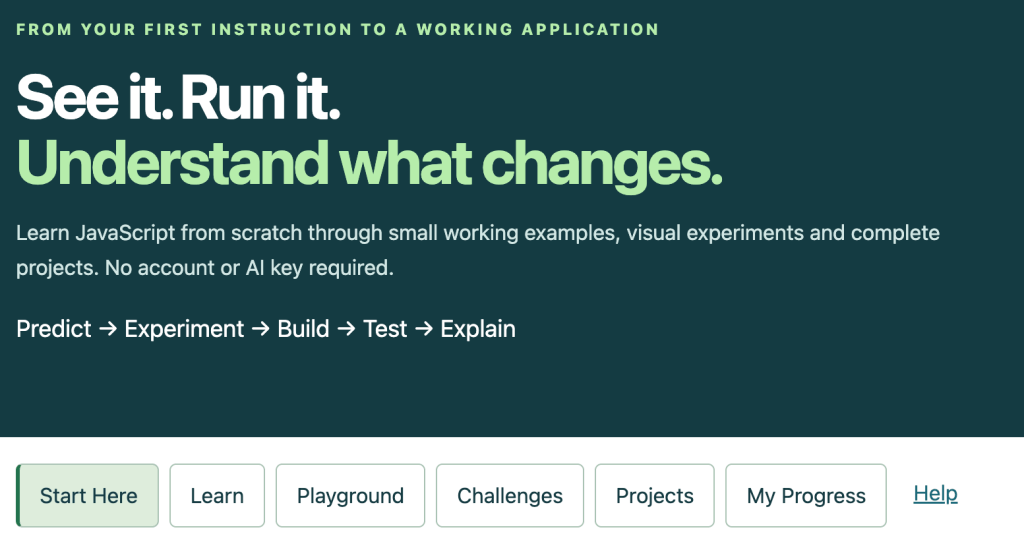
In this article, we’ll explore fundamental JavaScript concepts, practical coding techniques, modern development patterns, hands-on exercises, and projects that will help you become a more confident developer.
Whether you’re writing your first JavaScript function or improving your existing programming skills, there’s always something new to discover.
1. Think Like a JavaScript Developer
Learning JavaScript involves much more than understanding syntax.
Programming is fundamentally about solving problems.
Every application can be broken down into smaller responsibilities:
- Collect information.
- Store information.
- Process information.
- Make decisions.
- Repeat operations.
- Respond to events.
- Communicate results.
Consider an online shopping application.
The application needs to store products, calculate prices, apply discounts, respond to user interactions, and display results.
Each responsibility can be implemented using JavaScript.
Your First JavaScript Discovery
Consider the following code:
const price = 120;
const discount = 0.25;

const finalPrice = price * (1 - discount);

console.log(finalPrice);
Before running the code, predict the result.
The output is:
90Now experiment:
- Change the price to 200.
- Change the discount to 0.10.
- Set the discount to zero.
- Set the discount to 1.
- Try a discount greater than 1.
What happens?
The final experiment reveals a potential problem: the application could calculate a negative price.
You’ve just discovered why input validation matters.
This simple cycle of predicting, experimenting, and investigating is one of the most effective ways to develop programming knowledge.
2. Variables and Data Types: How JavaScript Stores Information
Variables allow applications to retain and work with information.
Modern JavaScript primarily uses const and let.
const courseName = "JavaScript Discovery";
let completedLessons = 0;

completedLessons += 1;

console.log(courseName);
console.log(completedLessons);
Use const when the variable should not be reassigned.
Use let when its assigned value needs to change.
Understanding JavaScript Data Types
JavaScript provides several primitive data types, alongside objects.
| Data type | Example |
|---|---|
| String | "JavaScript" |
| Number | 42 |
| Boolean | true |
| Undefined | undefined |
| Null | null |
| BigInt | 9007199254740993n |
| Symbol | Symbol("id") |
| Object | { name: "Alex" } |
| Array (a type of object) | [10, 20, 30] |
Understanding data types helps prevent unexpected behavior.
Discovery Challenge: Predict the Output
console.log(10 + 5);
console.log("10" + 5);
console.log("10" - 5);
console.log(Number("10") + 5);
console.log(Boolean("false"));
Expected results:
15
105
5
15
true
Why does this happen?
JavaScript sometimes automatically converts values between types, a behavior known as type coercion.
The addition operator concatenates strings when one of the converted operands is a string, while subtraction attempts numeric conversion.
The string "false" evaluates to true because it is a nonempty string.
These behaviors highlight why understanding JavaScript is more valuable than simply memorizing its syntax.
3. Functions: Turn Problems into Reusable Solutions
Functions allow you to organize code into reusable units.
Instead of repeating the same calculation throughout an application, define a function.
function calculateDiscount(price, discount) {
  return price * (1 - discount);
}

console.log(calculateDiscount(100, 0.20));
console.log(calculateDiscount(250, 0.15));
console.log(calculateDiscount(500, 0.30));
Expected output:
80
212.5
350
Functions make applications easier to organize, test, and maintain.
Improve the Function
What happens if someone provides an invalid price or discount?
function calculateDiscount(price, discount = 0) {
  if (!Number.isFinite(price) || price < 0) {
    throw new Error("Invalid price.");
  }

  if (
    !Number.isFinite(discount) ||
    discount < 0 ||
    discount > 1
  ) {
    throw new Error("Invalid discount.");
  }

  return Number(
    (price * (1 - discount)).toFixed(2)
  );
}

console.log(calculateDiscount(149.99, 0.15));
Result:
127.49The improved function validates inputs, provides a default discount, reports invalid values, and rounds the result for display-oriented calculations.
Production financial applications should use appropriate decimal arithmetic or integer-based monetary calculations rather than relying exclusively on floating-point rounding.
Your Challenge
Create a calculateOrderTotal() function that accepts:
- Product price
- Quantity
- Discount percentage
- Tax rate
Return the subtotal, discount amount, tax amount, and final total.
You’ve now progressed from practicing functions to implementing real application logic.
4. Objects: Represent Real-World Information
Objects allow developers to group related information.
Imagine building an educational application.
Each learner might have a name, experience level, completed lessons, and points.
const learner = {
  name: "Alex",
  level: "Beginner",
  completedLessons: 5,
  points: 250
};

console.log(learner.name);
console.log(learner.points);
Objects are particularly useful because they represent entities within an application.
Objects Can Also Contain Methods
const learner = {
  name: "Alex",
  points: 250,

  addPoints(amount) {
    this.points += amount;
  },

  getLevel() {
    if (this.points >= 1000) {
      return "Advanced";
    }

    if (this.points >= 500) {
      return "Intermediate";
    }

    return "Beginner";
  }
};

learner.addPoints(300);

console.log(learner.points);
console.log(learner.getLevel());
Expected output:
550
Intermediate
This demonstrates how information and behavior can be combined.
The same concept can be applied to products, tasks, customers, game characters, courses, and many other application components.
5. Arrays: Work with Collections of Information
Most real-world applications work with collections rather than individual values.
JavaScript arrays allow you to store and manipulate multiple records.
const courses = [
  {
    title: "JavaScript Fundamentals",
    category: "JavaScript",
    completed: true,
    duration: 60
  },
  {
    title: "DOM Manipulation",
    category: "JavaScript",
    completed: false,
    duration: 90
  },
  {
    title: "AI Application Development",
    category: "AI",
    completed: true,
    duration: 120
  }
];
Modern JavaScript provides powerful methods for processing arrays.
Map: Transform Information
const titles = courses.map(
  course => course.title
);

console.log(titles);
The result is an array containing only course titles.
Filter: Select Information
const completedCourses = courses.filter(
  course => course.completed
);

console.log(completedCourses);
The result contains only completed courses.
Reduce: Aggregate Information
const totalDuration = courses.reduce(
  (total, course) => total + course.duration,
  0
);

console.log(totalDuration);
Expected result:
270Combine Array Methods
const completedMinutes = courses
  .filter(course => course.completed)
  .reduce(
    (total, course) => total + course.duration,
    0
  );

console.log(completedMinutes);
Expected result:
180This is where JavaScript becomes especially useful for working with data.
You can combine operations to create meaningful information from raw records.
Discovery Challenge
Using the course data, calculate:
- Total number of courses
- Number of completed courses
- Completion percentage
- Total learning time
- Completed learning time
- Remaining learning time
These calculations could become the foundation of a learning analytics dashboard.
6. Modern JavaScript Features Every Developer Should Explore
Modern JavaScript includes language features that make code more expressive and easier to maintain.
Template Literals
const name = "Alex";
const score = 85;

console.log(`${name} achieved a score of ${score}%`);
Destructuring
const product = {
  title: "JavaScript Course",
  price: 49,
  category: "Education"
};

const { title, price } = product;

console.log(title);
console.log(price);
Spread Syntax
const original = [10, 20, 30];

const updated = [...original, 40];

console.log(original);
console.log(updated);
Spread syntax creates a new array in this example without modifying the original.
Optional Chaining
const user = {
  profile: {
    name: "Alex"
  }
};

console.log(user.profile?.name);
console.log(user.address?.city);
Expected output:
Alex
undefined
Nullish Coalescing
const settings = {
  theme: null,
  volume: 0
};

const theme = settings.theme ?? "light";
const volume = settings.volume ?? 50;

console.log(theme);
console.log(volume);
Expected output:
light
0
Unlike the logical OR operator, nullish coalescing preserves valid values such as zero, false, and empty strings.
Choose the Right Technique
| Feature | Common application |
|---|---|
| Destructuring | Extract information from objects |
| Spread syntax | Combine or copy collections |
| Template literals | Generate dynamic text |
| Optional chaining | Safely access nested properties |
| Nullish coalescing | Provide fallback values |
| Arrow functions | Create concise callbacks |
| Default parameters | Supply optional function values |
Learning these features through practical examples makes it easier to recognize when and why to use them.
7. DOM Manipulation: Bring Websites to Life
The Document Object Model, commonly called the DOM, represents the structure of a web page.
JavaScript can interact with this structure to create dynamic user experiences.
Using the DOM, applications can:
- Update text.
- Create elements.
- Respond to button clicks.
- Validate forms.
- Display search results.
- Update charts and dashboards.
- Build interactive games.
- Manage application interfaces.
Build a Simple Interactive Counter
<h1 id="counter">0</h1>

<button id="increase">Increase</button>
<button id="decrease">Decrease</button>
<button id="reset">Reset</button>

<script>
  let count = 0;

  const display = document
    .querySelector("#counter");

  function render() {
    display.textContent = count;
  }

  document
    .querySelector("#increase")
    .addEventListener("click", () => {
      count++;
      render();
    });

  document
    .querySelector("#decrease")
    .addEventListener("click", () => {
      count--;
      render();
    });

  document
    .querySelector("#reset")
    .addEventListener("click", () => {
      count = 0;
      render();
    });
</script>
This small application introduces a fundamental development pattern.
User interaction
       ↓
Event handler
       ↓
Application state changes
       ↓
Interface updates
This pattern appears throughout modern application development, including applications built using React, Vue, Angular, and vanilla JavaScript.
Extend the Counter
Try adding:
- A minimum value of zero
- A maximum value of 100
- An adjustable increment
- A history of changes
- Automatic saving
- Different colors based on the current value
Each improvement introduces a new programming challenge.
8. Events: Make Applications Respond to Users
JavaScript applications frequently respond to events.
Events can occur when:
- A user clicks a button.
- A form is submitted.
- A keyboard key is pressed.
- A user changes an input field.
- A page finishes loading.
- A browser window is resized.
Build a Live Character Counter
<textarea
  id="message"
  maxlength="200"
  placeholder="Enter your message"
></textarea>

<p id="remaining">200 characters remaining</p>

<script>
  const message = document
    .querySelector("#message");

  const remaining = document
    .querySelector("#remaining");

  message.addEventListener("input", () => {
    const available =
      message.maxLength - message.value.length;

    remaining.textContent =
      `${available} characters remaining`;

    remaining.style.color =
      available < 20 ? "red" : "green";
  });
</script>
The interface updates whenever the user changes the text.
This demonstrates how application state, events, and DOM manipulation work together.
Practical Applications
The same event-driven pattern can be used for search filters, live form validation, calculators, password strength indicators, quiz applications, and interactive dashboards.
9. Asynchronous JavaScript: Work with Information That Takes Time
Real applications frequently communicate with external services.
A weather application retrieves weather information.
An online store loads products.
An AI application sends instructions to an AI model.
These operations take time.
Asynchronous JavaScript allows programs to continue operating while waiting for results.
Understanding Execution Order
Predict the output:
console.log("Start");

setTimeout(() => {
  console.log("Timer");
}, 0);

Promise.resolve().then(() => {
  console.log("Promise");
});

console.log("End");
Expected output:
Start
End
Promise
Timer
Synchronous code executes first, promise reaction callbacks run as microtasks, and the timer callback runs afterward as a task.
Understanding this behavior helps developers avoid confusion when working with asynchronous applications.
Fetch Data from an API
async function loadUsers() {
  try {
    const response = await fetch(
      "https://jsonplaceholder.typicode.com/users"
    );

    if (!response.ok) {
      throw new Error(
        `HTTP error: ${response.status}`
      );
    }

    const users = await response.json();

    console.table(
      users.map(user => ({
        name: user.name,
        email: user.email
      }))
    );

  } catch (error) {
    console.error(
      "Unable to load users:",
      error.message
    );
  }
}

loadUsers();
This example introduces several important concepts:
- API requests
- Promises
- Async/await
- JSON data
- Error handling
- Data transformation
The example uses a public demonstration API and requires an internet connection.
Your Challenge
Create an application that retrieves users and displays them in cards on a web page.
Add a search field, loading indicator, and error message.
You’ve now developed the foundation of an API-powered web application.
10. Build a Complete JavaScript Project: Interactive Learning Tracker
Let’s combine several JavaScript concepts into a complete application.
The learning tracker will allow users to:
- Add learning activities.
- Mark activities as complete.
- Remove activities.
- Calculate learning progress.
- Save activities locally.
- Restore activities after refreshing the page.
This project combines HTML, CSS, JavaScript, objects, arrays, DOM manipulation, events, application state, and local storage.
Complete Source Code
Create a file named index.html and paste the following code into it.
<!DOCTYPE html>
<html lang="en">
<head>
  <meta charset="UTF-8">

  <meta
    name="viewport"
    content="width=device-width, initial-scale=1"
  >

  <title>JavaScript Learning Tracker</title>

  <style>
    * {
      box-sizing: border-box;
    }

    body {
      font-family: system-ui, sans-serif;
      background: #eef2f7;
      color: #172033;
      margin: 0;
      padding: 40px 16px;
    }

    main {
      max-width: 720px;
      margin: auto;
      padding: 28px;
      background: white;
      border-radius: 18px;
      box-shadow: 0 8px 30px #00000010;
    }

    h1 {
      margin-top: 0;
    }

    form {
      display: flex;
      flex-wrap: wrap;
      gap: 10px;
      margin: 24px 0;
    }

    input {
      flex: 1;
      min-width: 160px;
      padding: 12px;
      border: 1px solid #ccd3df;
      border-radius: 8px;
      font: inherit;
    }

    button {
      border: none;
      border-radius: 8px;
      padding: 10px 15px;
      background: #3659d9;
      color: white;
      cursor: pointer;
      font: inherit;
    }

    button:hover {
      background: #2746b7;
    }

    progress {
      width: 100%;
      height: 22px;
      accent-color: #169c68;
    }

    .stats {
      background: #f4f7ff;
      padding: 18px;
      border-radius: 12px;
    }

    ul {
      padding: 0;
      list-style: none;
    }

    li {
      display: flex;
      align-items: center;
      flex-wrap: wrap;
      gap: 10px;
      padding: 14px 0;
      border-bottom: 1px solid #e5e7eb;
    }

    li span {
      flex: 1;
      overflow-wrap: anywhere;
    }

    .completed {
      text-decoration: line-through;
      color: #64748b;
    }

    .delete {
      background: #b42318;
    }

    .delete:hover {
      background: #8f1d14;
    }

    #storageStatus {
      color: #b42318;
    }
  </style>
</head>

<body>
  <main>
    <h1>JavaScript Learning Tracker</h1>

    <p>
      Set learning goals and track your progress.
    </p>

    <section class="stats">
      <h2>Your Progress</h2>

      <p id="summary" aria-live="polite"></p>

      <progress
        id="progress"
        max="100"
        value="0"
        aria-label="Learning progress"
      ></progress>
    </section>

    <form id="activityForm">
      <input
        id="activityInput"
        placeholder="Enter a learning activity"
        aria-label="Learning activity"
        maxlength="150"
        required
      >

      <button type="submit">
        Add Activity
      </button>
    </form>

    <ul id="activityList"></ul>

    <p id="storageStatus" role="status"></p>
  </main>

  <script>
    const STORAGE_KEY = "js-discovery-activities";

    const form = document.querySelector(
      "#activityForm"
    );

    const input = document.querySelector(
      "#activityInput"
    );

    const list = document.querySelector(
      "#activityList"
    );

    const summary = document.querySelector(
      "#summary"
    );

    const progress = document.querySelector(
      "#progress"
    );

    const storageStatus = document.querySelector(
      "#storageStatus"
    );

    function loadActivities() {
      try {
        const saved = JSON.parse(
          localStorage.getItem(STORAGE_KEY) || "[]"
        );

        if (!Array.isArray(saved)) {
          return [];
        }

        return saved.filter(activity =>
          activity &&
          typeof activity.id === "string" &&
          typeof activity.title === "string" &&
          typeof activity.completed === "boolean"
        );

      } catch (error) {
        storageStatus.textContent =
          "Saved activities could not be loaded.";

        return [];
      }
    }

    let activities = loadActivities();

    function createId() {
      return globalThis.crypto?.randomUUID?.() ??
        `${Date.now()}-${Math.random()
          .toString(36).slice(2)}`;
    }

    function saveActivities() {
      try {
        localStorage.setItem(
          STORAGE_KEY,
          JSON.stringify(activities)
        );

        storageStatus.textContent = "";

      } catch (error) {
        storageStatus.textContent =
          "Changes could not be saved locally.";
      }
    }

    function addActivity(title) {
      activities.push({
        id: createId(),
        title,
        completed: false
      });

      update();
    }

    function toggleActivity(id) {
      activities = activities.map(activity =>
        activity.id === id
          ? {
              ...activity,
              completed: !activity.completed
            }
          : activity
      );

      update();
    }

    function removeActivity(id) {
      activities = activities.filter(
        activity => activity.id !== id
      );

      update();
    }

    function renderProgress() {
      const total = activities.length;

      const completed = activities.filter(
        activity => activity.completed
      ).length;

      const percentage = total
        ? Math.round(completed / total * 100)
        : 0;

      summary.textContent =
        `${completed} of ${total} completed ` +
        `(${percentage}%)`;

      progress.value = percentage;
    }

    function renderActivities() {
      list.replaceChildren();

      if (!activities.length) {
        const empty = document.createElement("li");

        empty.textContent =
          "Add your first learning activity.";

        list.append(empty);
        return;
      }

      activities.forEach(activity => {
        const item = document.createElement("li");

        const title = document.createElement("span");

        title.textContent = activity.title;

        if (activity.completed) {
          title.classList.add("completed");
        }

        const toggle = document.createElement(
          "button"
        );

        toggle.textContent = activity.completed
          ? "Undo"
          : "Complete";

        toggle.addEventListener("click", () => {
          toggleActivity(activity.id);
        });

        const remove = document.createElement(
          "button"
        );

        remove.textContent = "Delete";
        remove.className = "delete";

        remove.setAttribute(
          "aria-label",
          `Delete ${activity.title}`
        );

        remove.addEventListener("click", () => {
          removeActivity(activity.id);
        });

        item.append(title, toggle, remove);

        list.append(item);
      });
    }

    function update() {
      saveActivities();
      renderActivities();
      renderProgress();
    }

    form.addEventListener("submit", event => {
      event.preventDefault();

      const title = input.value.trim();

      if (!title) {
        return;
      }

      addActivity(title);

      input.value = "";
      input.focus();
    });

    renderActivities();
    renderProgress();
  </script>
</body>
</html>
How to Run the Application
Open the HTML file in a modern web browser. For more consistent local storage behavior, serve the file through a local development server.
Try adding these activities:
- Learn JavaScript variables.
- Practice array methods.
- Build an interactive website.
- Explore asynchronous JavaScript.
- Create an AI-powered application.
Mark several activities as complete and observe the progress indicator.
Refresh the page and verify that your activities remain saved when browser storage is available.
What Have You Learned?
This project demonstrates how individual programming concepts combine to create a complete application.
| JavaScript concept | Application feature |
|---|---|
| Variables | Application state |
| Objects | Learning activities |
| Arrays | Activity collection |
| Functions | Reusable operations |
| Events | User interactions |
| DOM manipulation | Interface rendering |
| Array methods | Progress and filtering |
| JSON | Data serialization |
| Local storage | Persistent information |
| Error handling | Storage failure management |
This is the difference between learning isolated programming concepts and developing practical programming skills.
Extend the Project
Challenge yourself to add:
- Activity categories
- Due dates
- Difficulty levels
- Search and filtering
- Learning streaks
- Achievement badges
- Dark mode
- Export to JSON
- Import saved activities
- Weekly learning reports
Each feature provides an opportunity to discover additional JavaScript techniques.
11. Debugging: One of the Most Important Developer Skills
Every developer encounters errors.
Learning how to investigate problems is often more valuable than memorizing additional syntax.
Consider this function:
function calculateTotal(items) {
  return items.reduce(
    (total, item) => total + item.price
  );
}

const products = [
  { price: 10 },
  { price: 20 },
  { price: 30 }
];

console.log(calculateTotal(products));
The result is not the expected numeric total.
Why?
The reduce() method does not receive an initial accumulator value. Consequently, the first product object becomes the initial accumulator.
The corrected implementation is:
function calculateTotal(items) {
  return items.reduce(
    (total, item) => total + item.price,
    0
  );
}
Expected result:
60A Practical Debugging Process
- Reproduce the problem.
- Identify the expected behavior.
- Inspect the actual result.
- Examine relevant variables.
- Identify the underlying cause.
- Make a focused correction.
- Test the corrected implementation.
- Check whether other functionality still works.
Useful Browser Developer Tools
| Tool | Purpose |
|---|---|
| Console | Inspect values and errors |
| Elements | Examine page structure |
| Sources | Debug JavaScript execution |
| Network | Inspect API requests |
| Application | Examine local storage |
| Performance | Investigate execution performance |
Open your browser’s developer tools and experiment with these features.
Learning to debug independently is a major milestone in becoming a confident developer.
12. Learn JavaScript with Automated Tests
Testing helps you determine whether code behaves as expected.
Consider a function that calculates learning progress.
function calculateProgress(completed, total) {
  if (
    !Number.isInteger(completed) ||
    !Number.isInteger(total) ||
    completed < 0 ||
    total < 0 ||
    completed > total
  ) {
    throw new Error("Invalid activity counts.");
  }

  if (total === 0) {
    return 0;
  }

  return Math.round(completed / total * 100);
}
Instead of manually testing every scenario, create repeatable checks.
const testCases = [
  { completed: 5, total: 10, expected: 50 },
  { completed: 10, total: 10, expected: 100 },
  { completed: 0, total: 10, expected: 0 },
  { completed: 0, total: 0, expected: 0 },
  { completed: 1, total: 3, expected: 33 }
];

testCases.forEach(test => {
  const actual = calculateProgress(
    test.completed,
    test.total
  );

  console.log({
    input: `${test.completed}/${test.total}`,
    expected: test.expected,
    actual,
    passed: actual === test.expected
  });
});
All five test cases should pass.
Now test invalid values, such as negative numbers, fractional activity counts, and completed activities exceeding the total.
Testing encourages you to think about how software should behave under different conditions.
This becomes especially important when working with AI-generated code.
13. Use AI to Learn JavaScript Without Becoming Dependent on It
AI assistants such as Gemini and ChatGPT can be incredibly useful when learning JavaScript.
They can explain concepts, generate examples, provide feedback, create challenges, identify bugs, and suggest alternative approaches.
However, there is a difference between using AI to generate code and using AI to develop programming skills.
If you ask AI to solve every challenge without investigating the solution, you may complete more projects without developing a deeper understanding.
A more effective approach is to use AI as a learning partner.
Prompt 1: Interactive JavaScript Tutor
Act as an interactive JavaScript tutor.

Teach me one concept at a time.

For each concept:

1. Explain it using simple language.
2. Provide a short working example.
3. Ask me to predict the output.
4. Let me answer before revealing the result.
5. Explain why the result occurs.
6. Provide a practical coding challenge.
7. Review my solution and suggest improvements.

Gradually increase the difficulty
based on my understanding.
Prompt 2: JavaScript Debugging Coach
Help me debug the following JavaScript code.

Do not immediately provide the complete solution.

First ask me to identify the expected behavior.

Then provide progressively more specific hints.

Help me understand the underlying cause
before revealing the corrected implementation.

Include a test case that demonstrates the fix.

SOURCE CODE:
[Paste code here]
Prompt 3: JavaScript Project Architect
Help me build a JavaScript application
while developing my programming skills.

PROJECT:
[Describe the project]

EXPERIENCE LEVEL:
[Beginner, intermediate, or advanced]

Break the application into small milestones.

For each milestone:

- Explain the relevant concepts.
- Describe the intended behavior.
- Provide implementation guidance.
- Include test cases.
- Suggest an independent coding challenge.
- Review security and accessibility.

Start with the smallest working application.

Do not introduce unnecessary complexity.
Prompt 4: Code Understanding Challenge
Analyze the following JavaScript code.

Create ten questions that test whether
I understand how the code works.

Include questions about:

- Execution order
- Variables and scope
- Data types
- Functions
- Expected outputs
- Edge cases
- Potential bugs

Ask the questions individually.

Wait for my answers before providing feedback.
These techniques turn AI-assisted programming into a more active learning experience.
14. Explore JavaScript Through 15 Practical Projects
Building projects helps reinforce concepts and introduces practical development challenges.
The following projects gradually increase in complexity.
Beginner Projects
1. Interactive Counter
Explore variables, functions, events, and DOM updates.
2. Tip and Discount Calculator
Practice arithmetic, numeric conversion, and input validation.
3. Random Quote Generator
Work with arrays, strings, random numbers, and interface updates.
4. Interactive Quiz
Explore conditional logic, objects, scoring, and events.
5. Password Strength Indicator
Practice strings, regular expressions, validation, and user feedback.
Intermediate Projects
6. Task Management Application
Explore application state, objects, arrays, local storage, and filtering.
7. Learning Progress Dashboard
Calculate statistics and display meaningful learning metrics.
8. Weather Dashboard
Practice APIs, asynchronous JavaScript, JSON, and error handling.
9. Personal Expense Tracker
Explore data aggregation, forms, categories, and reporting.
10. JavaScript Memory Game
Develop event-driven logic, timers, game state, and scoring.
Advanced Projects
11. Canvas Game Engine
Explore animation loops, collision detection, coordinates, and game architecture.
12. AI-Powered Study Assistant
Connect JavaScript to an AI API and validate generated responses. Keep API credentials on the server.
13. Google Workspace Automation Tool
Use Google Apps Script to connect spreadsheets, documents, and automated workflows.
14. Interactive Data Visualization Dashboard
Transform datasets into charts, reports, and searchable information.
15. Full-Stack JavaScript Application
Build a frontend, Node.js backend, API, database, and appropriate authentication.
You don’t need to complete every project.
Choose something that interests you and gradually expand its functionality.
The more meaningful the project is to you, the more opportunities you’ll have to apply the concepts you’ve learned.
15. A 14-Day JavaScript Discovery Challenge
Develop a consistent programming habit by completing one challenge each day.
| Day | Topic | Practical challenge |
|---|---|---|
| 1 | Variables and types | Build a personal profile object |
| 2 | Operators | Create a price calculator |
| 3 | Conditions | Build a grading system |
| 4 | Functions | Develop reusable calculations |
| 5 | Arrays | Process a collection of products |
| 6 | Objects | Model a learning application |
| 7 | Array methods | Generate a data summary |
| 8 | DOM manipulation | Build an interactive counter |
| 9 | Events | Create live form validation |
| 10 | Local storage | Save application preferences |
| 11 | Async/await | Retrieve information from an API |
| 12 | Error handling | Identify and repair broken code |
| 13 | Testing | Create repeatable function tests |
| 14 | Application development | Build and demonstrate a complete project |
For each challenge, follow the same learning process:
Predict → Write → Run → Investigate → Explain → Improve
Spend approximately 30–60 minutes per day, adjusting the pace to your experience.
Don’t measure your progress by the amount of code you’ve written.
Measure it by what you can understand, explain, modify, and build independently.
16. Ten Mistakes JavaScript Learners Should Avoid
1. Watching Tutorials Without Writing Code
Watching someone build an application is not the same as developing the ability to build it yourself.
2. Memorizing Syntax Instead of Understanding Concepts
Understanding why a function works is more valuable than memorizing its exact implementation.
3. Copying AI-Generated Code Without Reviewing It
Generated code can contain errors, security problems, or unnecessary complexity.
4. Avoiding Debugging
Debugging is not an interruption to learning. It is an important part of learning.
5. Learning Frameworks Too Early
Understanding core JavaScript, events, functions, arrays, objects, and asynchronous operations creates a stronger foundation for frameworks.
6. Building Projects That Are Too Large
Start with a manageable application and introduce complexity gradually.
7. Ignoring Edge Cases
Test empty inputs, invalid values, failed requests, and unexpected user behavior.
8. Not Using Browser Developer Tools
Developer tools provide valuable insight into what applications are doing.
9. Repeating the Same Simple Exercises
Increase the difficulty as your understanding improves.
10. Waiting Until You Know Everything Before Building
You don’t need to master JavaScript before creating useful applications.
Building applications is how you develop mastery.
17. Beyond the Browser: Where JavaScript Can Take You
JavaScript is often associated with websites, but its capabilities extend considerably further.
| Technology | What you can build |
|---|---|
| Vanilla JavaScript | Interactive websites and applications |
| Node.js | Backend services and APIs |
| React | Component-based interfaces |
| Vue | Interactive frontend applications |
| TypeScript | Applications with static type checking |
| Google Apps Script | Google Workspace automations |
| HTML5 Canvas | Games, graphics, and visualizations |
| Web Components | Reusable interface elements |
| Gemini API | AI-powered applications |
| Electron | Cross-platform desktop applications |
The JavaScript fundamentals you learn today can provide a foundation for exploring all these technologies.
Arrays, objects, functions, events, and asynchronous programming remain relevant across many different development environments.
This is why investing time in understanding the language itself can provide long-term value.
18. Vibe Learning: A Discovery-Based Approach to Programming
One of the principles behind Vibe Learning is that meaningful learning happens through active participation.
Instead of treating education as the passive consumption of information, learners explore ideas, test assumptions, apply knowledge, and reflect on their experiences.
AI can support this process by providing personalized explanations, additional challenges, immediate feedback, and alternative perspectives.
The JavaScript Discovery Learning Cycle
Explore: Investigate a new programming concept.
Predict: Anticipate how the code will behave.
Experiment: Execute and modify the code.
Investigate: Understand unexpected results.
Build: Apply the concept to a meaningful project.
Evaluate: Test whether the implementation works.
Explain: Describe the concept in your own words.
Improve: Refine the implementation and attempt more challenging problems.
This process encourages learners to become independent problem-solvers.
It also aligns with Vibe Teaching, where educators use AI and interactive experiences to support guided exploration, practical learning, and meaningful skill development.
The goal isn’t to make programming effortless.
It’s to make the process of developing programming skills more engaging, accessible, and effective.
19. Discover More with JavaScript Discovery Academy
If you’re ready to move beyond passive tutorials and explore JavaScript through practical learning, visit the JavaScript Discovery Academy.
Use the examples, challenges, and projects in this article to develop your understanding and discover new possibilities.
Explore the FREE JavaScript Discovery Academy
Continue Your JavaScript Learning Journey
JavaScript Async & Event Loop Lab
JavaScript Data Dashboard Studio
Interactive UI App Builder
Git & GitHub Studio
Apps Script Automation Academy
More Free Educational Resources
DiscoveryVIP Interactive Learning Guides:
Vibe Learning Interactive Tools:
Explore the Vibe Learning Framework:
Additional JavaScript Documentation
MDN Web Docs:
JavaScript.info:
Node.js:
Final Thoughts: Every Great Developer Starts with Curiosity
JavaScript isn’t simply a collection of programming instructions.
It’s a technology that allows you to transform ideas into interactive experiences, useful applications, intelligent workflows, and creative solutions.
Every function you write teaches you something.
Every error you investigate develops your problem-solving skills.
Every project you complete expands your understanding.
And every experiment introduces new possibilities.
Whether you’re learning JavaScript for web development, automation, artificial intelligence, game development, or personal curiosity, remember that becoming a developer is a continuous process of discovery.
Write code.
Make mistakes.
Ask questions.
Investigate unexpected behavior.
Build something meaningful.
Improve it.
Then discover what you can build next.
Don’t just learn JavaScript. Explore it, experiment with it, understand it, and create with it.
About the Author
Laurence Svekis is a Google Developer Expert (Google Workspace), Google Champion, author, software developer, and AI educator who has taught 3 million+ students worldwide.
He is the creator of Vibe Learning and Vibe Teaching, approaches focused on experiential learning, AI-assisted education, interactive experimentation, critical thinking, and practical skill development.
Through DiscoveryVIP.com and VibeLearning.ca, Laurence develops free interactive learning tools, educational guides, programming challenges, and hands-on resources covering JavaScript, artificial intelligence, Google Apps Script, automation, and modern application development.