
Learn how to build reliable, maintainable, and professional JavaScript applications through better architecture, debugging, testing, asynchronous programming, and real-world engineering practices.
Knowing JavaScript Syntax Is Only the Beginning
You know how to declare variables.
You understand functions, arrays, objects, and loops.
You can manipulate the DOM, handle button clicks, and fetch data from an API.
Maybe you’ve even built several applications.
But here’s a question worth considering:
Can you take a JavaScript application from a working prototype to something reliable, maintainable, testable, and ready for real users?
That’s where JavaScript programming becomes JavaScript engineering.
There’s a significant difference between writing code that works and designing software that continues to work as requirements change.
A small application might function perfectly with five records.
What happens when it processes 50,000?
A function might work with the example data.
What happens when it receives an empty array, invalid input, or an unexpected response?
An API request might succeed during development.
What happens when the network fails, the server returns an error, or the user clicks the submit button five times?
These are the problems that software engineers learn to anticipate.
And they’re the reason I’ve introduced a new learning resource at DiscoveryVIP:
JavaScript Engineering Academy Pro
https://discoveryvip.com/javascript-engineering-academy
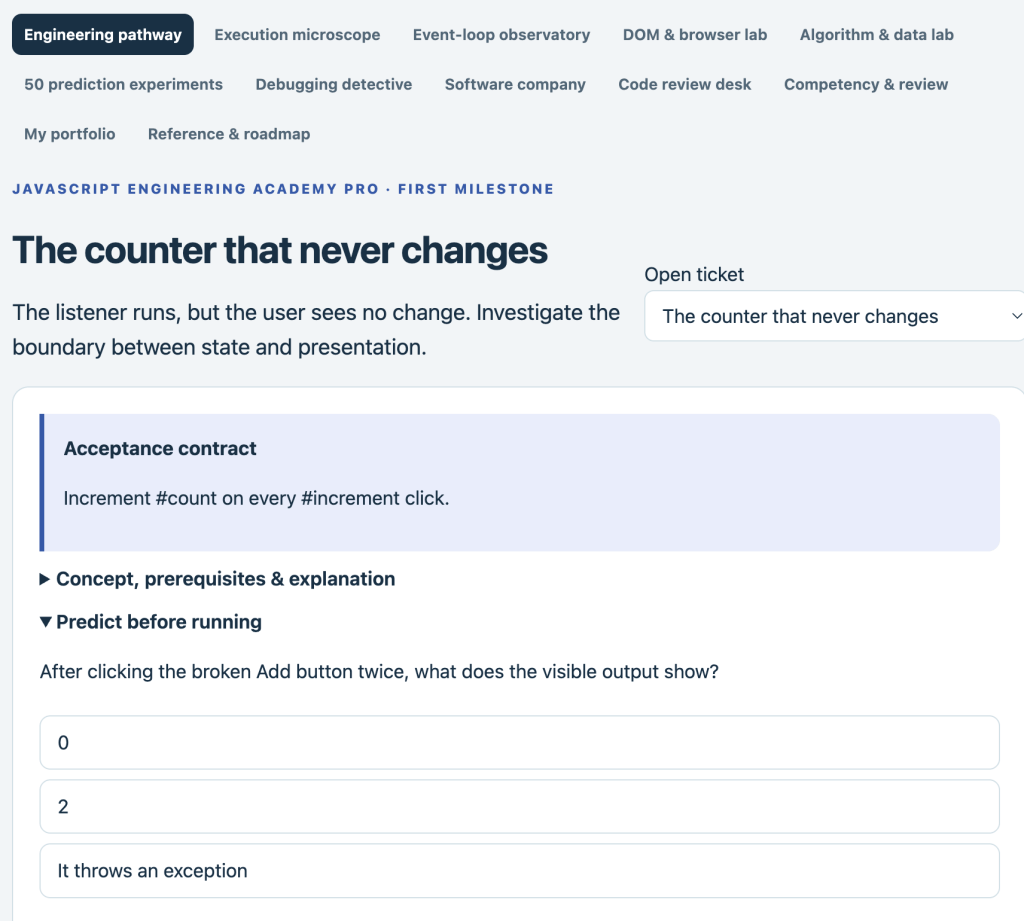
The focus of this article is on developing the habits and technical understanding that help JavaScript developers move beyond basic examples and build dependable applications.
We’ll explore the engineering concepts that matter, examine practical code examples, and work through challenges you can apply immediately.
1. The Difference Between a JavaScript Programmer and a JavaScript Engineer
A JavaScript programmer writes instructions that solve problems.
A JavaScript engineer also considers how those solutions behave over time, under different conditions, and within a larger system.
Consider a simple shopping cart.
A beginner might write:
let total = 0;

function addItem(price) {
  total += price;
}
This works for a basic demonstration.
But an engineer starts asking questions.
What happens if price is negative?
What happens if a string is passed instead of a number?
How do we remove an item?
How do we apply discounts?
How do we handle currency precision?
How do we test the calculations?
How do we keep the user interface synchronized with the cart?
What happens when the application grows?
These questions lead to better design.
A more deliberate approach
function calculateCartTotal(items) {
  if (!Array.isArray(items)) {
    throw new TypeError(
      "Items must be an array"
    );
  }

  return items.reduce((total, item) => {
    if (
      !Number.isInteger(item.priceCents) ||
      item.priceCents < 0 ||
      !Number.isInteger(item.quantity) ||
      item.quantity < 0
    ) {
      throw new RangeError(
        "Invalid cart item"
      );
    }

    return total +
      item.priceCents * item.quantity;
  }, 0);
}

const cart = [
  { priceCents: 1999, quantity: 2 },
  { priceCents: 750, quantity: 1 }
];

console.log(calculateCartTotal(cart));
// 4748 cents
Notice several improvements.
The function validates its input.
It avoids modifying external state.
It uses integer cents instead of floating-point currency calculations.
It has predictable behavior.
And it’s straightforward to test.
For a production financial system, you’d also need to consider safe integer limits, currency rules, taxes, rounding, and applicable accounting requirements.
Engineering begins when you stop thinking only about the expected result and start considering the conditions under which the result must remain correct.
2. Write Functions That Are Easy to Understand and Test
Functions are fundamental to JavaScript.
But not all functions are equally maintainable.
Consider this example:
function processOrder(order) {
  // Validate order
  // Calculate totals
  // Apply discounts
  // Update inventory
  // Save database record
  // Send confirmation email
  // Update interface
}
This function has too many responsibilities.
If something fails, it may be difficult to determine which operation caused the problem.
It also becomes harder to test individual behaviors.
Separate responsibilities
A better design might use smaller functions:
function validateOrder(order) {
  if (!order || !Array.isArray(order.items)) {
    throw new Error("Invalid order");
  }

  return order;
}

function calculateSubtotal(items) {
  return items.reduce(
    (sum, item) =>
      sum + item.priceCents * item.quantity,
    0
  );
}

function createOrderSummary(order) {
  validateOrder(order);

  return {
    itemCount: order.items.length,
    subtotalCents:
      calculateSubtotal(order.items)
  };
}
These functions separate validation, calculation, and summary generation.
The example is deliberately small; a complete application would also validate each item and its numeric limits.
The single-responsibility principle
A useful engineering guideline is that a function or module should have one clear reason to change.
This doesn’t mean every function must contain only a few lines.
It means responsibilities should be understandable and cohesive.
Practical challenge
Take a function from one of your existing projects.
Ask:
- Does it perform more than one unrelated task?
- Does it depend on external state?
- Does it modify data unexpectedly?
- Can I test it without running the entire application?
- Are its inputs and outputs clear?
Refactor it into smaller, testable units.
3. Understand State Before Building Complex Interfaces
One of the biggest challenges in application development is managing state.
State is the information that describes the application’s current condition.
For example, a task-management application might track:
const state = {
  tasks: [],
  filter: "all",
  searchTerm: "",
  selectedTaskId: null
};
The user interface should reflect that state.
Problems arise when the application stores the same information in multiple places and those values become inconsistent.
Derive values instead of duplicating them
Suppose your application stores:
const state = {
  tasks: [
    { id: 1, done: true },
    { id: 2, done: false }
  ],
  completedCount: 1
};
Now imagine a task changes.
If you forget to update completedCount, the application displays incorrect information.
A better approach is to derive the count:
function getCompletedCount(tasks) {
  return tasks.filter(
    task => task.done
  ).length;
}
Now the count is calculated from the source data.
Immutable state updates
When practical, create updated data instead of modifying existing objects.
function toggleTask(tasks, targetId) {
  return tasks.map(task =>
    task.id === targetId
      ? { ...task, done: !task.done }
      : task
  );
}
This function returns a new array.
It doesn’t mutate the original task objects.
That makes state transitions easier to reason about.
Engineering principle
Keep a clear source of truth and make state changes predictable.
This becomes especially important in applications with multiple components, asynchronous operations, and complex interactions.
4. Asynchronous JavaScript: Where Many Real-World Bugs Begin
JavaScript applications frequently interact with operations that take time.
Examples include:
- API requests.
- Database queries.
- Timers.
- File operations.
- User interactions.
- Background processing.
Asynchronous programming allows JavaScript to coordinate these operations without unnecessarily blocking execution.
But it introduces complexity.
Example: Fetching data
async function loadUsers() {
  const response = await fetch(
    "/api/users"
  );

  return response.json();
}
This works when the request succeeds and the response contains valid JSON.
But what happens when the server returns an error?
A common misconception is that fetch() automatically rejects its promise for HTTP errors such as 404 or 500.
It doesn’t.
You need to inspect the response.
Improved version
async function loadUsers() {
  const response = await fetch(
    "/api/users"
  );

  if (!response.ok) {
    throw new Error(
      `Request failed: ${response.status}`
    );
  }

  return response.json();
}
Now the function explicitly handles unsuccessful HTTP responses.
Handle failures at the calling layer
async function displayUsers() {
  try {
    const users = await loadUsers();

    console.log("Loaded users:", users);
  } catch (error) {
    console.error(
      "Unable to load users:",
      error.message
    );
  }
}
The application can now distinguish successful results from errors.
A production interface should also communicate failures to users and provide appropriate recovery options.
5. Learn to Prevent Race Conditions
Asynchronous applications can produce unexpected results when operations complete in a different order than they started.
Imagine a search interface.
A user types:
“Java”
The application sends a request.
Then the user types:
“JavaScript”
Another request begins.
What happens if the second request finishes first, but the first request finishes later?
The interface might display outdated results.
This is a race condition.
One solution: Abort previous requests
let currentController = null;

async function searchProducts(query) {
  if (currentController) {
    currentController.abort();
  }

  const controller = new AbortController();
  currentController = controller;

  try {
    const response = await fetch(
      `/api/products?q=${encodeURIComponent(query)}`,
      { signal: controller.signal }
    );

    if (!response.ok) {
      throw new Error("Search failed");
    }

    const products = await response.json();

    if (currentController === controller) {
      renderProducts(products);
    }
  } catch (error) {
    if (error.name !== "AbortError") {
      console.error(error);
    }
  } finally {
    if (currentController === controller) {
      currentController = null;
    }
  }
}
This example cancels the previous request when a new search begins.
It also checks whether the response belongs to the current request before rendering.
Practical challenge
Build a search interface that makes requests while the user types.
Test what happens when requests are delayed.
Add request cancellation.
Then add a debounce mechanism to avoid unnecessary requests.
Engineering skill: Learn to design for unpredictable timing rather than assuming operations finish in the order they begin.
6. Testing: The Difference Between “It Works” and “I Have Evidence It Works”
Testing is one of the most important engineering habits.
A function may work with the example you tried.
That doesn’t mean it behaves correctly for every relevant input.
Consider:
function divide(a, b) {
  return a / b;
}
It works for:
divide(10, 2);
// 5
But what should happen when the divisor is zero?
Or when one of the inputs is a string?
Define the expected behavior
function divide(a, b) {
  if (
    !Number.isFinite(a) ||
    !Number.isFinite(b)
  ) {
    throw new TypeError(
      "Inputs must be finite numbers"
    );
  }

  if (b === 0) {
    throw new RangeError(
      "Cannot divide by zero"
    );
  }

  return a / b;
}
Now the function has a defined contract.
Write tests
Using Node.js’s built-in test runner:
import test from "node:test";
import assert from "node:assert/strict";

function divide(a, b) {
  if (
    !Number.isFinite(a) ||
    !Number.isFinite(b)
  ) {
    throw new TypeError(
      "Inputs must be finite numbers"
    );
  }

  if (b === 0) {
    throw new RangeError(
      "Cannot divide by zero"
    );
  }

  return a / b;
}

test("divides two numbers", () => {
  assert.equal(divide(10, 2), 5);
});

test("rejects division by zero", () => {
  assert.throws(
    () => divide(10, 0),
    RangeError
  );
});

test("rejects invalid inputs", () => {
  assert.throws(
    () => divide("10", 2),
    TypeError
  );
});
Run the tests with Node.js:
node --testThree useful categories of tests
Unit tests verify individual functions or components.
Integration tests verify that multiple parts work together.
End-to-end tests verify complete user workflows.
Each category provides different evidence.
A strong testing strategy combines them according to the risks and complexity of the application.
7. Debugging Like an Engineer
Debugging isn’t simply finding a line of code that looks wrong.
It’s a process of investigating evidence.
A systematic debugging approach can save hours.
The seven-step debugging method
Step 1: Define the expected behavior.
What should the program do?
Step 2: Observe the actual behavior.
What happens instead?
Step 3: Reproduce the problem.
Can you make the error happen consistently?
Step 4: Reduce the problem.
Find the smallest example that still demonstrates the issue.
Step 5: Form a hypothesis.
What might explain the behavior?
Step 6: Test one change.
Avoid changing several unrelated things simultaneously.
Step 7: Add a regression test.
Make sure the same problem is detected if it returns.
Example: A subtle array bug
const numbers = [1, 2, 3, 4];

const doubled = numbers.map(number => {
  number * 2;
});

console.log(doubled);
Expected:
[2, 4, 6, 8]Actual:
[undefined, undefined, undefined, undefined]The problem is the missing return statement.
Corrected:
const doubled = numbers.map(number => {
  return number * 2;
});
Or:
const doubled = numbers.map(
  number => number * 2
);
The important lesson isn’t the syntax correction.
It’s learning to trace the values produced by a callback.
Practical challenge
Create a small application with three deliberate bugs.
Ask another developer or an AI assistant to describe the observed symptoms without revealing the causes.
Investigate and fix the bugs systematically.
Document what you learned.
8. JavaScript Architecture: Organize Code for Change
As applications grow, organization becomes increasingly important.
A single JavaScript file might work for a small demonstration.
But larger applications benefit from clear boundaries.
Consider a task-management application.
A simple project structure could look like this:
task-manager/
│
├── index.html
├── src/
│   ├── main.js
│   ├── state/
│   │   └── taskStore.js
│   ├── services/
│   │   └── taskApi.js
│   ├── components/
│   │   └── taskList.js
│   └── utils/
│       └── validation.js
│
└── tests/
    └── taskStore.test.js
Each area has a purpose.
State manages application data.
Services communicate with external systems.
Components render user interface elements.
Utilities contain reusable functions.
Tests verify expected behavior.
This is one possible structure, not a universal requirement.
The appropriate architecture depends on application size and complexity.
Use JavaScript modules
Export a function:
// utils/validation.js

export function isValidTask(task) {
  return (
    typeof task.title === "string" &&
    task.title.trim().length > 0
  );
}
Import it elsewhere:
// main.js

import {
  isValidTask
} from "./utils/validation.js";

const task = {
  title: "Learn JavaScript modules"
};

console.log(isValidTask(task));
In the browser, load the entry point as a module:
<script type="module" src="./src/main.js"></script>Modules make dependencies more explicit and allow code to be reused.
Engineering principle
Organize code around responsibilities, not simply around the number of lines.
9. Performance: Understand the Cost of Your Code
JavaScript performance becomes important when applications process large datasets or perform frequent updates.
Consider searching for a record in an array.
const user = users.find(
  user => user.id === targetId
);
For occasional searches in a small array, this is perfectly reasonable.
But if you’re performing thousands of lookups against a large collection, repeated linear searches may become expensive.
Use a Map for repeated key-based lookups
const usersById = new Map(
  users.map(user => [
    user.id,
    user
  ])
);

const user = usersById.get(targetId);
A Map generally provides efficient key-based lookup.
However, constructing the map also has a cost.
For a single lookup, the array approach may be simpler and sufficient.
For many repeated lookups, the map may be beneficial.
Benchmark before optimizing
const start = performance.now();

// Code to measure
const result = users.find(
  user => user.id === targetId
);

const end = performance.now();

console.log(
  `Execution time: ${end - start} ms`
);
This provides a basic timing measurement.
For meaningful comparisons, use representative data, repeated measurements, and an appropriate benchmarking method.
Common performance considerations
- Avoid unnecessary DOM updates.
- Reduce repeated expensive calculations.
- Use appropriate data structures.
- Debounce frequent input events when useful.
- Avoid blocking the main thread with heavy synchronous work.
- Measure before making optimization decisions.
Engineering principle: Optimize based on evidence, not assumptions.
10. Security: Treat External Data as Untrusted
JavaScript applications frequently process information supplied by users or external systems.
That information should not automatically be trusted.
Consider:
const message = userInput;

document.querySelector("#output").innerHTML =
  message;
If userInput contains HTML, the browser may interpret it as markup.
Depending on the content and context, this can create a cross-site scripting vulnerability.
Safer text rendering
document.querySelector("#output").textContent =
  userInput;
textContent inserts text without interpreting it as HTML.
When HTML rendering is genuinely required, use a suitable sanitization strategy and safe DOM APIs.
Other important security practices
- Validate inputs on the server, even when client-side validation exists.
- Avoid placing secret API keys in browser JavaScript.
- Use appropriate authentication and authorization.
- Understand cross-origin request restrictions.
- Keep dependencies updated.
- Avoid executing untrusted strings as code.
- Protect sensitive information in logs.
- Apply least-privilege permissions.
Security is not a feature to add at the end.
It should influence design decisions from the beginning.
11. Error Handling: Design for Things Going Wrong
Real applications encounter unexpected conditions.
Networks fail.
Users provide invalid information.
External services become unavailable.
Files are missing.
Data formats change.
A reliable application needs to respond appropriately.
Example: Handling an API request
async function fetchJson(url) {
  try {
    const response = await fetch(url);

    if (!response.ok) {
      throw new Error(
        `HTTP error ${response.status}`
      );
    }

    return await response.json();
  } catch (error) {
    console.error(
      "Request failed:",
      error
    );

    throw error;
  }
}
This function checks HTTP status and preserves failures for the calling code.
But a complete application may need more.
For example:
- Loading indicators.
- User-friendly error messages.
- Retry options.
- Request timeouts.
- Cancellation.
- Logging.
- Recovery behavior.
Avoid retrying everything
Retries can be useful for temporary network failures.
But retrying invalid requests usually won’t help.
Repeatedly retrying a non-idempotent operation can also cause duplicate actions.
A reliable retry strategy considers the type of error, operation safety, backoff timing, and retry limits.
12. Code Quality: Make Your JavaScript Easier to Maintain
Good code isn’t necessarily the shortest code.
It’s code that communicates its purpose clearly.
Compare:
const x = a.filter(b => b.p > 100);With:
const expensiveProducts = products.filter(
  product => product.price > 100
);
The second version communicates intent more clearly.
Meaningful names reduce the effort required to understand a program.
Five habits that improve code quality
Use descriptive names.
Choose names that explain the purpose of variables and functions.
Keep responsibilities clear.
Avoid combining unrelated operations into one function.
Make assumptions explicit.
Validate inputs and document important constraints.
Prefer predictable behavior.
Minimize unexpected side effects.
Write tests for important logic.
Especially for calculations, transformations, and error handling.
Tools such as ESLint and Prettier can also help enforce consistent code quality and formatting.
But automated tools don’t replace thoughtful design.
13. AI-Assisted JavaScript Engineering: Use AI Without Losing Understanding
AI coding assistants can help developers work faster.
They can generate examples, explain unfamiliar code, suggest refactoring approaches, and help investigate errors.
But there’s a danger in accepting generated code without understanding it.
A solution may look convincing while containing subtle defects.
A better AI-assisted development workflow
DEFINE → DESIGN → GENERATE → REVIEW → TEST → DEBUG → IMPROVE
Start by describing the problem.
Define the requirements.
Ask AI to propose an approach.
Review the design.
Generate a small implementation.
Test it.
Investigate failures.
Refine the result.
Reusable AI engineering prompt
Act as a senior JavaScript engineering mentor.

I am building:
[PROJECT DESCRIPTION]

Requirements:
[FUNCTIONAL REQUIREMENTS]

Constraints:
[TECHNICAL CONSTRAINTS]

Help me design and implement this project.

Follow these rules:

1. Clarify important missing requirements.
2. Recommend a simple, maintainable architecture.
3. Explain important design decisions.
4. Separate responsibilities into modules.
5. Include input validation.
6. Consider asynchronous failures.
7. Identify potential security concerns.
8. Suggest meaningful tests.
9. Explain performance tradeoffs.
10. Avoid unnecessary complexity.

Do not immediately generate an entire application.

Work incrementally.

After each implementation step:
- Explain what was created.
- Identify assumptions.
- Suggest tests.
- Ask me to verify the behavior.
- Help me understand the code.

The goal is to develop both a working
application and stronger engineering skills.
This approach treats AI as a development partner rather than an unquestioned source of correct code.
14. A Complete Engineering Challenge: Build a Reliable Task Manager
Let’s combine these concepts into one practical project.
Build a task-management application.
The initial version should allow users to:
- Add tasks.
- Mark tasks complete.
- Delete tasks.
- Filter tasks.
- Search tasks.
- Save progress locally.
But don’t stop when the interface works.
Apply engineering principles.
Phase 1: Define requirements
Write down the expected behavior.
What makes a valid task?
Can duplicate titles exist?
What happens when storage is unavailable?
What happens when a task doesn’t exist?
Phase 2: Design the data model
const task = {
  id: "task-001",
  title: "Learn JavaScript testing",
  completed: false,
  createdAt: "2026-11-10T12:00:00Z"
};
Phase 3: Build pure functions
function addTask(tasks, task) {
  if (
    !task ||
    typeof task.title !== "string" ||
    !task.title.trim()
  ) {
    throw new Error("Invalid task");
  }

  return [...tasks, task];
}
Phase 4: Add state management
Keep application state in one clearly defined location.
Update state predictably.
Phase 5: Connect the DOM
Render the task list.
Handle user actions.
Provide visible feedback.
Phase 6: Add persistence
Use localStorage for a simple browser-based version.
Handle invalid stored data and storage failures.
Phase 7: Write tests
Test:
- Adding a valid task.
- Rejecting an invalid task.
- Marking a task complete.
- Deleting a task.
- Filtering tasks.
- Handling empty collections.
Phase 8: Test failure conditions
What happens if the stored JSON is corrupted?
What happens if the user enters a very long title?
What happens if the same action is triggered repeatedly?
Phase 9: Review the architecture
Can you change the storage mechanism without rewriting the interface?
Can you test the task logic independently?
Can you add features without creating excessive complexity?
Phase 10: Document the application
Explain how to run it.
Describe the project structure.
Document important assumptions.
List known limitations.
This is how a small project becomes a meaningful engineering exercise.
15. A Seven-Day JavaScript Engineering Challenge
Want to strengthen your engineering skills this week?
Try one focused challenge each day.
Day 1: Refactor Existing Code
Take a working JavaScript function.
Improve its naming, responsibilities, and input validation.
Day 2: Add Unit Tests
Write tests for normal inputs, boundary conditions, and invalid values.
Day 3: Handle Asynchronous Errors
Build a small API-driven feature.
Handle loading, errors, and unsuccessful HTTP responses.
Day 4: Improve State Management
Refactor an interactive component to use a clear source of truth.
Avoid unnecessary duplicated state.
Day 5: Investigate Performance
Measure a repeated operation.
Compare two approaches using representative data.
Day 6: Review Security
Inspect how your application handles user input.
Replace unsafe patterns.
Review where secrets and permissions are managed.
Day 7: Build and Document
Combine what you’ve learned into a small application.
Add tests, error handling, and a README.
The goal isn’t to create the biggest project.
It’s to create a small project that demonstrates strong engineering habits.
16. Introducing JavaScript Engineering Academy Pro
I’ve created JavaScript Engineering Academy Pro as a new DiscoveryVIP resource for developers interested in strengthening their JavaScript engineering skills.
The academy provides a dedicated browser-based learning workspace.
It is intended for learners who want to move beyond isolated syntax examples and develop a more systematic approach to JavaScript development.
The concepts explored in this article provide a practical foundation for that journey.
What to focus on as you explore
Use the academy with five questions in mind:
Can I explain the code?
Don’t stop at getting the expected result.
Understand why it works.
Can I test it?
Identify normal cases, boundaries, and failure conditions.
Can I maintain it?
Consider naming, organization, dependencies, and responsibilities.
Can I improve it?
Look for opportunities to simplify, clarify, or strengthen the implementation.
Can I apply it independently?
Try building a related feature without copying the original example.
These questions help turn coding practice into engineering practice.
Start exploring
JavaScript Engineering Academy Pro
https://discoveryvip.com/javascript-engineering-academy
17. The Engineering Mindset: Think Beyond the First Successful Run
One of the most valuable shifts a developer can make is moving beyond the question:
“Does my code work?”
Instead, ask:
“Under what conditions does my code work, and how do I know?”
That change encourages deeper thinking.
It leads to better tests.
Clearer architecture.
More deliberate error handling.
Stronger security.
And software that’s easier to maintain.
A useful engineering checklist
Before considering a feature complete, ask:
- Does it satisfy the requirements?
- Are inputs validated?
- Are edge cases handled?
- Are errors communicated appropriately?
- Can important behavior be tested?
- Is the code understandable?
- Are responsibilities clearly separated?
- Have security risks been considered?
- Is performance acceptable for expected workloads?
- Can another developer maintain the solution?
Not every small exercise needs enterprise-level infrastructure.
The objective is to develop judgment about which practices matter for a particular problem.
18. Continue Your JavaScript Learning Journey
JavaScript Engineering Academy Pro is part of the growing collection of interactive development resources I’ve created at DiscoveryVIP.
If you’re developing your JavaScript skills, you may also find these resources useful.
JavaScript Engineering Academy Pro
Develop stronger JavaScript engineering habits and practical problem-solving skills.
https://discoveryvip.com/javascript-engineering-academy
JavaScript 100 Interactive Learning Studio
Explore 100 guided lessons and practical JavaScript exercises.
https://discoveryvip.com/javascript-100-lab/#learn/1
JavaScript Build Studio
Practise building JavaScript applications through structured development activities.
https://discoveryvip.com/javascript-build-studio
JavaScript DOM Lab
Explore DOM manipulation, browser events, and interactive interfaces.
https://discoveryvip.com/javascript-dom-lab/#studio
JavaScript Async Lab
Investigate asynchronous programming, promises, and execution behavior.
https://discoveryvip.com/javascript-async-lab/#studio
JavaScript Data Lab
Practise working with arrays, objects, and data transformations.
https://discoveryvip.com/javascript-data-lab/#studio
Explore all DiscoveryVIP learning resources:
https://discoveryvip.com/guides.php
Final Thoughts: Great JavaScript Developers Build More Than Working Code
Learning JavaScript syntax is an important first step.
But becoming a stronger developer requires more.
You need to understand how applications behave.
How data moves through a system.
How asynchronous operations interact.
How errors occur.
How to verify results.
How to organize code.
How to improve performance.
And how to build software that other people can understand and maintain.
These skills don’t develop through memorization alone.
They develop through practice.
Through debugging.
Through testing.
Through building projects.
And through repeatedly asking why something works—and what might cause it to fail.
That’s the mindset behind JavaScript engineering.
Don’t just write code that works once. Learn to build JavaScript applications that are reliable, understandable, testable, and ready to evolve.
Start with a small project.
Apply one engineering principle.
Test the result.
Improve the implementation.
Then repeat.
Explore JavaScript Engineering Academy Pro:
https://discoveryvip.com/javascript-engineering-academy

About the Author
Laurence Svekis is a Google Developer Expert specializing in Google Workspace, Google Champion, author, developer, and online educator who has taught 3 million+ students worldwide.
With more than 20 years of experience in web development and education, Laurence focuses on JavaScript, Google Apps Script, web development, AI-assisted coding, Google Workspace automation, and practical technology education.
He is also the creator of the Vibe Learning framework, an approach to AI-assisted learning that emphasizes active participation, experimentation, feedback, and independent understanding.
Through DiscoveryVIP and VibeLearning.ca, Laurence develops interactive educational resources designed to help learners turn programming concepts into practical development skills.
Join the Conversation
What’s the biggest challenge in moving from learning JavaScript to building professional applications?
Is it architecture, asynchronous programming, debugging, testing, performance, or simply knowing how to organize a growing project?
And which engineering skill do you wish you’d learned earlier in your development journey?
I’d be interested to hear your experiences.
#JavaScript #JavaScriptEngineering #WebDevelopment #SoftwareEngineering #LearnJavaScript #JavaScriptDeveloper #FrontendDevelopment #BackendDevelopment #NodeJS #JavaScriptTesting #CodeQuality #SoftwareArchitecture #Debugging #AsyncJavaScript #ProgrammingEducation #VibeCoding #VibeLearning #DiscoveryVIP #LaurenceSvekis