
Discover how to move beyond AI-generated code and develop the skills to plan, build, test, debug, and improve real software through 50 guided lessons and hands-on practice.
AI Can Write Code. But Can You Build Software?
Something remarkable has happened to software development.
You can now describe an application in plain English and ask an AI assistant to generate the code.
Want a task manager?
AI can help create one.
Need a dashboard?
AI can generate the interface.
Want a quiz application, calculator, learning tool, or business automation?
AI can help you get started in minutes.
But there’s an important question that often gets overlooked:
What happens after the AI generates the code?
What if the application doesn’t work?
What if the results are incorrect?
What if users encounter an unexpected error?
What if you want to add a new feature?
What if the AI tells you everything is working, but you haven’t actually tested it?
This is where the difference between generating code and developing software becomes clear.
Vibe coding can help you build faster. But understanding what you’re building is what makes you a capable developer.
That’s why I created a new free learning resource:
Vibe Coding Academy — 50 Guided Lessons to Build with AI and Own the Result
https://discoveryvip.com/vibe-coding-academy/?path=beginner
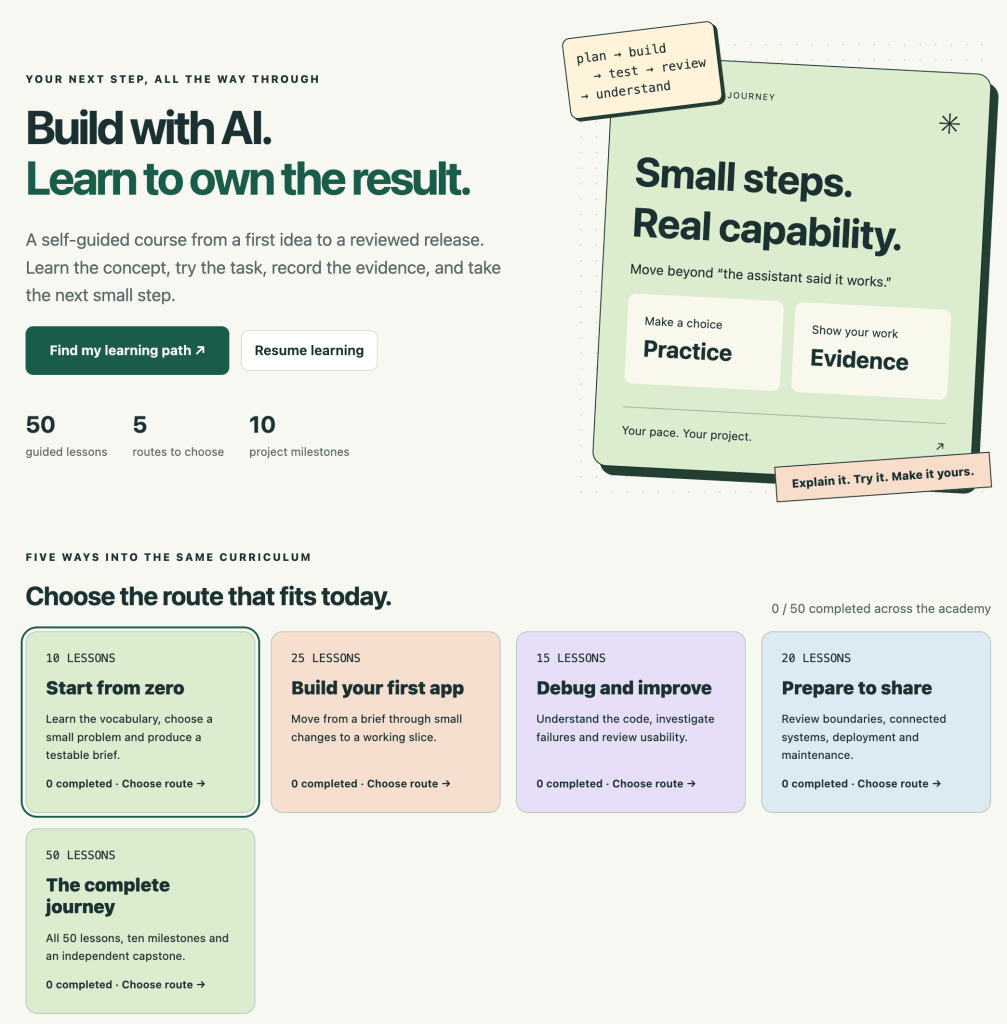
The Academy is designed to help you develop practical AI-assisted development skills through structured lessons, project milestones, experimentation, testing, and reflection.
Whether you’re new to programming or already experimenting with AI coding tools, the goal is to move from asking AI to build something toward confidently understanding and improving the result.
Let’s explore how.
1. What Is Vibe Coding?
Vibe coding is an approach to software development where you describe what you want to build in natural language and use AI to help generate or modify the code.
Instead of writing every line manually, you collaborate with an AI coding assistant.
For example, you might write:
Create a simple task manager using HTML, CSS, and JavaScript. Users should be able to add tasks, mark tasks as complete, and delete tasks. Use a clean, responsive design.
An AI assistant can generate an initial implementation.
You can then ask it to improve the layout, add features, or fix problems.
This can make development more accessible and accelerate experimentation.
But there are different ways to approach vibe coding.
Approach A: Generate and Hope
Ask AI to build an application.
Copy the generated code.
Run it.
If it appears to work, consider the project finished.
This approach can be fast, but it creates problems when something goes wrong.
Approach B: Generate, Understand, Test, and Improve
Define the problem.
Describe the expected behavior.
Generate a small implementation.
Review the code.
Test the behavior.
Identify problems.
Improve the solution.
Document what you’ve learned.
This approach requires more involvement, but it helps develop genuine development skills.
The goal isn’t simply to get AI to produce code. It’s to become capable of directing, evaluating, and improving the software you create.
2. Introducing Vibe Coding Academy
Vibe Coding Academy is a free, self-guided learning experience designed around practical AI-assisted development.
The Academy provides a structured path from your first application idea to a reviewed project.
Rather than treating AI-generated output as automatically correct, the lessons encourage you to understand concepts, complete practical tasks, record evidence, and explain your decisions.
What’s included?
50 Guided Lessons
Develop practical knowledge through structured lessons and worked examples.
5 Learning Routes
Choose a route that fits your current experience and learning goals.
10 Project Milestones
Move through meaningful stages of planning, building, testing, and reviewing a project.
Hands-On Practice
Apply concepts through practical exercises rather than simply reading explanations.
AI Coaching Prompts
Generate lesson-specific prompts that you can copy into your preferred AI assistant.
Project Workbook
Record your project brief, progress, evidence, reflections, and limitations.
Interactive Debugging Exercise
Practice identifying and repairing problems in a small task-management application.
Flexible Progress
Revisit lessons, switch learning routes, and continue at your own pace.
The Academy doesn’t require an account or an AI connection. Learning progress is stored locally in your browser, with backup and export options.
Explore the beginner learning path:
https://discoveryvip.com/vibe-coding-academy/?path=beginner
3. Why Learning to Vibe Code Requires More Than Writing Prompts
Imagine asking AI:
Build me a website.
What should the website contain?
Who will use it?
What problem should it solve?
Should it store data?
Does it need authentication?
What happens when something goes wrong?
How should it behave on mobile devices?
The AI doesn’t automatically know these answers.
It must make assumptions.
Some assumptions might be reasonable.
Others might be completely wrong.
That’s why effective AI-assisted development begins before the first line of code.
It begins with understanding the problem.
A better starting point
Instead of:
Build a task manager.
Try:
Build a browser-based task manager for one person.
Use HTML, CSS, and vanilla JavaScript.
Users should be able to add tasks, mark them complete, and delete them.
Empty task titles should not be accepted.
Tasks should have stable unique identifiers.
Store task data in browser local storage.
The interface should work on mobile and desktop.
Begin by explaining the application structure before generating code.
Build one feature at a time and include a way to test each feature.
Notice the difference.
The second prompt defines the application more clearly.
It also introduces important development concepts:
- Requirements.
- Constraints.
- Data structures.
- Validation.
- Persistence.
- Testing.
- Incremental development.
These concepts matter regardless of whether the code is written by a person or generated with AI.
4. The Five Stages of Responsible Vibe Coding
A useful way to approach AI-assisted development is through five connected stages.
PLAN → BUILD → TEST → REVIEW → UNDERSTAND
PLAN: Define What You’re Building
Identify the users, purpose, features, and constraints.
BUILD: Implement Small Features
Use AI to help generate manageable pieces of functionality.
TEST: Verify the Behavior
Check what the application actually does.
REVIEW: Inspect the Results
Evaluate code quality, usability, accessibility, and limitations.
UNDERSTAND: Explain Your Application
Make sure you can describe how the important parts work.
Let’s apply these stages to a practical example.
5. Project Example: Build a Simple Study Task Manager
Imagine you’re building a task manager for students.
The application should allow someone to:
- Add a study task.
- Mark a task as completed.
- View active tasks.
- Delete tasks.
- Keep tasks after refreshing the browser.
Before asking AI to generate the interface, define the expected behavior.
| Feature | Expected behavior |
|---|---|
| Add task | Creates a new task with a valid title |
| Empty input | Rejects blank or whitespace-only titles |
| Complete task | Changes the selected task’s status |
| Filter tasks | Shows the appropriate subset |
| Delete task | Removes the intended task |
| Save tasks | Preserves data between page refreshes |
This table is a small specification.
It helps both you and the AI understand what the application must accomplish.
Why specifications matter
Without a specification, you may judge success only by appearance.
The application might look polished while containing serious logic errors.
A specification gives you something concrete to test.
6. Build the Data Model Before the Interface
One useful development habit is to define how information will be represented.
For our task manager, each task needs:
- A unique identifier.
- A title.
- A completion status.
For example:
const tasks = [
  {
    id: "task-101",
    title: "Review JavaScript arrays",
    completed: false
  },
  {
    id: "task-102",
    title: "Practice CSS Grid",
    completed: true
  }
];
This structure is simple.
But it supports several important operations.
We can add tasks.
Update completion status.
Filter tasks.
Delete tasks.
Save tasks.
The important decision is to give every task a stable identifier.
We’ll see why that matters shortly.
7. Write Your First Feature: Adding Tasks
Let’s create a JavaScript function that adds a task.
function addTask(tasks, title) {
  const cleanTitle = title.trim();

  if (!cleanTitle) {
    return tasks;
  }

  const newTask = {
    id: crypto.randomUUID(),
    title: cleanTitle,
    completed: false
  };

  return [...tasks, newTask];
}
This function demonstrates several useful concepts.
Input validation
const cleanTitle = title.trim();The trim() method removes whitespace from the beginning and end of a string.
That means an input containing only spaces becomes an empty string.
Guard clauses
if (!cleanTitle) {
  return tasks;
}
This prevents invalid tasks from being added.
Stable identifiers
id: crypto.randomUUID()Each new task receives a unique identifier.
Immutable updates
return [...tasks, newTask];The function returns a new array rather than directly changing the original.
This pattern can make state changes easier to reason about.
What should we test?
A useful AI prompt might be:
Review this JavaScript function for adding tasks.
Identify at least five test cases.
Include normal inputs, empty strings, whitespace-only strings, and repeated task titles.
Explain what the expected result should be for each test.
Now AI is helping you evaluate code, not simply generate more of it.
8. The Hidden Bug: Deleting the Wrong Task
Here’s a problem that appears in many beginner applications.
Imagine you have five tasks.
You filter the list to show only incomplete tasks.
Then you click Delete on the second visible task.
A poorly designed application might use the visible position to determine which task to remove from the original array.
But the second visible task isn’t necessarily the second task in storage.
Example
const tasks = [
  { id: "a", title: "Task A", completed: true },
  { id: "b", title: "Task B", completed: false },
  { id: "c", title: "Task C", completed: true },
  { id: "d", title: "Task D", completed: false }
];
The incomplete tasks are:
[
  { id: "b", title: "Task B", completed: false },
  { id: "d", title: "Task D", completed: false }
]
If you delete the second visible item by using its position in the original array, you could remove the wrong task.
The better solution
Delete by stable task ID.
function deleteTask(tasks, taskId) {
  return tasks.filter(
    task => task.id !== taskId
  );
}
Now the operation doesn’t depend on the item’s visible position.
It removes the task with the matching identifier.
Why this is important
This is exactly the type of problem that AI-generated code can contain.
The application might appear to work during basic testing.
But filtering the list exposes a defect.
Testing realistic user behavior is more valuable than simply checking whether the interface loads.
9. Learn to Test AI-Generated Code
A common mistake in vibe coding is accepting an AI assistant’s statement that the code should work.
For example:
I’ve fixed the issue. The application now works correctly.
That statement isn’t evidence.
The code needs to be executed and tested.
A simple testing strategy
For our task manager, try these cases.
Test 1: Normal task
Enter:
Study JavaScript
Expected result: A new task appears.
Test 2: Empty input
Enter nothing.
Expected result: No task is created.
Test 3: Whitespace-only input
Enter three spaces.
Expected result: No task is created.
Test 4: Filter and delete
Create several tasks, mark some complete, filter the list, and delete one visible task.
Expected result: Only the selected task is removed.
Test 5: Refresh
Create tasks and refresh the browser.
Expected result: Tasks remain available if persistence has been implemented.
An important distinction
Tests verify specific behavior.
They don’t automatically prove that an entire application is correct.
A small set of passing tests is useful evidence, but it isn’t a complete security, accessibility, or reliability audit.
10. Debugging Is One of the Most Important Vibe Coding Skills
When AI-generated code fails, beginners often ask:
Fix everything.
Sometimes the AI generates a completely new version of the application.
That might solve the original problem.
But it can also introduce new defects.
A better approach is to investigate the specific failure.
Step 1: Describe the observed behavior
“When I filter completed tasks and delete the second visible item, a different task disappears.”
Step 2: Describe the expected behavior
“Only the selected task should be removed.”
Step 3: Provide the relevant code
Share the filtering and deletion functions.
Step 4: Ask for an explanation
Identify the likely cause of this bug.
Explain how visible list positions differ from stable task identifiers.
Suggest the smallest correction.
Include tests that demonstrate the problem and verify the fix.
Avoid rewriting unrelated parts of the application.
This is a much more focused request.
It also helps you understand the underlying issue.
The best debugging prompt isn’t necessarily the one that asks AI to fix the most code. It’s the one that helps identify the actual problem.
11. Practice Debugging Inside Vibe Coding Academy
One of the Academy’s practical activities is an interactive task-board repair exercise.
The exercise includes two deliberately introduced defects.
You’ll investigate:
Problem 1: Invalid task titles
The application needs to validate a title after trimming whitespace.
Problem 2: Incorrect deletion behavior
The application needs to delete tasks using stable identifiers rather than visible positions.
You can change the repair controls, interact with the sample task board, and run three predefined behavior checks.
The exercise uses local sample state.
It doesn’t execute code from your own project or automatically verify an external application.
That’s an important distinction.
The activity is designed to teach you how to recognize and reason about specific software behaviors.
Try the exercise here:
https://discoveryvip.com/vibe-coding-academy/?path=beginner
12. Why Building in Small Steps Works Better
Imagine asking AI to create an entire application with:
- Authentication.
- A database.
- A dashboard.
- File uploads.
- User profiles.
- Notifications.
- Reports.
- Administrative controls.
All in one request.
Even if AI generates a large amount of code, understanding and testing everything becomes difficult.
A more manageable approach is to develop the application incrementally.
Example: Task Manager Development Roadmap
Milestone 1: Define the project
Write the requirements.
Milestone 2: Build the interface
Create the HTML structure and basic CSS.
Milestone 3: Add tasks
Implement input validation and task creation.
Milestone 4: Complete tasks
Add status updates.
Milestone 5: Filter tasks
Display active and completed tasks.
Milestone 6: Delete tasks
Use stable identifiers.
Milestone 7: Save data
Add local storage.
Milestone 8: Test behavior
Verify common and edge cases.
Milestone 9: Review quality
Check accessibility, usability, and maintainability.
Milestone 10: Prepare a release
Document limitations and verify the final application.
This approach helps keep the project understandable.
It also makes it easier to identify which change introduced a problem.
13. Learn to Review Code Instead of Just Running It
AI-generated code can look convincing.
But a working interface doesn’t necessarily mean the implementation is good.
Consider:
document.querySelector("#output").innerHTML =
  userInput;
If userInput contains untrusted content, inserting it directly as HTML can create a security problem.
For ordinary text, a safer approach is:
document.querySelector("#output").textContent =
  userInput;
This treats the input as text rather than HTML markup.
Questions to ask during code review
- Does the code validate user input?
- Does it handle missing or unexpected data?
- Are identifiers stable?
- Are errors handled clearly?
- Does the code modify only what it should?
- Are user-controlled values inserted safely?
- Can someone else understand the functions?
- Are there unnecessary dependencies?
- Is sensitive information exposed?
- Have important behaviors been tested?
These questions help develop critical judgment.
And that judgment becomes increasingly valuable as AI-generated code becomes more common.
14. Context Engineering Makes Vibe Coding More Effective
AI coding assistants need more than a vague description of an application.
They benefit from knowing:
- The project goal.
- The intended users.
- The technology stack.
- Existing features.
- Current limitations.
- Relevant code.
- The exact problem being solved.
- Expected behavior.
- Testing requirements.
This is where context engineering becomes useful.
Example: A structured coding request
PROJECT:
Browser-based study task manager.

TECHNOLOGY:
HTML, CSS, vanilla JavaScript.

CURRENT STATE:
Task creation and completion work.

CURRENT PROBLEM:
Deleting a task after filtering sometimes
removes the wrong item.

EXPECTED BEHAVIOR:
Only the selected task should be deleted.

CONSTRAINTS:
- Preserve existing features.
- Avoid external libraries.
- Make the smallest practical change.

REQUEST:
1. Explain the cause.
2. Identify the affected function.
3. Suggest a correction.
4. Provide relevant tests.
5. Explain any remaining limitations.
This is more useful than:
“Fix my task manager.”
It gives AI the information needed to focus on the actual issue.
For more practice with this skill, explore:
https://discoveryvip.com/ai-context-lab
15. The Importance of Understanding Your Own Project
Here’s a useful test of your development knowledge.
Can you explain your application without asking AI to explain it for you?
For a simple task manager, you should be able to answer:
Where is the task data stored?
Perhaps in a JavaScript array and browser local storage.
How is a task created?
Through a function that validates the title and adds a task object.
How is a task deleted?
By filtering out the task with a matching identifier.
How does the interface update?
A rendering function reads the current state and updates the displayed list.
What happens when the browser refreshes?
The application restores saved data if persistence has been implemented.
What limitations remain?
For example, browser storage isn’t a shared database and may be cleared.
If you can answer these questions, you’re developing genuine understanding.
If you can’t, you’ve identified useful topics to investigate.
Being able to explain your software is a meaningful part of being able to maintain it.
16. Five Learning Routes for Different Experience Levels
One of the useful features of Vibe Coding Academy is that you don’t have to follow a single rigid learning path.
The Academy provides five routes into a shared curriculum.
This makes it easier to choose a learning journey based on your current goals.
You can begin with foundational concepts, revisit material you need to strengthen, or explore lessons relevant to your project.
The routes share lessons, and your progress follows you when switching between them.
No lesson is permanently locked behind another.
How to choose a route
If you’re new to programming, focus on understanding application structure, basic code behavior, and small projects.
If you’ve already built applications, focus on testing, debugging, review, and project improvement.
If you’re comfortable with AI coding assistants, challenge yourself to explain and verify the code they generate.
The most important goal is not simply to complete lessons.
It’s to develop the ability to apply what you’ve learned.
17. Use AI as a Coding Coach, Not Just a Code Generator
AI can be especially useful when it helps you learn through questions and feedback.
Instead of always asking for a complete solution, try using AI as a coach.
Reusable AI Coding Coach Prompt
Act as an experienced software development instructor.
I’m learning to build applications with AI assistance.
My project is:
[DESCRIBE YOUR PROJECT]
My current experience level is:
[BEGINNER / INTERMEDIATE / ADVANCED]
Help me develop the application one small feature at a time.
Before generating code, explain the purpose of the feature.
Ask me to predict how the code should behave.
Show a small example.
Give me an opportunity to implement or modify the solution.
Help me test normal behavior and edge cases.
When something fails, guide me through identifying the cause.
Avoid rewriting unrelated code.
Ask me to explain what I’ve learned before moving to the next feature.
This approach keeps you actively involved.
AI becomes a learning partner rather than a replacement for understanding.
Vibe Coding Academy includes a coaching-prompt generator that uses the current lesson and your project goal to prepare prompts you can copy or download.
The Academy itself doesn’t send these prompts to an AI service.
You decide whether and where to use them.
18. Keep a Development Journal
One of the most overlooked learning techniques is recording what you discover.
When you’re building with AI, it’s easy to move quickly from one generated solution to another.
But without reflection, you may forget why certain decisions were made.
A simple development journal can help.
Example entry
Feature: Task deletion
Goal: Remove the selected task.
Problem: Filtering changed the visible position of tasks.
Cause: Deletion relied on array position instead of task ID.
Solution: Delete using a stable identifier.
Evidence: Tested deletion before and after filtering.
Remaining limitation: No undo feature.
This short record captures much more than a checkbox saying the feature is complete.
It explains the problem, reasoning, solution, and evidence.
Why this matters
A development journal can help you:
- Remember important decisions.
- Avoid repeating mistakes.
- Track project progress.
- Explain your implementation.
- Identify remaining limitations.
- Prepare future improvements.
Vibe Coding Academy includes a project workbook for recording this kind of information.
You can export the workbook to keep a copy of your learning and project notes.
19. Ten Project Milestones: From Idea to Reviewed Release
The Academy includes ten project milestones that help organize the learning journey.
A useful way to think about milestones is to connect each one to a concrete deliverable.
For example:
| Stage | Example deliverable |
|---|---|
| Project definition | One-page project brief |
| Requirements | Feature checklist |
| Interface planning | Page sketch or wireframe |
| Data planning | Data structure |
| Initial implementation | Working first feature |
| Feature development | Core functionality |
| Validation | Input and error handling |
| Testing | Test results |
| Review | Quality and limitation notes |
| Release preparation | Reviewed project version |
The exact milestone activities in your learning path provide the detailed guidance.
The important idea is to produce evidence of progress.
Don’t simply record that you’ve completed a stage.
Record what you’ve built, tested, or learned.
20. Common Vibe Coding Mistakes to Avoid
Mistake 1: Asking AI to Build Everything at Once
Large requests can create complicated implementations that are difficult to verify.
Better approach: Work in small, testable features.
Mistake 2: Accepting AI Explanations as Proof
An AI assistant can describe what code should do without actually running it.
Better approach: Execute the code and observe the behavior.
Mistake 3: Ignoring Error Messages
Repeatedly regenerating code can hide the underlying problem.
Better approach: Investigate errors and identify their causes.
Mistake 4: Making Changes Without Testing Existing Features
A new feature can accidentally break something that previously worked.
Better approach: Retest important behavior after each change.
Mistake 5: Building Without Requirements
If the expected behavior is unclear, success becomes difficult to measure.
Better approach: Define inputs, outputs, and acceptance criteria.
Mistake 6: Neglecting Security and Accessibility
An application can look polished while containing important problems.
Better approach: Include basic security and accessibility review throughout development.
Mistake 7: Never Reviewing the Generated Code
If you don’t understand the implementation, future changes become more difficult.
Better approach: Ask AI to explain the code and verify those explanations through experimentation.
Mistake 8: Confusing Progress with Mastery
Completing lessons doesn’t automatically mean you can apply the skills independently.
Better approach: Build, test, explain, and improve something of your own.
21. A Seven-Day Vibe Coding Challenge
Want to begin practicing immediately?
Here’s a simple seven-day challenge.
Day 1: Define Your Project
Choose a small application.
Examples:
- Study task manager.
- Personal reading tracker.
- Quiz application.
- Expense organizer using sample data.
- Flashcard tool.
Write a one-page project brief.
Day 2: Plan the Interface
Identify the main screens and user interactions.
Sketch a simple layout.
Day 3: Build the First Feature
Use AI to help generate a small working implementation.
Review the code before adding more features.
Day 4: Add Input Validation
Test empty inputs, unexpected values, and invalid actions.
Day 5: Debug a Problem
Identify one issue and investigate it systematically.
Record the cause and correction.
Day 6: Test the Application
Create a checklist of expected behaviors.
Run each test and record the results.
Day 7: Review and Explain
Document:
- What the application does.
- How the important functions work.
- What you’ve tested.
- What limitations remain.
- What you would improve next.
By the end of the challenge, you’ll have more than a generated application.
You’ll have a project you can discuss, evaluate, and continue developing.
22. How Vibe Coding Academy Connects with Vibe Learning
Vibe Coding Academy reflects the principles behind Vibe Learning, the AI-assisted learning framework I developed.
Vibe Learning focuses on active participation, guided exploration, practical application, feedback, reflection, and developing independent understanding.
The goal isn’t to use AI to avoid learning.
It’s to use AI to make meaningful learning more accessible.
The Vibe Learning Progression
Curiosity → Explore → Understand → Practice → Feedback → Reflect → Connect → Create → Share → Reinvent
Here’s how that applies to vibe coding.
Curiosity: Imagine an application you’d like to create.
Explore: Investigate possible approaches and technologies.
Understand: Learn how the application should work.
Practice: Build individual features with AI assistance.
Feedback: Test the code and inspect results.
Reflect: Explain what worked and what failed.
Connect: Combine programming concepts into a complete application.
Create: Develop something useful.
Share: Demonstrate your project and explain your decisions.
Reinvent: Improve the application as your understanding grows.
This approach helps transform AI-assisted coding from passive generation into active skill development.
Learn more about Vibe Learning:
23. A Practical Challenge: Can You Explain What AI Built?
Here’s a challenge you can try with any AI coding assistant.
Ask AI to generate a small JavaScript application.
Then answer these ten questions without asking AI for the answers first.
- What problem does the application solve?
- Where is the data stored?
- Which function handles user input?
- How is input validated?
- What happens when an error occurs?
- How does the interface update?
- What happens when the application is refreshed?
- Which parts have been tested?
- What security or usability limitations remain?
- What would you change to improve the application?
If you can answer these questions confidently, you’re developing a deeper understanding of your project.
If some answers are unclear, those become your next learning objectives.
This is one of the most valuable habits you can develop when coding with AI.
24. The Future of Vibe Coding Belongs to People Who Understand What They Build
AI-assisted development is making software creation more accessible.
People who previously found programming intimidating can now experiment with ideas, generate prototypes, and explore possibilities much more quickly.
Experienced developers can also use AI to accelerate routine tasks and investigate unfamiliar technologies.
But faster code generation doesn’t eliminate the need for software engineering judgment.
Applications still need to be:
- Useful.
- Reliable.
- Secure.
- Accessible.
- Maintainable.
- Tested.
- Understandable.
And someone still needs to decide whether the software meets those expectations.
That’s why I believe the next important step in AI-assisted development education is teaching people how to evaluate and improve the applications they create.
AI can help you write the code. Your understanding helps you take responsibility for the result.
25. Start Your Vibe Coding Learning Journey Today
You don’t need to be an experienced programmer to begin exploring AI-assisted development.
Start with an idea.
Define a small problem.
Ask AI to help you plan.
Build one feature.
Test it.
Understand how it works.
Then continue.
The Vibe Coding Academy provides a structured environment for developing these skills through 50 guided lessons, five learning routes, ten project milestones, practical exercises, and a learning workbook.
You can work at your own pace, revisit lessons, and focus on the skills that matter most to your current project.
And you can start without creating an account or connecting an AI service.
The goal isn’t just to build something with AI. It’s to build something you understand.
Start Learning for Free
Vibe Coding Academy — Beginner Path
https://discoveryvip.com/vibe-coding-academy/?path=beginner
Explore More Free Coding and AI Guides
https://discoveryvip.com/guides.php
Discover More Interactive Learning Tools
https://discoveryvip.com/tools.php
Learn More About Vibe Learning
About the Author
Laurence Svekis is a web developer, educator, bestselling author, Google Developer Expert specializing in Google Workspace, and Google Champion.
With more than 20 years of experience in web development and online education, Laurence has taught over 3 million students worldwide.
He specializes in JavaScript, Google Apps Script, web development, automation, and practical AI-assisted learning.
Laurence is also the creator of the Vibe Learning framework, an approach to AI-assisted education focused on exploration, understanding, guided practice, feedback, and real-world skill development.
Through DiscoveryVIP and Vibe Learning, he creates free interactive tools and educational resources designed to help learners build useful skills and develop greater independence.
Join the Conversation
Is AI making people better programmers — or simply making it easier to generate code they don’t understand?
I believe the answer depends on how we use it.
AI can be a powerful development assistant.
But genuine capability comes from understanding problems, testing solutions, reviewing code, and learning from mistakes.
What do you think?
Should people learning to vibe code be required to understand the code AI generates?
Or is producing a working application enough?
Share your thoughts.
Build with AI. Learn to own the result.
#VibeCoding #VibeLearning #ArtificialIntelligence #AICoding #LearnToCode #SoftwareDevelopment #Programming #GenerativeAI #AIForDevelopers #JavaScript #WebDevelopment #CodingEducation #AIProductivity #ContextEngineering #EdTech #DiscoveryVIP #LaurenceSvekis