
Discover how to transform passive lessons into interactive learning experiences using Vibe Teaching, AI-assisted instructional design, meaningful feedback, learner decision-making, and evidence of understanding.
What If the Problem Isn’t What We’re Teaching, but How We’re Designing Learning?
Imagine two classrooms teaching exactly the same topic.
In the first classroom, the educator presents information, explains a concept, provides examples, and asks learners to complete a quiz.
In the second classroom, learners begin with a problem.
They make a prediction.
They choose an approach.
They test an idea.
They receive feedback.
They explain what happened.
Then they’re challenged to apply what they learned to a new situation.
Both classrooms might cover the same content.
Both might use the same technology.
Both might even achieve similar scores on a basic recall quiz.
But are learners developing the same understanding?
That’s the question educators need to consider as artificial intelligence becomes increasingly integrated into education.
AI can now generate explanations, presentations, quizzes, lesson outlines, activities, and feedback in seconds.
Creating educational content has become easier than ever.
But creating more content is not the same as creating better learning.
The real challenge is designing experiences that help learners think, experiment, make decisions, receive meaningful feedback, and demonstrate what they understand.
This is the foundation of my Vibe Teaching framework, and it’s the thinking behind my new interactive resource:
Vibe Teaching & AI Instructional Design Academy
The Academy is designed for educators, facilitators, instructional designers, and anyone developing meaningful learning experiences.
Rather than simply asking AI to create another lesson, it encourages you to design learning activities, test learner pathways, examine evidence, revise feedback, and create resources that can be shared.
In this article, I’ll explore the instructional design principles behind this approach and show how you can apply them immediately, whether you’re teaching programming, business, science, communication, or professional skills.
1. The AI Content Explosion Has Created a New Educational Challenge
For years, creating educational content required considerable time.
Educators prepared presentations, wrote explanations, developed examples, designed assessments, and assembled learning materials.
AI has dramatically accelerated many of those tasks.
Today, an educator can ask an AI assistant to generate:
- A 60-minute lesson plan.
- A presentation outline.
- Ten quiz questions.
- A collection of examples.
- A case study.
- A discussion activity.
- A grading rubric.
- Feedback for learner submissions.
These capabilities can be useful.
But there’s an important distinction between content production and instructional design.
Consider a prompt such as:
“Create a lesson about critical thinking.”
An AI assistant might generate an introduction, definitions, examples, discussion questions, and a quiz.
The result may look complete.
But several important questions remain unanswered.
What will learners actually do?
What decisions will they make?
How will misconceptions become visible?
What happens when they choose an incorrect answer?
Will they receive feedback that helps them improve?
Can they apply their understanding independently?
And what evidence will demonstrate that learning occurred?
These questions are central to instructional design.
AI can help educators answer them, but it cannot replace the responsibility to make thoughtful educational decisions.
A more useful starting point
Instead of asking:
“Can AI create this lesson?”
Ask:
“What learning experience would help someone genuinely understand and apply this concept?”
That change in perspective is the beginning of Vibe Teaching.
2. What Is Vibe Teaching?
Vibe Teaching is an educational approach I developed as an extension of my Vibe Learning framework.
The central idea is that meaningful learning requires active participation.
Learners should not simply consume explanations or accept AI-generated answers.
They should have opportunities to explore ideas, make predictions, test assumptions, evaluate evidence, explain their reasoning, and apply knowledge independently.
AI can support this process.
It can provide explanations, generate examples, offer hints, simulate scenarios, and help educators develop activities.
But the learning experience should remain centered on the learner’s thinking.
Six principles of Vibe Teaching
1. Begin with a meaningful learning outcome
Identify what learners should be able to demonstrate.
2. Create opportunities for exploration
Present questions, problems, scenarios, or examples that require participation.
3. Provide appropriate support
Use educator guidance, peer discussion, worked examples, hints, or AI assistance when needed.
4. Make reasoning visible
Ask learners to explain their decisions and revise their thinking.
5. Require independent application
Give learners a changed situation in which they must use their understanding.
6. Use evidence to improve instruction
Examine learner responses, identify misconceptions, and refine the activity.
These principles form a practical cycle:
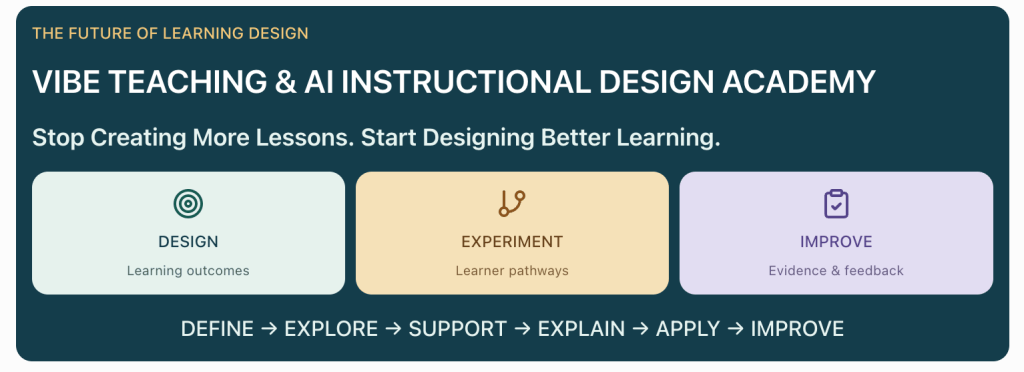
DEFINE → EXPLORE → SUPPORT → EXPLAIN → APPLY → IMPROVE
The goal isn’t to make every lesson more complicated.
It’s to ensure that learners have meaningful opportunities to think.
3. Start with Evidence, Not Activities
One of the most common instructional design mistakes is choosing an activity before defining what learners should accomplish.
An educator might decide to create a quiz, simulation, video, or interactive exercise because the format seems engaging.
But engagement alone doesn’t guarantee learning.
A better approach begins with a question:
What evidence would convince me that the learner understands this concept?
Let’s consider a practical example.
Topic: Evaluating AI-generated information
A vague learning outcome might be:
“Students will understand AI hallucinations.”
But what does understand mean?
Can learners define the term?
Recognize an unsupported claim?
Verify information using reliable sources?
Explain why a claim should not be trusted?
Those are different abilities.
Improve the learning outcome
A stronger outcome might be:
“Given an AI-generated explanation containing factual claims, learners will identify unsupported statements, determine what evidence is needed, and produce a revised explanation that clearly distinguishes verified information from uncertainty.”
Now we have a meaningful target.
The learner must demonstrate several observable skills.
They must identify a problem.
Evaluate evidence.
Make a decision.
Revise an explanation.
And communicate their reasoning.
Design the assessment backward
Once the outcome is clear, we can identify the evidence required.
| Learning requirement | Evidence of understanding |
|---|---|
| Identify unsupported claims | Learner highlights claims lacking evidence |
| Evaluate sources | Learner selects appropriate verification sources |
| Explain reasoning | Learner justifies why evidence is sufficient or insufficient |
| Revise information | Learner rewrites the explanation accurately |
| Transfer learning | Learner evaluates a different AI-generated response |
This is much more informative than simply asking learners to define an AI hallucination.
It also creates a clear foundation for designing an interactive activity.
4. Turn a Passive Lesson into an Interactive Learning Experience
Let’s work through a complete example.
Suppose you’re teaching learners how to evaluate AI-generated information.
Traditional lesson
A conventional lesson might include:
- A definition of hallucinations.
- Examples of incorrect AI responses.
- A presentation about verification.
- A short multiple-choice quiz.
This approach can introduce the topic.
But learners may finish the lesson without practising the actual skill.
Vibe Teaching approach
Instead, begin with a realistic problem.
Scenario:
A project team uses an AI assistant to prepare a report about workplace technology trends.
The AI produces the following statement:
“Research shows that 92% of organizations have completely replaced traditional training with AI-generated learning.”
No source is provided.
The learner must decide what to do.
Decision point 1: Evaluate the claim
Present three options.
A. Include the statement because the AI sounds confident.
B. Remove the percentage and replace it with a general statement.
C. Locate the original research, verify the claim, and revise the report based on the evidence.
The learner selects an option.
But the activity shouldn’t end with “correct” or “incorrect.”
Instead, provide feedback that explains the reasoning.
Feedback for option A
“Confidence is not evidence. A precise statistic can appear credible even when no reliable source supports it. What would you need to verify before including this claim?”
Feedback for option B
“Removing an unsupported percentage may reduce the risk of repeating a false statistic, but the broader claim may still require evidence. How could you establish whether the trend itself is accurate?”
Feedback for option C
“Verification is the strongest approach. Identify the original source, examine its methodology, and confirm whether the claim accurately represents the evidence.”
Notice the difference.
The feedback isn’t simply judging the learner.
It’s helping them think.
Decision point 2: Revise the explanation
Ask learners to rewrite the statement.
They should avoid unsupported certainty and accurately represent whatever evidence is available.
For example:
“AI-generated learning tools are increasingly being explored in workplace training, but the extent of adoption varies by organization and requires current, reliable evidence.”
This revised statement is more cautious, although any factual claim about adoption should still be supported before publication.
Decision point 3: Transfer the skill
Now introduce a different situation.
An AI assistant produces a technical recommendation that includes a library version, security claim, and performance benchmark.
Ask learners:
Which claims require verification?
What sources would you consult?
What would you do if the evidence contradicted the AI response?
This final activity tests whether learners can apply the skill beyond the original example.
That’s the difference between recognizing an answer and developing transferable understanding.
5. Feedback Should Help Learners Improve, Not Just Tell Them They’re Wrong
Feedback is one of the most important components of an effective learning experience.
But not all feedback is equally useful.
Consider a multiple-choice question.
The learner selects an incorrect answer.
The system responds:
“Incorrect. Try again.”
This tells the learner that something is wrong.
It doesn’t explain why.
It doesn’t identify the misconception.
And it doesn’t provide a useful next step.
A better feedback structure
Effective instructional feedback can include four components.
1. Identify the issue
Explain what was incorrect or incomplete.
2. Explain the reasoning
Connect the mistake to the underlying concept.
3. Provide a focused hint
Offer enough support to help the learner continue.
4. Invite another attempt
Give the learner an opportunity to revise the response.
Example: JavaScript debugging
Suppose a learner is asked to predict the output of this code:
const prices = [10, 20, 30];

const discounted = prices.map(price => {
  price * 0.9;
});

console.log(discounted);
The learner predicts:
[9, 18, 27]But the actual result is:
[undefined, undefined, undefined]A weak feedback message says:
“Incorrect. The output is undefined.”
A stronger response says:
“The callback uses braces, which means the function body requires an explicit return statement. The multiplication runs, but its result isn’t returned. What change would allow each transformed value to become part of the new array?”
Now the learner has a reason to inspect the code.
They can make a prediction.
Modify the function.
Run it again.
And explain the result.
Why this matters
The goal of feedback isn’t merely to provide the correct answer.
It’s to help learners understand what they need to change.
That principle applies to programming, mathematics, writing, science, business, and many other subjects.
6. Design Different Pathways for Different Learners
Not every learner arrives with the same background knowledge.
Some learners need a prerequisite explanation.
Others are ready to solve a problem immediately.
Some benefit from examples.
Others learn more effectively by making a prediction and testing it.
A single fixed sequence may not serve everyone equally well.
Example: Teaching evidence evaluation
Imagine two learners.
Learner A has limited experience evaluating sources.
Learner B regularly works with research and technical documentation.
If both receive the same introductory explanation, one may feel overwhelmed while the other becomes disengaged.
A more flexible activity could begin with a diagnostic question.
“Which of the following is the strongest evidence for a factual claim?”
Depending on the response, the lesson can provide different support.
Pathway A: Prerequisite support
The learner receives a short explanation of source reliability.
They compare examples.
They practise identifying primary and secondary sources.
Then they return to the main activity.
Pathway B: Immediate application
The learner begins with a more challenging scenario.
They evaluate a claim and explain their reasoning.
If their response reveals a misconception, they receive focused support.
The instructional design principle
Adapt the support, not the importance of the learning outcome.
Different learners may need different pathways.
But everyone should have an opportunity to demonstrate the intended skill.
7. Use AI to Support Thinking, Not Replace It
AI can play several useful roles in an educational experience.
It can act as an explainer.
A source of examples.
A brainstorming partner.
A simulator.
A feedback assistant.
Or a guide for exploring alternatives.
But there is a risk.
If AI immediately supplies complete solutions, learners may bypass the thinking required to develop understanding.
Compare two approaches
Approach A: Answer generation
Learner:
“Solve this JavaScript problem.”
AI:
Provides the complete code.
The learner copies it.
The task is finished.
But what was learned?
Approach B: Guided reasoning
Learner:
“I’m trying to filter an array of products by price.”
AI:
“What condition should determine whether a product remains in the array?”
Learner:
“Products under $50.”
AI:
“Which JavaScript array method creates a new array containing only elements that satisfy a condition?”
Learner:
“filter().”
AI:
“Good. Try writing the callback. I’ll review your approach without giving away the solution.”
The second interaction encourages participation.
It still uses AI.
But it preserves the learner’s responsibility to reason.
A reusable AI tutor prompt
Educators can adapt this prompt for their own activities:
You are an AI learning coach.

Your goal is to help learners develop
independent understanding.

TOPIC:
[Insert topic]

LEARNING OUTCOME:
[Insert observable outcome]

LEARNER BACKGROUND:
[Describe prerequisites]

INSTRUCTIONS:
1. Begin by asking what the learner already knows.
2. Present one manageable challenge.
3. Ask for a prediction or explanation.
4. Do not immediately provide the full solution.
5. Give focused hints when needed.
6. Explain misconceptions clearly.
7. Ask the learner to revise their answer.
8. Provide a new example to test transfer.
9. Encourage reflection on the reasoning.

IMPORTANT:
Do not mistake a correct final answer
for demonstrated understanding.

Ask the learner to explain how
they reached their conclusion.
This approach works particularly well for learning activities where reasoning matters more than speed.
8. Introducing the Vibe Teaching & AI Instructional Design Academy
The Vibe Teaching & AI Instructional Design Academy brings these ideas into a practical, browser-based learning and design environment.
Instead of working only with static lesson plans, educators can construct interactive activities, test how learners may respond, review feedback, and prepare materials for sharing.
The resource includes several connected areas.
The Lesson Designer
The lesson designer lets you define essential instructional details, including:
- Lesson title and context.
- Learning outcome.
- Prerequisites and diagnostic activities.
- Resources and estimated workload.
- Educator notes and rubric.
- Interactive content blocks.
- Questions, options, and reference answers.
- Feedback and continuation pathways.
This encourages you to think beyond the presentation of information.
You can design the sequence of decisions and activities that learners experience.
Interactive Content Blocks
Each block can represent an explanation, question, or activity.
You can configure how learners respond, what feedback they receive, and where the activity continues.
This is particularly useful for creating scenarios where different choices lead to different instructional responses.
Learner Preview
The Academy provides a learner preview so you can rehearse an activity before sharing it.
The opening lesson also includes scripted learner perspectives that can prefill selected answers.
These are useful for examining how the activity behaves under different response patterns.
They are simulations, not evidence of how real students will perform.
Practice Library
The practice library provides a way to explore instructional design cases and activities.
You can use these as opportunities to investigate learning outcomes, feedback, and activity design.
Portfolio and Export
The Academy supports local drafts, saved versions, and reflection.
You can export your work as a standalone HTML activity or project JSON, download a rubric, and print a lesson plan.
This makes it possible to move from designing an activity to preparing something that can be shared or developed further.
Your drafts and rehearsal evidence are stored locally in the browser, so exporting copies is important when you want to preserve or transfer your work.
Explore the Academy:
9. A Practical Lesson Design Workflow
Let’s apply the Academy’s instructional design approach to a real teaching task.
Step 1: Define the learning outcome
Choose a skill learners should demonstrate.
Example:
“Given a short AI-generated explanation, learners will identify unsupported claims and revise the explanation using appropriate evidence.”
Step 2: Identify prerequisites
Ask what learners need to know first.
For this example:
- The difference between a claim and evidence.
- The importance of source reliability.
- How to recognize unsupported certainty.
Create a short diagnostic activity.
Step 3: Introduce a meaningful problem
Present an AI-generated explanation containing a questionable claim.
Don’t immediately explain what’s wrong.
Ask learners to investigate.
Step 4: Create decision points
Provide several plausible choices.
Include options that represent common misconceptions.
For example:
- Trust the confident statement.
- Remove the statistic without checking the broader claim.
- Verify the original evidence.
- Replace the claim with a different unsupported assertion.
Step 5: Design feedback
For each response, explain the reasoning.
Avoid simply identifying the correct answer.
Provide hints and opportunities to revise.
Step 6: Test the activity
Use the learner preview.
Try different choices.
Check whether the feedback makes sense.
Look for dead ends, confusing transitions, or unsupported assumptions.
Step 7: Require independent application
Present a different claim.
Ask learners to evaluate it without repeating the original explanation.
This provides stronger evidence of transfer.
Step 8: Review and export
Review the lesson outcome, activity sequence, feedback, and rubric.
Save a version.
Export the activity.
Then test the exported result before sharing it.
This process creates a more deliberate learning experience than simply generating a quiz and publishing it.
10. A Better Way to Assess Learning in the Age of AI
AI has made it easier for learners to produce polished answers.
A written response may look complete.
A programming solution may run correctly.
A research summary may sound authoritative.
But those outcomes don’t necessarily show how much the learner understands.
This creates an important challenge for assessment.
How do we evaluate understanding when AI can help produce the final artifact?
One answer is to assess more than the final product.
Evaluate the learning process
Consider collecting evidence of:
- Initial predictions.
- Decisions made during an activity.
- Explanations of reasoning.
- Revisions after feedback.
- Responses to unexpected conditions.
- Independent application in a new context.
Example: Programming assessment
Instead of asking only:
“Write a function that filters an array.”
Ask learners to:
- Predict what an existing function will return.
- Explain why it behaves that way.
- Identify a bug.
- Modify the function.
- Test an edge case.
- Explain how the fix works.
- Apply the same concept to a different dataset.
An AI assistant may still help.
But the assessment gathers more evidence about the learner’s reasoning.
Example: Business communication
Instead of asking learners to write a professional email, provide a scenario involving conflicting priorities.
Ask them to:
- Identify the communication objective.
- Choose an appropriate tone.
- Explain the risks of different approaches.
- Draft the message.
- Evaluate AI-generated alternatives.
- Revise their response.
- Justify the final decision.
This moves assessment toward judgment, reflection, and application.
11. Create Rubrics That Measure Understanding
A good rubric should describe what successful performance looks like.
It shouldn’t simply reward length, presentation, or the appearance of completeness.
Consider an activity where learners evaluate AI-generated information.
A useful rubric might include:
| Criterion | Developing | Proficient | Advanced |
|---|---|---|---|
| Claim identification | Finds obvious unsupported claims | Identifies most relevant claims | Distinguishes subtle claims and assumptions |
| Evidence evaluation | Uses limited or weak evidence | Selects appropriate sources | Evaluates source quality and limitations |
| Reasoning | Provides incomplete explanations | Justifies decisions clearly | Explains tradeoffs and uncertainty |
| Revision | Makes superficial changes | Corrects unsupported claims | Produces precise, well-supported explanations |
| Transfer | Struggles with a new example | Applies the method independently | Adapts the method to complex situations |
The rubric should align with the learning outcome.
If the objective is evaluating evidence, the assessment should not focus primarily on writing style.
An important principle
Assess the skill you intended to teach, not simply the easiest thing to measure.
12. How to Use AI as an Instructional Design Partner
AI can be particularly useful during lesson design when it is given a focused role.
Rather than asking it to create an entire course in one step, use it to support specific instructional decisions.
Prompt 1: Improve a learning outcome
Act as an instructional design reviewer.

Review this learning outcome:

[INSERT OUTCOME]

Evaluate:
1. Is the outcome observable?
2. Is it appropriate for the audience?
3. Does it require meaningful understanding?
4. Can it be assessed?
5. What evidence would demonstrate success?

Suggest a revised outcome.

Explain why the revision is stronger.
Prompt 2: Identify likely misconceptions
I am designing a lesson about:

[INSERT TOPIC]

Learner background:
[INSERT BACKGROUND]

Learning outcome:
[INSERT OUTCOME]

Identify five misconceptions learners
may have about this topic.

For each misconception, provide:
- Why it may occur.
- How to recognize it.
- A diagnostic question.
- A useful feedback response.
- A follow-up practice activity.
Prompt 3: Design meaningful feedback
Review this learning activity:

[INSERT ACTIVITY]

Correct reasoning:
[INSERT REFERENCE]

Common incorrect response:
[INSERT RESPONSE]

Create feedback that:
1. Identifies the misconception.
2. Explains the underlying concept.
3. Provides a focused hint.
4. Encourages another attempt.
5. Does not immediately reveal
   the complete solution.
Prompt 4: Test an activity for weaknesses
Act as an instructional design evaluator.

Review this interactive lesson:

[INSERT LESSON]

Learning outcome:
[INSERT OUTCOME]

Identify:
- Confusing instructions.
- Weak decision points.
- Missing prerequisites.
- Feedback that gives away answers.
- Opportunities for superficial completion.
- Gaps in assessment.
- Accessibility concerns.

Prioritize the five most important
improvements.

For each improvement, explain
how it strengthens learning.
Prompt 5: Create a transfer challenge
I have taught this concept:

[INSERT CONCEPT]

Learners have practised it using:

[INSERT ORIGINAL EXAMPLE]

Create a new challenge that requires
the same underlying skill in a
different context.

Do not simply change names or numbers.

The new challenge should require
independent application.

Include:
- Scenario.
- Learner task.
- Expected evidence.
- Common mistakes.
- Assessment criteria.
These prompts are useful because they ask AI to contribute to the design process without replacing educator judgment.
13. Five Common Mistakes When Designing AI-Supported Learning
Mistake 1: Confusing Engagement with Learning
Animations, interactive elements, and AI-generated activities may capture attention.
But an engaging interface doesn’t automatically create understanding.
Better approach: Define what learners must demonstrate and design interactions that produce meaningful evidence.
Mistake 2: Giving Answers Too Quickly
Immediate solutions can reduce productive problem-solving.
Better approach: Use progressive hints and guided questions before revealing complete answers.
Mistake 3: Treating Every Learner the Same
Learners bring different knowledge, experiences, and misconceptions.
Better approach: Use diagnostic activities and appropriate pathways.
Mistake 4: Measuring Only Completion
Finishing a lesson doesn’t necessarily mean understanding it.
Better approach: Include explanations, revisions, and independent application.
Mistake 5: Accepting AI-Generated Content Without Review
AI can produce plausible but incorrect explanations, unsuitable examples, and poorly aligned assessments.
Better approach: Review factual accuracy, instructional alignment, accessibility, and the quality of feedback before sharing materials.
14. Seven Days to Build a Better Learning Experience
If you’re an educator or instructional designer, here’s a practical challenge you can complete using the Vibe Teaching & AI Instructional Design Academy.
Day 1: Choose a Lesson That Needs Improvement
Select an existing lesson.
Identify where learners are mostly passive.
Write a stronger, observable learning outcome.
Day 2: Design a Diagnostic Activity
Create a question or short scenario that reveals prior knowledge.
Identify two likely misconceptions.
Day 3: Add a Meaningful Decision
Replace part of the explanation with a problem.
Ask learners to make a prediction or choose an approach.
Day 4: Improve the Feedback
Write feedback for correct and incorrect responses.
Explain reasoning.
Provide hints.
Encourage revision.
Day 5: Create Different Pathways
Design support for learners who need prerequisite knowledge.
Provide an appropriate challenge for learners ready to advance.
Day 6: Test the Experience
Use the Academy’s learner preview.
Try different response paths.
Look for confusing instructions and weak feedback.
Revise the activity.
Day 7: Evaluate and Share
Create or refine the rubric.
Add an independent transfer activity.
Save a version.
Export the lesson.
Test the final activity before sharing it with learners.
At the end of the week, you’ll have more than a revised lesson plan.
You’ll have an interactive learning experience designed around evidence of understanding.
15. Why This Matters for the Future of Education
AI will continue changing how educational content is created and delivered.
Educators will have access to increasingly capable tools for generating explanations, activities, assessments, simulations, and personalized support.
But those capabilities make instructional judgment more important, not less.
We need to ask better questions.
What should learners understand?
What experiences help them develop that understanding?
When should AI provide support?
When should learners struggle productively?
How can we recognize misconceptions?
What evidence demonstrates independent capability?
And how should we improve an activity when learners aren’t achieving the intended outcome?
These are fundamentally educational questions.
Technology can support the answers.
But thoughtful instructional design remains essential.
The opportunity isn’t simply to create lessons faster.
It’s to create learning experiences that are more responsive, meaningful, and effective.
16. Explore the Vibe Teaching & AI Instructional Design Academy
If you’re ready to move beyond static lesson plans and experiment with more interactive instructional design, explore the new Academy.
Vibe Teaching & AI Instructional Design Academy
Use it to define learning outcomes, build activities, configure feedback, rehearse learner pathways, reflect on evidence, and prepare shareable resources.
You can also explore related resources:
Vibe Teaching Framework
Vibe Learning & Teaching Studio
Vibe Learning Tools
DiscoveryVIP Interactive Learning Guides
These resources share a common objective: helping learners and educators use technology to develop meaningful understanding through participation, experimentation, feedback, and reflection.
Final Thoughts: The Future of Teaching Isn’t More Content. It’s Better Learning.
AI can generate a lesson in seconds.
It can produce explanations, examples, quizzes, and activities faster than ever before.
But meaningful learning requires more than content.
It requires opportunities to think.
To question.
To make decisions.
To encounter misconceptions.
To receive feedback.
To revise understanding.
And to apply knowledge independently.
That’s what Vibe Teaching is designed to support.
And that’s why I created the Vibe Teaching & AI Instructional Design Academy.
The goal isn’t to replace educators with AI.
It’s to give educators better ways to design, test, and improve learning experiences.
Don’t just create another lesson. Design an experience that changes what learners can understand and do.
Explore the Academy:
About the Author
Laurence Svekis is a Google Developer Expert specializing in Google Workspace, Google Champion, author, developer, and online educator who has taught 3 million+ students worldwide.
With more than 20 years of experience in technology and education, Laurence focuses on JavaScript, Google Apps Script, AI-assisted development, Google Workspace automation, and practical learning experiences.
He is the creator of the Vibe Learning framework, introduced in 2025, and its educator-focused extension, Vibe Teaching.
Through DiscoveryVIP and VibeLearning.ca, Laurence develops interactive learning tools, instructional resources, and practical educational experiences that emphasize exploration, experimentation, feedback, and independent understanding.
Join the Conversation
How should AI change the way we teach?
Should educators focus on creating more content, personalizing instruction, designing better activities, or finding new ways to assess understanding?
And what does meaningful learning look like when AI can generate answers instantly?
I’d be interested to hear how you’re using AI in your own teaching and instructional design.
#VibeTeaching #VibeLearning #AIinEducation #InstructionalDesign #TeachingWithAI #EducationalTechnology #EdTech #ActiveLearning #LearningDesign #AIForEducators #DigitalLearning #FutureOfEducation #LearningExperienceDesign #TeachingInnovation #DiscoveryVIP #LaurenceSvekis