
How to Evaluate AI Responses, Spot Hidden Mistakes, and Build More Reliable AI Workflows
AI in Practice | A practical guide to working smarter with artificial intelligence
The Problem With AI Isn’t Always That It Gets Things Wrong
It’s that it can make the wrong answer sound completely right.
Imagine asking an AI assistant to research a topic, summarize a document, or recommend a solution to a technical problem.
Within seconds, you receive a beautifully formatted response.
The explanation is clear. The language is professional. The recommendations sound reasonable.
You might even think, “That saved me an hour!”
But here’s the question most people forget to ask:
How do you know the answer is actually correct?
This is one of the biggest challenges facing anyone who uses AI today.
As AI becomes part of our daily workflows, evaluating its output is becoming just as important as knowing how to write a good prompt.
And the good news?
You don’t need to be an AI researcher to start evaluating AI effectively.
In this issue of AI in Practice, we’ll explore a simple framework for evaluating AI responses, walk through a practical example, and introduce a free interactive learning resource where you can develop these skills further.
1. Why AI Confidence Can Be Misleading
Large language models generate responses based on patterns learned during training and information available in their current context.
They can produce useful explanations, code, summaries, and recommendations.
But they don’t automatically verify every claim they make.
This creates an important distinction:
A convincing answer is not necessarily a correct answer.
Consider these three AI responses:
Response A: Provides a short answer with accurate facts and appropriate references.
Response B: Provides a detailed, beautifully formatted answer containing several unsupported claims.
Response C: Acknowledges uncertainty, explains what is known, and identifies information that needs verification.
Which response is best?
Many people instinctively prefer Response B because it appears more complete.
But depending on the task, Response A or C may be far more reliable.
This highlights an essential lesson:
Evaluate AI by the quality of its information, not the confidence of its presentation.
2. The Five Dimensions of a Good AI Response
One of the easiest ways to improve your AI workflow is to stop asking whether an answer is simply “good” or “bad.”
Instead, evaluate it across five dimensions.
1. Accuracy — Is the information correct?
This is the most obvious evaluation criterion.
Check whether factual claims are supported by trustworthy evidence.
For example, if an AI provides a statistic about technology adoption, ask:
- Where did this number come from?
- Is the source credible?
- Is the information current?
- Does the cited source actually support the claim?
Practical takeaway: Never confuse a detailed explanation with verified information.
2. Relevance — Did the AI answer the actual question?
An AI response can be completely accurate and still fail to accomplish the task.
Suppose you ask:
“Explain JavaScript promises to a beginner using one practical example.”
The AI responds with an advanced technical explanation of asynchronous execution, microtasks, and the event loop.
The information may be correct.
But it isn’t necessarily useful for the intended audience.
Practical takeaway: A successful response must match the user’s goal, not just the topic.
3. Completeness — Is anything important missing?
AI sometimes provides an answer that appears complete while overlooking essential details.
For example, you ask AI to explain how to deploy a web application.
It explains hosting, uploading files, and configuring a domain.
But it forgets environment variables, security settings, and testing.
The answer isn’t entirely wrong.
It’s incomplete.
Practical takeaway: Ask what important information might be missing before accepting a response.
4. Consistency — Does the AI provide dependable results?
Imagine running the same prompt five times.
Four responses are accurate.
One contains a significant error.
Would you trust the system in an important workflow?
Consistency matters because AI systems can produce different outputs even when given similar instructions.
Practical takeaway: Test important prompts multiple times and compare the results.
5. Risk — What happens if the answer is wrong?
Not all mistakes have equal consequences.
An incorrect suggestion for a blog headline is usually easy to fix.
An incorrect calculation in a financial report could be much more serious.
The same accuracy rate can have very different implications depending on how the AI is being used.
Practical takeaway: The greater the consequences of an error, the stronger your evaluation and human review should be.
3. Let’s Evaluate an AI Response Together
Here’s a practical exercise you can try right now.
Imagine asking an AI assistant:
“What are the benefits of using AI to learn programming?”
The AI responds:
AI makes learning programming faster and easier. Students who use AI learn twice as quickly as traditional students. AI provides instant feedback, personalized explanations, and unlimited practice opportunities. Therefore, everyone should use AI when learning to code.
At first glance, this looks like a reasonable answer.
But let’s examine it more carefully.
Accuracy
The response claims that students using AI learn twice as quickly.
Where is the evidence?
Without a credible study supporting that specific claim, we should treat it as unverified.
Relevance
The response does address the question about AI-assisted learning.
That’s a positive.
Completeness
What about the limitations?
The response doesn’t mention the possibility of incorrect explanations, overreliance on generated code, or the importance of independent practice.
Consistency
Would the AI provide the same recommendations across different learners, programming languages, and experience levels?
We would need additional tests to know.
Risk
For general educational advice, the immediate risk may be relatively low.
However, inaccurate learning advice could encourage habits that make it harder to develop genuine understanding.
A Better AI Response
Here’s an improved version:
“AI can support programming education by providing immediate explanations, helping learners debug code, generating practice exercises, and adapting explanations to different experience levels.
However, its effectiveness depends on how it’s used. Learners should test generated code, verify explanations, and practice solving problems independently.
AI works best as a learning assistant rather than a replacement for active learning.”
Notice the difference?
The second answer is more balanced, avoids unsupported numerical claims, and provides useful context.
The lesson: A shorter, carefully qualified response can be more valuable than a longer, overconfident one.
4. Create Your Own AI Evaluation Scorecard
You don’t need complicated software to begin evaluating AI.
A simple scorecard can help you make more consistent judgments.
For each response, assign a score from 1 to 5.
| Criterion | Score |
|---|---|
| Accuracy | 1–5 |
| Relevance | 1–5 |
| Completeness | 1–5 |
| Consistency | 1–5 |
| Risk handling | 1–5 |
| Total | 25 possible |
A score of 5 means the response performs very well against that criterion.
For risk handling, a higher score means the response appropriately recognizes uncertainty and avoids unsupported high-consequence recommendations.
You can use these illustrative ranges for low-risk practice:
- 21–25: Strong candidate for use after normal review.
- 16–20: Useful but may need improvement.
- 11–15: Significant weaknesses; revise and retest.
- 5–10: Poor result; investigate and redesign the approach.
These ranges are examples, not validated industry benchmarks.
Important: A high total score must never cancel out a critical error. If a response fails a mandatory accuracy, security, or safety requirement, it should fail that evaluation regardless of its overall score.
For consistency, you will also need to compare multiple responses rather than judge a single answer.
5. The AI Evaluation Prompt You Can Use Today
Here’s a reusable prompt you can copy into your favorite AI assistant.
Copy-and-Try Prompt
“Act as an AI response evaluator.
I will provide an original question and an AI-generated response.
Evaluate the response using five criteria:
- Accuracy — Identify factual claims that are incorrect, unsupported, or require verification.
- Relevance — Determine whether the response directly addresses the original question.
- Completeness — Identify important missing information.
- Consistency — Identify internal contradictions and explain what additional tests would be needed to assess repeatability.
- Risk handling — Identify the possible consequences of incorrect information and whether appropriate uncertainty is communicated.
For each criterion, provide a score from 1 to 5, explain your reasoning, and recommend improvements.
Do not claim to have independently verified facts unless you have actually checked reliable sources.
Finally, rewrite the response to improve its quality while preserving accurate information.
Original question:
[INSERT QUESTION]
AI response:
[INSERT RESPONSE]”
Why This Works
Instead of simply asking AI whether an answer is correct, you’re giving it a structured evaluation process.
That encourages more specific feedback.
However, there’s an important limitation.
Using AI to evaluate AI is helpful, but it isn’t independent verification.
The evaluating model can make mistakes too.
For important tasks, combine AI-assisted evaluation with trustworthy reference sources, automated tests where applicable, and human judgment.
6. A High AI Score Can Still Hide a Serious Problem
Let’s explore a scenario.
Imagine you’ve built an AI assistant that answers customer questions.
You test it with 100 questions.
It answers 95 correctly.
That’s a 95% success rate.
Impressive, right?
Now imagine that the five incorrect responses involve refunds, billing disputes, and sensitive customer information.
Suddenly, that 95% score doesn’t seem quite as reassuring.
This illustrates a fundamental principle of AI evaluation:
Average performance does not tell the whole story.
When evaluating AI, we need to consider:
- Which types of questions fail?
- Are the failures predictable?
- Are certain mistakes more serious than others?
- Does performance change with unusual or ambiguous inputs?
- Can the system recognize when it doesn’t know an answer?
A useful evaluation process should include ordinary examples, difficult cases, and situations where the correct response is to acknowledge uncertainty.
The goal isn’t simply to maximize a score.
The goal is to understand when an AI system can be trusted, when it needs review, and when it should not be used without additional safeguards.
7. Move From One-Off Testing to Repeatable Evaluation
Here’s where AI evaluation becomes especially valuable for developers, educators, and anyone building AI-powered workflows.
Instead of evaluating a single response, create a small collection of test cases.
For example, if you’re building an AI coding assistant, your test cases might include:
Test 1: Basic explanation
Ask the assistant to explain a simple JavaScript function.
Check for accuracy, clarity, and beginner-friendly language.
Test 2: Code generation
Ask it to generate a function that removes duplicate values from an array.
Execute the generated code and test it with different inputs.
Test 3: Error handling
Provide code containing a bug.
Check whether the assistant identifies the actual issue rather than inventing a problem.
Test 4: Ambiguous instructions
Give the assistant an incomplete request.
Evaluate whether it asks an appropriate clarifying question.
Test 5: Uncertainty
Ask about a library feature that may not exist.
Check whether the assistant acknowledges uncertainty rather than inventing documentation or functionality.
Once you’ve created these tests, you can reuse them whenever you change your prompt, model, or application.
This makes evaluation repeatable.
And repeatable evaluation helps you understand whether changes actually improve your system.
8. Put Your New Skills Into Practice With the Free AI Evaluation Lab
Reading about AI evaluation is a great starting point.
But the best way to develop these skills is through hands-on practice.
That’s why I’ve added a new interactive resource to DiscoveryVIP:
🚀 AI Evaluation Lab — Free Interactive Guide
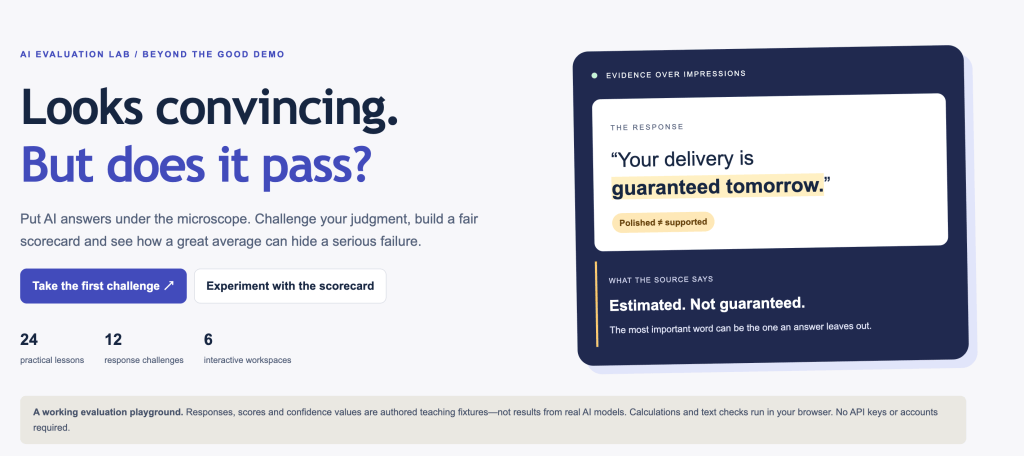
Explore the guide:
https://discoveryvip.com/ai-evaluation-lab
The AI Evaluation Lab is designed to help you move beyond simply reading about AI reliability and begin thinking systematically about how AI systems should be tested.
The learning experience includes:
📘 24 Practical Lessons
Build your understanding of AI evaluation concepts and develop a more structured approach to assessing AI-generated responses.
🧠 12 Response Challenges
Practice identifying weaknesses, unsupported claims, and potentially misleading answers.
🛠️ 6 Interactive Workspaces
Explore evaluation scorecards, thresholds, response reviews, and test-planning concepts through interactive exercises.
Who Is This Guide For?
Whether you’re just getting started with AI or already building AI-powered applications, evaluation skills are increasingly useful.
For developers: Learn to assess generated code, test outputs, and identify potential reliability issues.
For educators: Explore how to assess AI-generated learning materials and explanations.
For business professionals: Develop better judgment when reviewing AI-generated reports, summaries, and recommendations.
For AI enthusiasts: Learn to distinguish impressive-looking output from dependable results.
The guide offers educational, browser-based activities, with no API key or account required.
👉 Start exploring the free AI Evaluation Lab:
https://discoveryvip.com/ai-evaluation-lab
9. Your AI Challenge for This Week
Here’s a simple activity that can change how you work with AI.
Choose one prompt you use regularly.
It might be a prompt for writing, research, programming, summarization, or lesson planning.
Then:
- Run the prompt three times.
- Compare the responses for differences.
- Identify factual claims that need verification.
- Score the results using the five evaluation dimensions.
- Improve your prompt and repeat the experiment.
Ask yourself:
Did the improved prompt actually produce better results, or did the answers just sound better?
That’s the mindset behind effective AI evaluation.
It’s also an excellent example of applying structured learning: explore, practice, receive feedback, reflect, and improve.
Final Thoughts: The Next AI Skill Isn’t Just Prompting
For the past few years, much of the conversation around AI has focused on writing better prompts.
And prompting is important.
But as AI becomes more deeply integrated into education, software development, business, and everyday decision-making, another skill becomes essential.
Knowing how to evaluate the answers.
The most effective AI users won’t necessarily be the people who generate the most content or write the longest prompts.
They’ll be the people who know how to question outputs, recognize uncertainty, test assumptions, and verify results.
That’s how we move from simply using AI to using it responsibly and effectively.
And that’s what AI in Practice is all about.
Continue Learning
🔗 AI Evaluation Lab — Free Interactive Guide
https://discoveryvip.com/ai-evaluation-lab
🔗 Explore More Free AI Guides and Learning Resources
https://discoveryvip.com/guides.php
🔗 Subscribe to AI in Practice on LinkedIn
https://www.linkedin.com/newsletters/ai-in-practice-7511537011069972480
Let’s Start a Conversation
💬 Here’s my question for you:
When you use AI at work or for learning, how do you decide whether to trust its answer?
Do you verify everything, spot-check important claims, or mostly rely on whether the response looks reasonable?
I’d love to hear how you’re approaching AI evaluation.
Share your experience in the comments.
Written by Laurence Lars Svekis
Web Developer | Google Developer Expert (Google Workspace) | Online Educator | Creator of the Vibe Learning Framework
Helping developers, educators, and lifelong learners turn AI into a practical tool for learning, building, and creating.
#AIinPractice #ArtificialIntelligence #AIEvaluation #GenerativeAI #AITesting #AIQuality #PromptEngineering #ResponsibleAI #AIEngineering #VibeLearning #VibeTeaching #VibeCoding #AILearning #LearnAI #DiscoveryVIP