
30 Practical Lessons to Help You Think Better With AI, Verify Results, and Build Workflows You Can Trust
AI in Practice Newsletter | By Laurence Lars Svekis | October 2026
AI can generate an impressive answer in seconds. But how do you know whether it’s the right answer?
This is one of the most important questions facing anyone using artificial intelligence today.
We’ve entered an era where AI tools can write documents, analyze information, generate code, summarize research, and help automate complex workflows.
But there’s a growing problem.
Using AI is becoming easier. Knowing how to use AI effectively is not necessarily getting easier.
Many people still approach AI with a simple process:
Ask a question. Get an answer. Copy the result. Move on.
Sometimes that works.
Other times, the response contains missing information, unsupported claims, incorrect assumptions, or recommendations that don’t fit the situation.
The real skill isn’t simply knowing how to write a prompt.
It’s knowing how to define a problem, communicate expectations, evaluate results, and decide what to do next.
In this issue of AI in Practice, I want to share a practical framework for developing those skills.
I’ll also introduce my free AI Mastery Lab, a structured learning environment featuring 30 lessons and three hands-on labs designed to help you become a more thoughtful and effective AI user.
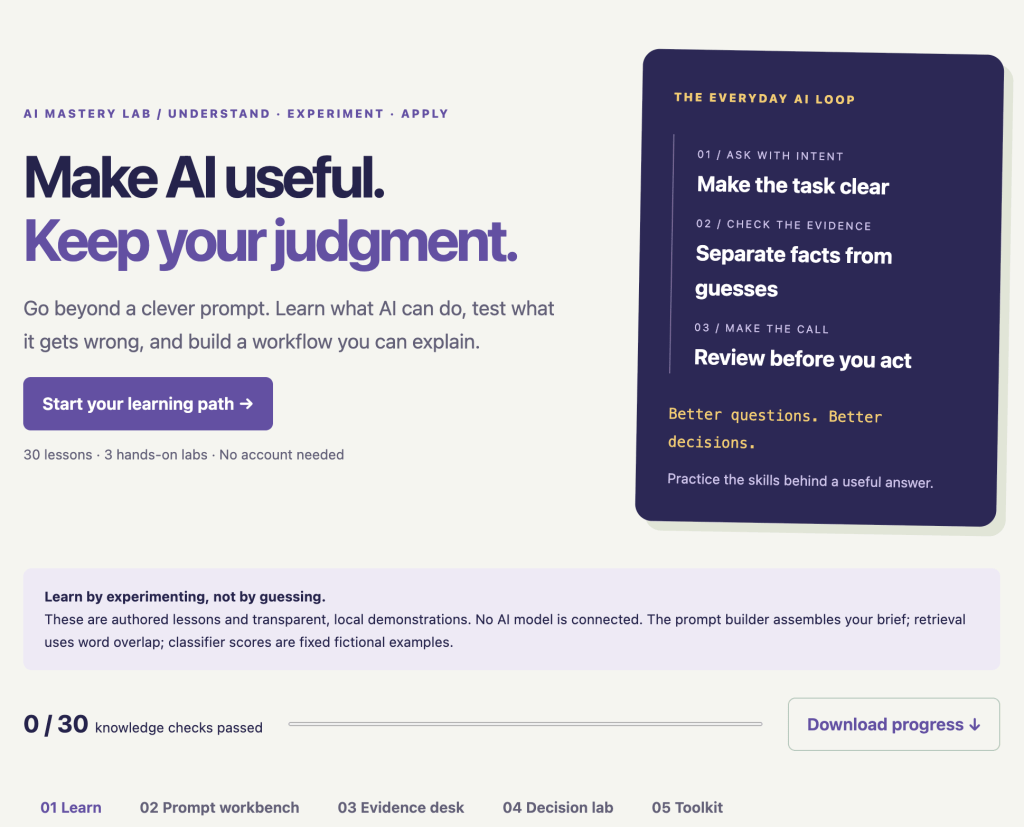
🔗 Explore AI Mastery Lab:
https://discoveryvip.com/ai-mastery-lab/#learn
1. The Difference Between Using AI and Mastering AI
Imagine two people using the same AI assistant.
The first person types:
“Write a report about our project.”
The AI generates a professional-looking report.
The person copies it into a document and sends it to their team.
The second person takes a different approach.
They explain the purpose of the report, identify the intended audience, provide relevant source information, specify the required format, and ask the AI to identify missing facts.
After receiving the response, they verify important claims and revise the document before sharing it.
Both people used AI.
But the second person used a repeatable process that provides more opportunities to catch mistakes and produce something useful.
AI mastery is not about knowing hundreds of clever prompts. It’s about developing reliable habits.
These habits include understanding what AI can and cannot do, communicating clearly, checking evidence, recognizing uncertainty, and keeping human judgment involved.
Let’s explore how to develop them.
2. A Simple Framework: Ask, Check, Decide
One of the most useful approaches to working with AI is a three-stage process.
Step 1: ASK with intent
Clearly define what you want the AI to accomplish.
Before writing a prompt, answer these questions:
- What problem am I solving?
- Who will use the result?
- What information should the AI consider?
- What should the finished output look like?
- What constraints must it follow?
Step 2: CHECK the evidence
Don’t assume that a confident response is an accurate response.
Look for missing information, unsupported claims, incorrect calculations, and conclusions that go beyond the available evidence.
Step 3: DECIDE with judgment
Review the output before using it.
Ask whether it meets your requirements, whether the information is sufficiently reliable, and whether a human needs to make the final decision.
ASK → CHECK → DECIDE
This simple loop is useful for research, writing, coding, business analysis, education, and many other AI-supported activities.
The more important the decision, the more carefully you should verify the supporting information.
3. Prompt Engineering: Give AI a Clear Job to Do
Let’s look at a practical example.
Suppose you want AI to summarize a meeting.
Weak prompt
“Summarize this meeting.”
What’s missing?
The AI doesn’t know who will read the summary, which details matter most, or what format you need.
Better prompt
“Summarize the following meeting notes for a project team that couldn’t attend.
Include:
- A brief overview of the meeting.
- Decisions that were confirmed.
- Action items with responsible owners.
- Deadlines explicitly mentioned.
- Open questions requiring follow-up.
Use clear headings and a table for action items.
Do not invent missing deadlines or assign owners unless they are identified in the notes.
Mark any missing information as ‘Not specified.'”
This prompt gives the AI a much clearer assignment.
The six elements of a useful prompt
| Element | Purpose |
|---|---|
| Task | Defines what needs to be accomplished |
| Audience | Identifies who will use the result |
| Context | Supplies relevant background information |
| Format | Specifies how the output should be organized |
| Constraints | Establishes rules and limitations |
| Verification | Explains how the result should be checked |
You don’t need every element in every prompt.
But when an AI response isn’t meeting your expectations, these six elements provide a useful checklist for improving it.
Try this today
Take a prompt you regularly use and add three things: a specific audience, an explicit output format, and instructions for handling missing information.
Compare the results.
Do you receive something more useful? Does it require less editing?
Better prompts begin with clearer thinking.
4. The Most Overlooked AI Skill: Knowing When an Answer Is Wrong
AI-generated text can sound convincing even when it contains factual errors.
This is particularly challenging because fluency and accuracy are not the same thing.
A polished explanation might include an invented statistic, an outdated policy, or a conclusion that isn’t supported by the information provided.
Example: AI-generated research summary
Imagine you ask AI:
“Summarize the latest research on remote work productivity.”
The response might include statements such as:
“Studies show that remote workers are 35% more productive.”
That sounds precise.
But before using the claim, you should ask:
- Which study supports this number?
- When was it published?
- How was productivity measured?
- Who participated in the study?
- Does the research actually support that conclusion?
If the source can’t be verified, the number shouldn’t be presented as an established fact.
A practical evidence checklist
Before relying on an important AI-generated claim, consider:
Source: Can you identify the original source?
Relevance: Does the source address the actual question?
Date: Is the information current enough?
Context: Does the claim accurately represent what the source says?
Uncertainty: Are important limitations or disagreements acknowledged?
Verification: Can the claim be checked independently?
A citation generated by AI isn’t automatically proof. Open the source and confirm that it supports the statement.
This is one of the most important habits for responsible AI use.
5. Use AI to Improve Your Thinking, Not Just Produce Answers
Here’s an approach I frequently recommend in AI-assisted learning.
Instead of asking AI to solve a problem immediately, ask it to help you work through the problem.
Example: AI as a thinking partner
Try this prompt:
“Act as a critical-thinking coach.
I’m trying to solve the following problem:
[Describe your problem]
Before suggesting a solution:
- Ask me three questions that would help clarify the situation.
- Identify assumptions I might be making.
- Suggest two or three possible approaches.
- Explain the advantages and limitations of each.
- Help me define criteria for evaluating the options.
Don’t make the final decision for me.”
This approach changes the interaction.
Instead of treating AI as an answer machine, you’re using it to structure your thinking.
It can be particularly useful when you’re planning a project, learning a new skill, evaluating alternatives, or trying to understand a complex topic.
This also connects with my Vibe Learning framework, which emphasizes curiosity, exploration, understanding, practice, feedback, and reflection.
The goal is to develop your capabilities while using AI to support the learning process.
Learn more:
6. Why Testing AI Outputs Matters
One successful AI response doesn’t prove that a prompt or workflow will work consistently.
Consider an AI system that categorizes incoming customer support messages.
You might ask it to classify messages into three categories:
- Billing
- Technical Support
- General Inquiry
The system correctly categorizes your first five examples.
Does that mean it’s ready to process hundreds of customer messages automatically?
Not necessarily.
You also need to test unusual cases.
What happens when a message discusses both billing and technical support?
What happens when the message is incomplete?
What happens when the request is written ambiguously?
Four categories of AI testing
1. Typical cases
Examples that represent normal usage.
2. Edge cases
Unusual inputs that might expose weaknesses.
3. Ambiguous cases
Inputs that could reasonably have more than one interpretation.
4. Missing-information cases
Examples where the system doesn’t have enough information to produce a reliable answer.
Testing across these categories helps reveal weaknesses that aren’t visible when everything goes according to plan.
A practical exercise
Choose a prompt you use frequently.
Test it with five different inputs.
Record whether the output follows the instructions, uses the provided information correctly, and handles uncertainty appropriately.
Then change one meaningful part of your prompt and repeat the experiment.
This is a simple way to move from guessing about prompt quality to evaluating it.
7. Understanding AI Classification: Precision vs. Recall
Here’s a concept that becomes especially important when AI is used to prioritize information or support decisions.
Imagine an AI-assisted system that flags customer support tickets requiring urgent attention.
The system must distinguish between urgent and routine requests.
Two useful evaluation measures are precision and recall.
Precision: How many flagged tickets were actually urgent?
If the system flags 20 tickets and 15 are genuinely urgent:
Precision = 15 ÷ 20 = 75%
Recall: How many urgent tickets did the system successfully identify?
If there were 25 genuinely urgent tickets and the system flagged 15 of them:
Recall = 15 ÷ 25 = 60%
These measures tell us different things.
Precision focuses on how trustworthy the positive flags are.
Recall focuses on how many actual positive cases were detected.
Why the tradeoff matters
If you lower the threshold for flagging urgent tickets, you may catch more urgent requests.
But you might also create more false alarms.
If you raise the threshold, you may reduce false alarms while missing requests that needed attention.
Neither approach is automatically better.
The right choice depends on the consequences of errors, the available review capacity, and the purpose of the system.
This is why understanding AI evaluation matters even if you’re not developing machine-learning models yourself.
You need to understand what the numbers mean before relying on them.
8. From Individual Prompts to Repeatable AI Workflows
A single successful prompt can be useful.
A repeatable workflow can be much more valuable.
Imagine you receive a weekly collection of project updates and need to prepare a summary for your team.
Instead of manually starting from scratch each week, you could create a structured AI-assisted process.
Example: Weekly project reporting workflow
Stage 1 — Collect
Gather the relevant project updates and supporting documents.
Stage 2 — Organize
Identify project names, completed tasks, upcoming deadlines, and reported blockers.
Stage 3 — Generate
Ask AI to create a draft report using a consistent template.
Stage 4 — Verify
Check the draft against the original updates, especially dates, owners, and status claims.
Stage 5 — Review
Have the responsible person approve the report before distribution.
Stage 6 — Improve
Record recurring problems and update the workflow to address them.
This approach makes the process easier to repeat, evaluate, and improve.
It also creates clear points where human review can prevent an error from being passed along.
The important principle
Don’t automate a process you haven’t learned to evaluate.
Start with a small, reviewable workflow.
Understand where errors occur.
Only then consider expanding its scope.
9. Introducing AI Mastery Lab: 30 Lessons and Three Hands-On Labs
To help people develop these skills, I’ve created the AI Mastery Lab on DiscoveryVIP.
It’s a free, interactive learning environment focused on understanding AI, experimenting with its limitations, and applying it thoughtfully.
The lab contains 30 lessons, knowledge checks, and three practical experiments.
The Prompt Workbench
Learn to construct clearer prompts by defining the task, audience, context, output format, constraints, and verification process.
Compare different prompt instructions and observe how changes affect the quality of a task brief.
The Evidence Desk
Practice evaluating claims against fictional source documents.
Learn to distinguish between supported information, missing evidence, and statements that go beyond what the sources establish.
The Decision Lab
Explore how classification thresholds affect precision, recall, and false alarms.
Experiment with different thresholds and consider the practical consequences of the tradeoffs.
Additional learning features
The lab also includes:
- Interactive knowledge checks with explanations.
- Reflection notes.
- A reusable prompt-building tool.
- A capstone checklist for planning a small AI pilot.
- Downloadable learning progress.
- A complete 30-lesson handbook.
An important distinction: The exercises use transparent local demonstrations and fictional examples. They don’t connect to a live AI model or make real AI predictions.
That makes the lab useful for exploring foundational concepts without confusing simulated results with actual model performance.
🔗 Explore AI Mastery Lab:
https://discoveryvip.com/ai-mastery-lab/#learn
10. A Seven-Day AI Mastery Challenge
Want to improve how you use AI this week?
Here’s a practical challenge you can complete using your preferred AI assistant and the concepts covered in this article.
| Day | Focus | Challenge |
|---|---|---|
| 1 | Prompt clarity | Rewrite three vague prompts with clearer instructions |
| 2 | Context | Add audience, constraints, and output requirements |
| 3 | Verification | Check five factual claims against reliable sources |
| 4 | Critical thinking | Ask AI to identify assumptions and alternative approaches |
| 5 | Evaluation | Test one prompt with typical and unusual inputs |
| 6 | Workflow design | Map a repetitive task into clear stages |
| 7 | Reflection | Review your results and document improvements |
What should you measure?
Don’t just measure whether the AI produces an answer.
Consider whether it produces something accurate, useful, complete, and appropriate for your intended audience.
Also measure how much time you spend checking and correcting the output.
If an AI workflow saves ten minutes of drafting but requires twenty minutes of corrections, it may not be improving the process.
The objective is meaningful improvement, not simply more AI-generated content.
11. Five Mistakes to Avoid When Using AI
Mistake 1: Assuming confidence means accuracy
A convincing answer can still be incorrect.
Verify important claims.
Mistake 2: Giving vague instructions
Unclear requests leave more room for incorrect assumptions.
Define the task and expected output.
Mistake 3: Skipping human review
AI can assist with decisions, but important outputs should receive appropriate human oversight.
Mistake 4: Testing only successful examples
A workflow that performs well on easy cases might struggle with ambiguity, incomplete information, or unusual inputs.
Test beyond the obvious.
Mistake 5: Automating too much too quickly
Begin with a narrow task, measurable outcomes, and clear review procedures.
Expand only when you understand the limitations.
12. More Free Resources for Putting AI Into Practice
I’ve been developing practical tools and learning resources to help people go beyond simply experimenting with AI.
Here are several places to continue learning.
AI Mastery Lab — 30 Interactive Lessons
https://discoveryvip.com/ai-mastery-lab/#learn
AI Evaluation Lab — Evaluate AI Outputs More Effectively
https://discoveryvip.com/ai-evaluation-lab
AI Learning Studio — Structured AI-Assisted Learning
https://discoveryvip.com/ai-learning-studio
DiscoveryVIP Guides — AI, Development, and Automation Resources
https://discoveryvip.com/guides.php
Vibe Learning — A Structured Approach to Learning With AI
Final Thoughts: AI Mastery Is About Better Judgment
We’re moving beyond the stage where simply knowing how to use an AI chatbot is a meaningful advantage.
AI tools are increasingly accessible.
What matters now is how effectively we use them.
Can we define problems clearly?
Can we recognize missing information?
Can we evaluate the evidence behind a claim?
Can we build workflows that are useful, measurable, and reviewable?
And most importantly, can we recognize when AI should support a decision rather than make it for us?
The future of effective AI use isn’t just about better prompts. It’s about better thinking, better evaluation, and better decisions.
That’s the philosophy behind AI Mastery Lab and the broader learning resources I’m creating.
My goal is to help people become more capable, independent, and confident when working with AI.
Not just to generate more content.
But to create better results.
🚀 Start exploring the free AI Mastery Lab:
https://discoveryvip.com/ai-mastery-lab/#learn
💬 Let’s Discuss: What’s the Most Important AI Skill in 2026?
I’d love to hear your perspective.
As AI becomes more capable, which skill do you think will matter most?
🅰️ Prompt engineering — Knowing how to ask better questions.
🅱️ Critical thinking — Evaluating AI-generated answers.
🅲️ AI automation — Building workflows that save time.
🅳️ Technical understanding — Knowing how AI systems work.
🅴️ Human judgment — Knowing when to trust AI and when to question it.
👇 Comment A, B, C, D, or E — and tell me why!
If you’re already using AI in your work, I’d especially like to hear about a time when evaluating or improving an AI-generated result made a meaningful difference.
Let’s share practical experiences and help each other become better AI users.
About the Author
Laurence Lars Svekis is a web developer, online educator, bestselling author, and Google Developer Expert with more than 20 years of experience in technology education.
His educational resources have reached more than one million students worldwide.
Through DiscoveryVIP and Vibe Learning, he creates practical learning tools, AI-supported educational frameworks, and developer resources designed to help people turn emerging technologies into useful skills.
DiscoveryVIP: https://discoveryvip.com/
Vibe Learning: https://vibelearning.ca/
Subscribe to AI in Practice on LinkedIn:
https://www.linkedin.com/newsletters/ai-in-practice-7511537011069972480
#AIinPractice #ArtificialIntelligence #AIMastery #PromptEngineering #AIProductivity #AIWorkflows #CriticalThinking #GenerativeAI #AILearning #AIInnovation #VibeLearning #AIForBusiness #ResponsibleAI #DiscoveryVIP