
How to turn everyday AI conversations into repeatable systems that save time, reduce mistakes, and deliver better results.
AI in Practice | Practical AI Skills, Tools & Real-World Learning
What If You’re Using AI the Hard Way?
Think about the last time you used ChatGPT, Gemini, or another AI assistant.
Maybe you asked it to write an email.
Or summarize a document.
Or help solve a programming problem.
You typed a prompt, received a response, made a few adjustments, and eventually got something useful.
Then, the next day, you started all over again.
New conversation. New instructions. New corrections.
Sound familiar?
This is how millions of people interact with AI.
And while there’s nothing wrong with using AI as a chatbot, we’re missing a much bigger opportunity.
The real productivity breakthrough isn’t getting AI to answer more questions. It’s creating systems that consistently help us complete tasks.
That’s the difference between simply prompting AI and designing an AI workflow.
In this issue, I’ll show you how to make that transition with a practical example you can try today.
1. The Difference Between an AI Prompt and an AI Workflow
Let’s start with something simple.
Imagine you need to create a weekly project update.
Approach A: The Traditional AI Chat
You open your AI assistant and type:
“Write a weekly project update for my team.”
The AI generates a professional-looking report.
But it doesn’t know what actually happened during the week.
So you add more details.
Then you correct the dates.
Then you ask it to shorten the introduction.
Then you realize it forgot the project risks.
After several exchanges, you finally have something usable.
Next week, you repeat the entire process.
Approach B: The AI Workflow
Now imagine having a repeatable process:
Step 1: Collect the week’s project information.
Step 2: Organize it into a consistent structure.
Step 3: Ask AI to create a draft using specific instructions.
Step 4: Check the draft against the original information.
Step 5: Review and approve the final report.
Suddenly, you’re not starting from scratch.
You have a system.
And that system can be improved, tested, and eventually automated.
The Key Difference
A prompt tells AI what to do.
A workflow defines how the entire task gets completed.
That includes the information AI receives, the work it performs, the checks applied to its output, and the decisions that remain with you.
2. The Five Building Blocks of a Reliable AI Workflow
You don’t need advanced programming knowledge to design a useful AI workflow.
Start with five components.
1. Input: What Information Does AI Need?
AI can only work effectively with the information available to it.
Poor input:
“Write a report about our project.”
Better input:
“Create a weekly project report using the following task updates, completed milestones, outstanding issues, and deadlines.”
The difference is context.
Before using AI, ask yourself:
- What information is required?
- Where will it come from?
- Is it accurate and current?
- What information should not be shared with the AI?
Lesson: Better workflows begin with better information, not longer prompts.
2. Instructions: What Exactly Should AI Do?
Vague instructions produce unpredictable results.
Instead of:
“Summarize this information.”
Try:
“Summarize the supplied project updates into four sections: completed work, work in progress, blockers, and next steps. Preserve all important dates. Do not invent missing details.”
Now AI has a clearly defined task.
You’re also establishing boundaries.
Lesson: A good workflow makes success measurable.
3. Output: What Should the Result Look Like?
One of the most overlooked aspects of prompting is output structure.
Suppose your team expects a consistent weekly update.
You could specify:
Weekly Project Update
- Project name
- Reporting period
- Completed milestones
- Current priorities
- Risks and blockers
- Next steps
- Decisions required
This structure makes the output easier to review and reuse.
It also makes missing information more visible.
Lesson: Consistent output formats make AI results easier to evaluate.
4. Verification: How Do You Know It’s Correct?
This connects directly to our previous AI in Practice issue about evaluating AI responses.
A polished AI response is not necessarily an accurate one.
Your workflow should include checks.
For a project report, that might mean verifying:
- Dates against the source information.
- Milestones against actual project records.
- Numbers against original data.
- Statements that appear without supporting evidence.
- Missing or contradictory information.
You can ask AI to help identify possible problems, but important facts should still be verified against the source.
Lesson: Verification is part of the workflow, not an optional extra.
5. Action: What Happens After AI Finishes?
This is where the workflow becomes useful.
What happens to the result?
Does it become a document?
Is it copied into a spreadsheet?
Does someone review it before it gets sent?
Does it trigger another step?
The final action should be clear.
For our example, the result is a reviewed project update ready for the team.
Lesson: A workflow isn’t complete until the output serves its intended purpose.
3. Let’s Build a Real AI Workflow
Let’s create a practical example you can use immediately.
Our Goal: Turn Messy Notes Into a Professional Weekly Report
Imagine these are your notes from the week:
Monday: Finished homepage redesign.
Tuesday: Fixed mobile navigation issues.
Wednesday: Started user registration feature.
Thursday: Registration testing found a validation bug.
Friday: Fixed the validation bug. Final regression testing still needed.
Next week: Complete testing and prepare release.
Important: Client approval required before deployment.
Now, instead of manually rewriting these notes, we’ll create a reusable AI workflow.
<text size=”sm” weight=”medium”>The reusable prompt</text>
ROLE
You are a project reporting assistant.
GOAL
Transform raw weekly project notes into a clear, accurate, professional status report.
INPUT
I will provide unstructured notes describing completed tasks, ongoing work, issues, and upcoming priorities.
INSTRUCTIONS
- Identify completed work.
- Identify ongoing work.
- Highlight blockers or outstanding issues.
- Extract next steps.
- Identify decisions or approvals required.
- Preserve all dates and factual details.
- Do not invent progress, deadlines, or outcomes.
- Clearly identify missing information.
OUTPUT FORMAT
Create a report with these sections:
- Weekly Summary
- Completed Work
- Work in Progress
- Risks and Blockers
- Next Steps
- Decisions Required
QUALITY CHECK
Before returning the report, compare it against the supplied notes. Identify any statements that cannot be supported by the input.
SOURCE NOTES
[PASTE WEEKLY NOTES HERE]
What Makes This Prompt Different?
Notice that we’re not simply saying “write a report.”
We’re defining a process.
We’re specifying the role, inputs, instructions, output structure, and quality requirements.
We’ve also told AI what to do when information is missing.
That makes the process easier to repeat.
And the next time we need a weekly report?
We reuse the same instructions with updated notes.
That’s the beginning of a real AI workflow.
4. The Next Level: Connect Multiple Steps
Once you understand the basic process, you can expand it.
Imagine a workflow that begins with information stored in a spreadsheet.
The workflow could look like this:
Google Sheets → Data Preparation → AI Draft → Validation → Human Review → Google Docs
Each component has a responsibility.
Google Sheets stores the project information.
Data preparation organizes the relevant records.
AI converts the information into readable text.
Validation checks required fields and compares the output with the source.
Human review confirms accuracy and approves the report.
Google Docs becomes the destination for the finished document.
This is a useful example of combining traditional software with generative AI.
And here’s something important:
Not every step needs AI.
In fact, many workflows become more reliable when you use ordinary code for predictable tasks and reserve AI for work that benefits from language understanding or generation.
For example:
Use code to calculate totals.
Use AI to explain what the totals mean.
Use code to validate required fields.
Use AI to draft a readable summary.
Use a human reviewer to approve important decisions.
Choosing the right tool for each task is often more valuable than trying to make AI do everything.
5. When Should You Automate an AI Workflow?
Not every workflow should be automated immediately.
Start by asking three questions.
Is the Task Repetitive?
Tasks that follow similar steps every day or week are strong candidates.
Examples include creating recurring reports, organizing notes, drafting routine communications, and preparing structured summaries.
Can You Define a Successful Result?
If you can’t explain what a correct output looks like, automation becomes difficult to evaluate.
Create a clear success checklist first.
What Happens If Something Goes Wrong?
A minor formatting error might be inconvenient.
An incorrect financial figure or an unauthorized message could create a much bigger problem.
High-consequence workflows need stronger safeguards and appropriate human approval.
My recommendation: Start with a repeatable manual workflow, test it, and automate only the steps you understand.
6. Five AI Workflow Ideas You Can Try This Week
Here are five practical applications that don’t require building a complicated AI system.
Workflow 1: Research Assistant
Collect trusted source material, ask AI to organize the findings, verify important claims, and produce a summary with references.
Best for: Research, content creation, and learning.
Workflow 2: Content Creation
Turn an article outline into a draft, review factual claims, adjust the tone, and prepare platform-specific versions.
Best for: Blogs, newsletters, and social media.
Workflow 3: Learning Assistant
Choose a learning objective, ask AI for an explanation, attempt an exercise independently, request feedback, and test your understanding.
Best for: Students, educators, and lifelong learners.
Workflow 4: Coding Assistant
Define a feature, provide the project context, ask AI to implement one small part, inspect the code, run tests, and document the result.
Best for: Developers and anyone learning to build software with AI.
Workflow 5: Meeting Notes Organizer
Provide meeting notes, extract action items and decisions, identify missing owners or deadlines, and prepare a summary for review.
Best for: Teams, project managers, and business professionals.
The pattern is similar in every case.
Collect → Organize → Generate → Verify → Act
Once you recognize that pattern, you’ll start seeing opportunities to improve everyday tasks.
7. Learn More With Free Interactive AI Tools
Understanding a workflow is one thing.
Building the skills to design, test, and improve one is another.
That’s why I’ve been developing practical, interactive learning resources through DiscoveryVIP.
These tools are designed to help you experiment with AI concepts and develop reusable skills.
🧠 AI Learning Studio
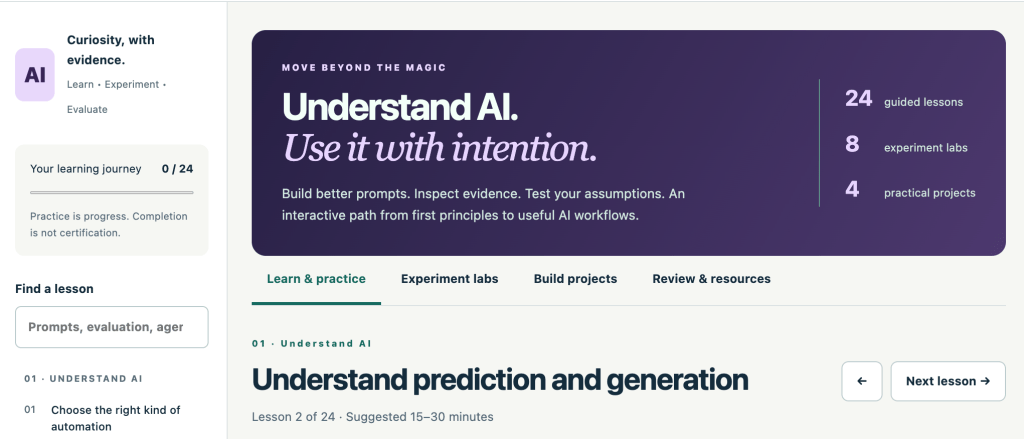
24 guided lessons, 8 interactive experiments, and 4 practical project workspaces.
Explore prompt design, evidence verification, AI evaluation, workflow design, and the differences between workflows and AI agents.
Learn how to choose the right kind of automation, create structured prompts, and plan dependable AI systems.
🔗 https://discoveryvip.com/ai-learning-studio/
🔍 AI Evaluation Lab
Learn how to assess AI responses rather than simply trusting polished answers.
Explore evaluation criteria, response challenges, and practical testing approaches.
This is especially useful when adding quality checks to your workflows.
🔗 https://discoveryvip.com/ai-evaluation-lab/
🛠️ AI Prompt Generator & Writing Guide
Build structured, reusable prompts using task descriptions, context, requirements, examples, output formats, and evidence policies.
This free browser-based tool helps you prepare instructions to use with your preferred AI assistant.
🔗 https://www.discoveryvip.com/tool.php?slug=ai-prompt-generator
📚 Explore the Full Interactive Guide Library
Find additional resources covering AI, prompt engineering, Vibe Coding, JavaScript, Google Apps Script, and practical development skills.
🔗 https://discoveryvip.com/guides.php
These resources emphasize learning by doing, with opportunities to practice and apply what you learn.
8. Your AI in Practice Challenge: Build One Workflow in 20 Minutes
Here’s your challenge for this week.
Don’t try to automate your entire day.
Pick one repetitive task and improve it.
Minutes 1–5: Choose the task
Select something you regularly ask AI to help with.
Minutes 6–10: Map the process
Write down the required input, instructions, output, verification steps, and final action.
Minutes 11–15: Create your reusable prompt
Use the framework from this article to build instructions that you can use again.
Minutes 16–20: Test and improve
Run the workflow with sample information.
Look for missing details, incorrect assumptions, and unnecessary steps.
Record what worked and what needs improvement.
One More Challenge
Try your workflow with a second example.
Does it still work?
Or does it only work with the original information?
A reliable workflow should handle reasonable variations without requiring you to rewrite everything.
That’s how you begin moving from a one-time AI conversation to a reusable system.
9. The Bigger Picture: From AI User to AI Workflow Designer
We’re entering a stage where knowing how to use AI is only the beginning.
The bigger opportunity is understanding how to combine AI with information, software, human judgment, and repeatable processes.
You don’t need to create an autonomous AI agent to benefit from this.
You don’t even need to write code.
You can start by creating a better prompt, adding a verification step, and reusing a successful process.
Over time, those small improvements can become more sophisticated workflows.
And eventually, some of those workflows may become automated applications.
The important skill isn’t making AI do everything. It’s knowing how to design a process where AI does the right work, at the right time, with the right checks.
That’s a skill worth developing.
Final Thoughts: Don’t Just Ask AI for Answers. Design Better Outcomes.
If there’s one idea I want you to take away from this issue, it’s this:
Stop measuring your AI success by how impressive a single response looks. Start measuring it by how reliably you can achieve the outcome you need.
A great prompt can save time.
A great workflow can save time repeatedly.
And a well-designed workflow gives you something even more valuable: a process you can understand, evaluate, and improve.
That’s how we turn AI from an interesting technology into a practical tool.
And that’s what AI in Practice is all about.
Continue Your AI Learning Journey
🚀 Start with the AI Learning Studio:
https://discoveryvip.com/ai-learning-studio
🔍 Explore the AI Evaluation Lab:
https://discoveryvip.com/ai-evaluation-lab
📚 Discover more free interactive guides:
https://discoveryvip.com/guides.php
📰 Follow AI in Practice on LinkedIn:
https://www.linkedin.com/newsletters/ai-in-practice-7511537011069972480
Let’s Discuss!
💬 What’s one repetitive task you would love to turn into an AI-powered workflow?
Writing reports? Creating content? Managing information? Coding? Organizing your daily work?
Share your ideas in the comments.
Your example might inspire someone else to build their first AI workflow.
And if you’ve already built one, I’d love to hear what worked — and what didn’t.
About the Author
Laurence Lars Svekis
Web Developer | Google Developer Expert (Google Workspace) | Online Educator | Creator of the Vibe Learning Framework
Helping developers, educators, and lifelong learners build practical skills through AI-supported learning, experimentation, and real-world projects.
AI in Practice — Learn It. Apply It. Improve It.
#AIinPractice #ArtificialIntelligence #AIWorkflows #GenerativeAI #PromptEngineering #AIAutomation #AIProductivity #ChatGPT #GeminiAI #VibeLearning #VibeCoding #AIEngineering #LearnAI #DiscoveryVIP