
Discover how personalized learning roadmaps, practical milestones, AI-assisted planning, and mastery-based progression can help you learn more effectively. Introducing the free AI Skill Roadmap Generator from Vibe Learning.
Have you ever started learning something new with excitement, only to feel overwhelmed a few weeks later?
Maybe you wanted to learn JavaScript.
You watched a few tutorials.
Completed some exercises.
Asked AI to explain difficult concepts.
Started a project.
Then discovered another tutorial that promised a better approach.
Before long, you had dozens of bookmarks, several unfinished courses, and no clear idea of what to learn next.
Sound familiar?
This is one of the biggest challenges with modern learning.
We have more educational content available than ever before, but access to information doesn’t automatically create a clear path toward mastering a skill.
AI can explain almost anything.
YouTube offers thousands of tutorials.
Online courses provide structured lessons.
But learners still face important questions:
- Where should I start?
- What do I already know?
- Which concepts should I learn first?
- How much time should I spend practicing?
- How can I tell whether I’m improving?
- What should I learn next?
These questions inspired me to create the AI Skill Roadmap Generator, a free interactive tool for Vibe Learning.
The idea is simple:
Your learning journey should be built around your goals, current understanding, available time, and demonstrated progress—not just a fixed list of lessons.
🚀 Explore the free AI Skill Roadmap Generator:
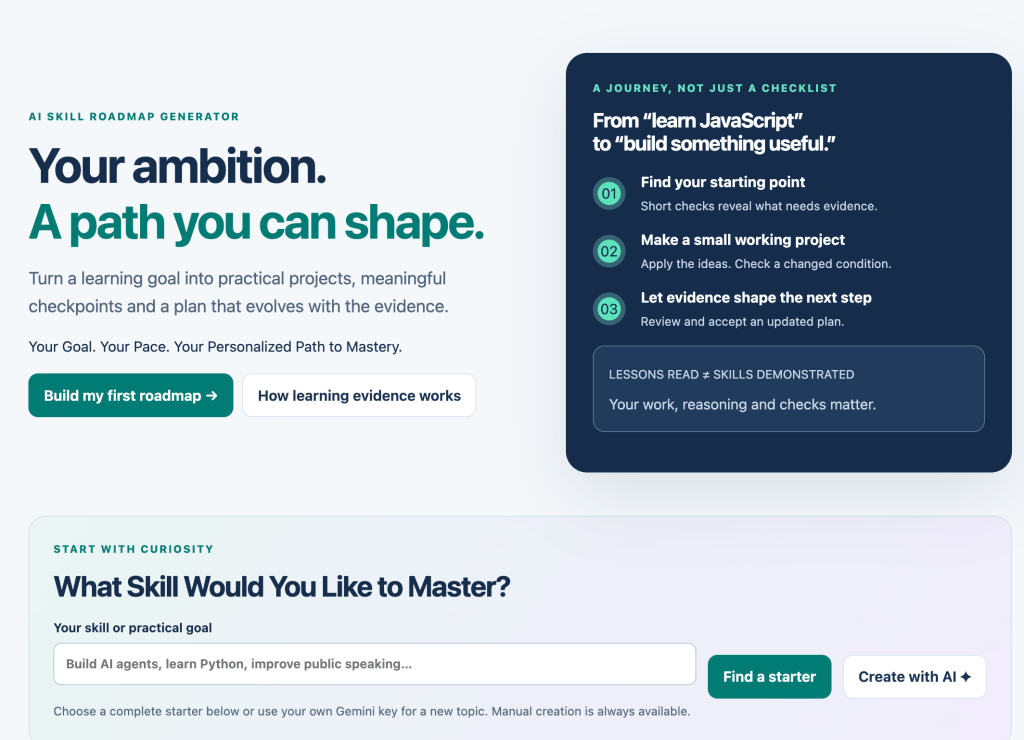
https://vibelearning.ca/tools/skill-roadmap
Let’s explore how to build a meaningful learning roadmap, why traditional study plans often fail, and how to turn a broad learning goal into practical, measurable progress.
1. Why Most Learning Plans Don’t Work
Imagine you decide to learn web development.
You search online and find a roadmap containing 75 different topics.
HTML.
CSS.
JavaScript.
Responsive design.
Git.
APIs.
Frameworks.
Testing.
Databases.
Deployment.
The roadmap might contain valuable information.
But there’s a problem.
It doesn’t know anything about you.
Perhaps you already understand HTML and CSS.
Maybe you have experience with another programming language.
Perhaps you can study only four hours per week.
Or maybe your goal is simply to build interactive websites rather than become a full-stack developer.
A generic roadmap may not reflect those differences.
The problem with one-size-fits-all learning
Traditional roadmaps often assume that everyone should:
- Start at the same place.
- Study the same topics.
- Follow the same sequence.
- Spend similar amounts of time learning.
- Progress after completing each lesson.
But learning isn’t always linear.
Different people bring different experiences, strengths, gaps, and goals.
A useful learning roadmap should help you reach your specific goal—not simply expose you to every possible topic.
2. What Is a Skill Roadmap?
A skill roadmap is a structured plan showing how to develop a particular ability over time.
Unlike a simple checklist, a good roadmap connects learning activities to measurable outcomes.
For example, suppose your goal is:
“I want to learn JavaScript.”
That’s a starting point, but it’s broad.
A more useful goal might be:
“I want to build interactive JavaScript web applications without copying complete solutions from tutorials.”
Now we can create a roadmap around that outcome.
Example JavaScript roadmap
| Stage | Learning focus | Practical milestone |
|---|---|---|
| 1 | Variables, types, operators | Build a simple calculator |
| 2 | Conditions and loops | Create a number-guessing game |
| 3 | Functions and arrays | Build a task manager |
| 4 | DOM and events | Create an interactive quiz |
| 5 | APIs and asynchronous code | Build a data-driven dashboard |
| 6 | Integration and debugging | Complete an independent web app |
Notice that each stage has a practical result.
You’re not simply reading about JavaScript.
You’re developing the ability to use it.
The difference between a checklist and a roadmap
A checklist asks:
“Did you finish the lesson?”
A learning roadmap asks:
“Can you demonstrate the skill?”
That difference matters.
3. Introducing the AI Skill Roadmap Generator
The AI Skill Roadmap Generator is designed to help learners approach skill development more intentionally.
Instead of jumping between disconnected resources, the goal is to build a structured learning journey around a specific skill and desired outcome.
The tool includes a learning workspace with areas for:
🧭 Explore Skills — Begin investigating learning directions.
🗺️ Create a Roadmap — Start organizing a learning journey.
📚 My Roadmaps — Return to your roadmap workspace.
💡 Learning Guide — Explore guidance on the learning process.
🤖 AI Connection — Access the optional AI connection experience.
The broader approach combines structured learning plans with practical goals, milestones, and opportunities to assess progress.
Why this matters
Imagine two learners who both want to learn JavaScript.
Learner A
Already knows Python and basic programming.
Wants to build interactive websites.
Has six hours per week.
Learner B
Has never programmed before.
Wants to learn basic JavaScript.
Has three hours per week.
These learners should not necessarily follow identical plans.
Their starting points, learning needs, and pacing will differ.
The purpose of personalized roadmap planning is to account for those differences.
🔗 Try the AI Skill Roadmap Generator:
https://vibelearning.ca/tools/skill-roadmap
4. The Five Ingredients of an Effective Learning Roadmap
Before creating a roadmap, it’s important to understand what makes one useful.
1. A Clear Skill Goal
Avoid vague goals such as:
“Learn programming.”
Instead, define an outcome:
“Build a working JavaScript quiz application with scoring, feedback, and restart functionality.”
Specific goals make it easier to identify the required knowledge.
2. Your Current Experience
Be realistic about what you already know.
You don’t need to start from the beginning if you already understand the fundamentals.
But you also shouldn’t skip essential concepts simply because you’ve encountered them before.
3. Available Learning Time
A roadmap should fit your actual schedule.
Someone with three hours per week may need a different plan from someone with ten hours.
The goal is consistency, not unrealistic deadlines.
4. Practical Milestones
Each stage should produce evidence of progress.
Examples include:
- Write a working function.
- Explain an important concept.
- Complete a small project.
- Debug an unfamiliar problem.
- Apply a technique independently.
5. Mastery Checks
A milestone should include a way to determine whether you’re ready to progress.
This might involve a short quiz, practical challenge, explanation, or independent project.
A good roadmap connects what you learn to what you can actually demonstrate.
5. Practical Example: Build a Personalized JavaScript Roadmap
Let’s build a roadmap for a beginner who wants to create interactive websites.
Step 1: Define the goal
Goal: Build a JavaScript application that allows users to add, complete, and remove tasks.
Step 2: Identify required concepts
To build this application, the learner needs to understand:
- Variables
- Data types
- Arrays
- Objects
- Functions
- DOM selection
- Event listeners
- Updating page content
These become the foundation of the roadmap.
Step 3: Organize the concepts
A reasonable progression might be:
JavaScript Fundamentals
         |
         v
Variables and Data Types
         |
         v
Functions and Conditions
         |
         v
Arrays and Objects
         |
         v
DOM Manipulation
         |
         v
Event Handling
         |
         v
Task Manager Project
Step 4: Add milestones
Milestone 1: Write a function that creates a task object.
Milestone 2: Store multiple tasks in an array.
Milestone 3: Display tasks on a web page.
Milestone 4: Add tasks using a form.
Milestone 5: Mark tasks as complete.
Milestone 6: Remove tasks and handle empty input.
Step 5: Add a mastery challenge
At the end, the learner should be able to build a similar application without following a complete tutorial.
For example:
“Create a reading-list application using the same concepts.”
This tests whether the learner can transfer their understanding to a new situation.
6. Why Learning Time Should Influence Your Roadmap
One of the biggest mistakes learners make is creating a schedule they cannot realistically maintain.
Imagine planning to study three hours every day.
That might sound ambitious.
But if your normal schedule only allows 30 minutes, the plan quickly becomes frustrating.
A more practical approach
Start with the time you can consistently dedicate.
For example:
Four hours per week
| Activity | Weekly time |
|---|---|
| Explore new concepts | 60 minutes |
| Guided practice | 60 minutes |
| Independent project work | 90 minutes |
| Review and reflection | 30 minutes |
This is an example allocation, not a universal formula.
You can adjust it based on your goals and learning needs.
Why practical scheduling matters
Learning requires more than exposure to new material.
You also need time to:
- Experiment
- Make mistakes
- Review difficult concepts
- Practice independently
- Apply knowledge
A realistic roadmap creates room for these activities.
And if progress takes longer than expected?
Adjust the roadmap.
The roadmap should serve the learner—not the other way around.
7. The Difference Between Completing Lessons and Demonstrating Mastery
Imagine completing a lesson about JavaScript functions.
You watch the video.
Read the explanation.
Copy the example.
Mark the lesson complete.
Does that mean you’ve mastered functions?
Not necessarily.
You might recognize a function when you see one but struggle to create one independently.
A better mastery check
Consider this example:
function calculateTotal(price, quantity) {
  return price * quantity;
}
A learner who has only memorized the example may struggle when the problem changes.
So let’s test understanding.
Challenge 1: Explain what the function does.
Challenge 2: Modify it to include a discount.
Challenge 3: Make sure the discount cannot exceed 100%.
Challenge 4: Write a different function that calculates sales tax.
Challenge 5: Combine the functions in a small checkout example.
Each challenge requires a deeper level of understanding.
A practical mastery model
<escape>Level 1:</escape> Recognize the concept.
<escape>Level 2:</escape> Explain it in your own words.
<escape>Level 3:</escape> Apply it with guidance.
<escape>Level 4:</escape> Apply it independently.
<escape>Level 5:</escape> Transfer it to a new problem.
This model helps you decide whether to continue practicing or move forward.
8. Adaptive Learning: Your Roadmap Should Change as You Improve
A fixed roadmap assumes your learning journey will follow the original plan.
But what happens when you discover that you already understand a topic?
Or when a concept takes longer than expected?
Or when you realize a different skill is more important to your goal?
An adaptive roadmap can respond to those changes.
Example: Learning JavaScript arrays
Suppose your roadmap includes:
- Creating arrays.
- Accessing array elements.
- Using loops.
- Using
map(). - Using
filter(). - Using
reduce().
You quickly demonstrate that you understand creating arrays and accessing elements.
There’s little value in spending unnecessary time repeating those lessons.
But when you reach reduce(), you struggle to understand the accumulator.
Your roadmap should reflect that.
You might:
- Spend more time exploring examples.
- Review callback functions.
- Practice simple accumulation.
- Complete another challenge before progressing.
The adaptive learning cycle
Assess → Plan → Practice → Demonstrate → Reflect → Adjust
This is the principle behind mastery-based learning.
Progress should be informed by evidence of understanding rather than only by elapsed time or completed lessons.
9. How to Build Milestones That Actually Mean Something
A weak milestone might say:
“Finish Chapter 4.”
A stronger milestone says:
“Create a JavaScript function that filters an array of products based on price.”
The second milestone describes an observable skill.
Let’s examine an example.
Learning goal: Understand array filtering
Consider this code:
const products = [
  { name: "Keyboard", price: 45 },
  { name: "Monitor", price: 220 },
  { name: "Mouse", price: 25 }
];

const affordable = products.filter(
  product => product.price < 50
);

console.log(affordable);
The result contains the keyboard and mouse.
Turn this into a milestone
Concept: Array filtering
Objective: Select elements that meet a condition.
Practice: Filter products by price.
Challenge: Modify the code to filter products by name.
Mastery check: Write a new filtering function without copying the example.
Now the milestone has a clear purpose.
It helps you determine whether you understand the concept well enough to use it.
10. Use Projects to Connect Multiple Skills
Projects are one of the most useful components of a learning roadmap.
They encourage learners to combine concepts instead of studying each topic in isolation.
Imagine learning these JavaScript topics:
- Arrays
- Objects
- Functions
- Conditions
- Events
- DOM manipulation
You could study them separately.
But a project provides a reason to connect them.
Example: Interactive Quiz Application
Your project could include:
Question data
Store questions in an array of objects.
Display logic
Use functions to show the current question.
User interaction
Use event listeners to process answers.
Scoring
Use conditions to determine whether an answer is correct.
Progress
Track the current question and total score.
Results
Display feedback when the quiz ends.
Why this is useful
A single project creates opportunities to practice several related skills.
It also exposes gaps that isolated exercises may not reveal.
For example, you might understand arrays but struggle to update the DOM.
That tells you where to focus your next learning activity.
Projects turn your roadmap into a practical journey rather than a collection of disconnected lessons.
11. Example Roadmap: Learn AI-Assisted Web Development
Let’s explore a more modern learning goal.
Suppose you want to build web applications using AI assistance.
You don’t necessarily need to master every technology before starting.
But you should develop enough understanding to evaluate, test, and modify AI-generated code.
Here’s an example roadmap.
Stage 1: Web Fundamentals
Learn HTML, CSS, and JavaScript basics.
Milestone: Build a responsive web page.
Stage 2: JavaScript Interaction
Explore DOM manipulation, functions, arrays, and events.
Milestone: Build an interactive calculator or quiz.
Stage 3: Working with AI
Practice writing clear development prompts.
Learn to describe requirements, constraints, and expected behavior.
Milestone: Use AI to help plan a small application.
Stage 4: Debugging and Testing
Learn to inspect errors, test assumptions, and validate generated code.
Milestone: Diagnose and fix several deliberately introduced bugs.
Stage 5: Application Development
Combine your knowledge into a working project.
Milestone: Build an application with user input, validation, and useful output.
Stage 6: Independent Evaluation
Review the application’s functionality, accessibility, usability, and maintainability.
Milestone: Improve the application based on testing results.
The goal isn’t simply to generate code with AI.
It’s to develop the ability to understand, evaluate, and improve what you build.
12. Five Common Mistakes When Creating a Learning Roadmap
Mistake 1: Choosing a Goal That’s Too Broad
“Become an expert in AI” is difficult to translate into a practical plan.
Better approach: Choose a specific outcome, such as building a simple AI-assisted study application.
Mistake 2: Adding Too Many Topics
A roadmap containing hundreds of concepts can become overwhelming.
Better approach: Focus on the skills required for your immediate goal.
Mistake 3: Measuring Progress Only by Completion
Finishing a lesson doesn’t prove you can apply its content.
Better approach: Use practical challenges and mastery checks.
Mistake 4: Ignoring Prerequisites
Attempting advanced topics without the required foundations can create unnecessary confusion.
Better approach: Identify and review important prerequisite concepts.
Mistake 5: Never Updating the Roadmap
Your needs and abilities will change as you learn.
Better approach: Review your roadmap regularly and adjust it based on demonstrated progress.
A useful roadmap is a living plan.
13. A Practical AI Prompt for Generating Your Own Skill Roadmap
You can use AI to help structure your learning journey.
Here’s a reusable prompt.
AI Skill Roadmap Prompt
Act as an expert learning coach and curriculum designer.
I want to develop the following skill:
[SKILL]
My current experience level is:
[BEGINNER / INTERMEDIATE / ADVANCED]
My specific learning goal is:
[GOAL]
I can dedicate approximately:
[HOURS PER WEEK]
Create a personalized learning roadmap that includes:
- An initial assessment of my current knowledge.
- The most important prerequisite concepts.
- A recommended sequence of learning milestones.
- Practical exercises for each milestone.
- Small projects that combine multiple concepts.
- Questions that test understanding.
- Independent mastery challenges.
- Common mistakes and misconceptions.
- Suggested ways to review difficult topics.
- Criteria for deciding when to progress.
Keep the plan realistic for my available time.
Ask clarifying questions when needed.
Do not assume I’ve mastered a skill simply because I’ve completed a lesson.
If I demonstrate strong understanding, suggest more challenging activities.
If I struggle, recommend prerequisite review and additional practice.
At the end of each milestone, help me reflect on what I’ve learned and adjust the roadmap.
This prompt provides a structured starting point.
The AI Skill Roadmap Generator offers a dedicated learning workspace for exploring roadmap creation.
🔗 https://vibelearning.ca/tools/skill-roadmap/
14. Build a 30-Day Learning Roadmap
Let’s create a practical example.
Goal
Learn enough JavaScript to build a simple interactive quiz application.
Available time
Approximately five hours per week.
Week 1: JavaScript Fundamentals
Focus: Variables, data types, operators, and conditions.
Practice: Write short examples that compare values and make decisions.
Milestone: Build a simple score calculator.
Mastery check: Explain how conditions control program behavior.
Week 2: Functions and Arrays
Focus: Functions, arrays, objects, and iteration.
Practice: Store quiz questions in an array of objects.
Milestone: Write a function that retrieves a question.
Mastery check: Create and use functions independently.
Week 3: DOM and Events
Focus: Selecting HTML elements and responding to user interactions.
Practice: Display questions and process button clicks.
Milestone: Build an interactive quiz interface.
Mastery check: Explain how JavaScript responds to user actions.
Week 4: Complete the Project
Focus: Integration, debugging, and testing.
Practice: Add scoring, feedback, and restart functionality.
Milestone: Complete a working quiz application.
Mastery check: Build a small variation without following the original tutorial.
What if you don’t finish?
That’s fine.
The four-week structure is a planning example, not a deadline that determines success.
If you need more practice, extend the roadmap.
If you demonstrate mastery early, introduce a new challenge.
Your progress should determine your next step.
15. Connect Your Skill Roadmap to Real-World Projects
One of the most effective ways to maintain motivation is to connect learning to something meaningful.
For example:
| Skill | Practical project |
|---|---|
| JavaScript | Interactive task manager |
| HTML and CSS | Responsive portfolio website |
| Google Apps Script | Spreadsheet automation |
| Python | Data analysis tool |
| AI prompting | Structured research assistant |
| Data visualization | Interactive dashboard |
| Technical writing | Step-by-step educational guide |
Projects provide context.
They help you understand why concepts matter.
They also create something tangible that demonstrates your developing abilities.
A useful question
Before adding a topic to your roadmap, ask:
“How will learning this help me achieve my goal?”
If the answer isn’t clear, the topic may be optional or better suited to a later stage.
This doesn’t mean you should never explore unrelated ideas.
Curiosity is valuable.
But a focused roadmap helps you prioritize when you have a specific outcome in mind.
16. How Skill Roadmaps Connect with Vibe Learning
The AI Skill Roadmap Generator builds on the principles behind Vibe Learning, the AI-assisted learning framework I developed in 2025.
Vibe Learning emphasizes structured exploration, active participation, meaningful practice, feedback, reflection, and real-world application.
A skill roadmap helps organize these activities into a purposeful journey.
The Vibe Learning progression
Curiosity → Explore → Understand → Practice → Feedback → Reflect → Connect → Create → Share → Reinvent
A personalized roadmap can support every stage.
Curiosity: Identify what you want to learn.
Explore: Investigate important concepts and prerequisites.
Understand: Develop explanations and connect ideas.
Practice: Apply knowledge through exercises.
Feedback: Evaluate results and identify gaps.
Reflect: Consider what you’ve learned.
Connect: Relate new concepts to existing knowledge.
Create: Build something meaningful.
Share: Explain or demonstrate your work.
Reinvent: Adjust your approach and pursue new challenges.
The roadmap provides structure while allowing the learner to explore, experiment, and adapt.
The important distinction
A traditional learning plan may focus on content delivery.
A Vibe Learning approach focuses on developing understanding and practical ability.
The goal isn’t to finish the roadmap. The goal is to become capable of doing what you set out to learn.
Learn more about the Vibe Learning framework:
17. Your First AI Skill Roadmap Challenge
Ready to put these ideas into practice?
Here’s a challenge you can complete today.
Challenge: Design Your Next Learning Journey
Choose one skill you’d genuinely like to improve.
It could be:
- JavaScript
- Artificial intelligence
- Web development
- Google Apps Script
- Data analysis
- Public speaking
- Writing
- Mathematics
- Digital design
- Project management
Now answer five questions.
Question 1: What skill do you want to develop?
Be specific.
Question 2: What can you already do?
Identify your current knowledge and experience.
Question 3: What would successful learning look like?
Describe a practical outcome.
Question 4: How much time can you realistically dedicate?
Choose a sustainable amount.
Question 5: How will you demonstrate mastery?
Define an exercise, challenge, or project.
Bonus challenge
Create three milestones.
For each milestone, include:
- One important concept.
- One practical exercise.
- One independent challenge.
- One way to assess understanding.
Then ask yourself:
“If I complete these milestones, will I actually be closer to my goal?”
If the answer is yes, you’re beginning to build a useful roadmap.
🚀 Open the AI Skill Roadmap Generator:
https://vibelearning.ca/tools/skill-roadmap
18. The Future of AI Learning Should Be Personalized and Adaptive
AI is changing how people access educational information.
But providing information is only one part of effective learning.
Learners also need direction.
They need to know what matters, what to practice, and how to evaluate progress.
A well-designed learning roadmap can help answer those questions.
And AI-assisted planning creates opportunities to make roadmaps more responsive to individual needs.
Imagine a learning experience where:
- Beginners receive additional foundational guidance.
- Experienced learners can demonstrate what they already know.
- Difficult concepts receive more practice.
- Successful mastery unlocks more challenging activities.
- Projects reflect the learner’s actual goals.
- Feedback helps determine the next step.
This is a more useful direction than simply producing longer lists of tutorials.
However, AI-generated assessments and recommendations should still be checked against actual performance.
A roadmap should guide learning, not make unsupported claims about someone’s abilities.
19. Start Building Your Personalized Skill Roadmap Today
You don’t need to learn everything.
You need to identify what matters for your goal.
Start with one skill.
Define what you want to accomplish.
Assess what you already understand.
Identify important prerequisites.
Create meaningful milestones.
Practice through real examples.
Test your understanding.
And adjust your plan as you improve.
The AI Skill Roadmap Generator provides an interactive environment for approaching learning with greater structure and purpose.
Whether you’re developing technical skills, exploring AI, improving your writing, or learning something entirely new, a personalized roadmap can help turn a broad ambition into achievable progress.
🚀 TRY THE FREE AI SKILL ROADMAP GENERATOR
https://vibelearning.ca/tools/skill-roadmap
Explore more free Vibe Learning tools:
Learn more about the Vibe Learning framework:
Discover free developer and AI learning guides:
https://discoveryvip.com/guides.php
About the Author
Laurence Svekis is a web developer, educator, author, and Google Developer Expert with over two decades of experience in web development and online education.
Having taught more than 3 million students worldwide, Laurence focuses on making technical education more practical, interactive, and accessible.
He is the creator of the Vibe Learning framework, an approach to AI-assisted learning that emphasizes curiosity, structured exploration, meaningful practice, feedback, reflection, and real-world application.
Through Vibe Learning and DiscoveryVIP, Laurence develops free interactive tools and educational resources designed to help learners develop genuine understanding and practical skills.
Join the Conversation
Are traditional learning roadmaps too rigid for the way people actually learn?
Think about the last new skill you tried to develop.
Did you follow a structured plan?
Jump between tutorials?
Learn through projects?
Or rely on AI to guide you?
What helped you make the most progress?
And here’s an even more important question:
Should learning progress be measured by completed lessons—or by demonstrated ability?
I’d love to hear your thoughts.
The future of learning isn’t about completing more courses. It’s about building skills you can actually use.
#VibeLearning #SkillRoadmap #AILearning #PersonalizedLearning #AdaptiveLearning #MasteryBasedLearning #ArtificialIntelligence #AIinEducation #EdTech #ActiveLearning #LearningStrategies #LifelongLearning #LearnWithAI #FutureOfEducation #VibeTeaching #SkillDevelopment #DiscoveryVIP #LaurenceSvekis