
Discover how knowledge mapping, visual relationships, prerequisite learning, and active recall can transform complicated subjects into connected understanding. Explore the free Knowledge Map Builder from Vibe Learning.
Have you ever spent hours learning something, only to realize you don’t fully understand how the different ideas fit together?
Maybe you’re learning JavaScript.
You understand variables.
You’ve practiced functions.
You’ve read about arrays, objects, promises, and asynchronous programming.
But when you try to build an actual application, something is missing.
You know the individual concepts, yet you’re unsure how they connect.
Or perhaps you’re studying artificial intelligence.
You’ve heard about machine learning, neural networks, large language models, embeddings, and AI agents.
You recognize the terminology.
But could you explain how these concepts relate to one another?
Knowing individual facts is not the same as understanding a subject.
Real understanding develops when you can identify relationships, recognize prerequisites, explain connections, and apply knowledge to new situations.
That’s the idea behind the Knowledge Map Builder, a free interactive learning tool I created for Vibe Learning.
Instead of treating a subject as a long list of disconnected lessons, the Knowledge Map Builder encourages you to explore it as a network of connected ideas.
🚀 Explore the free Knowledge Map Builder:
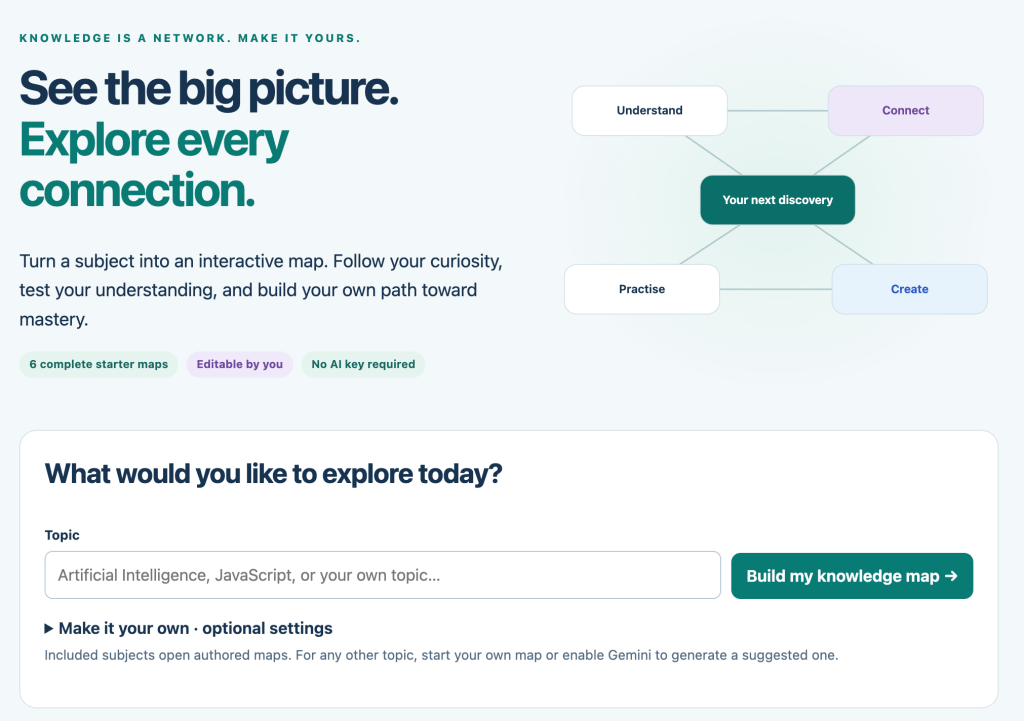
https://vibelearning.ca/tools/knowledge-map
Let’s explore how knowledge mapping works, why it can improve your learning, and how to build your own knowledge maps for almost any subject.
1. What Is a Knowledge Map?
A knowledge map is a visual representation of concepts and the relationships between them.
Imagine you’re learning web development.
A traditional course might present the following topics:
- HTML
- CSS
- JavaScript
- DOM manipulation
- Events
- APIs
- Asynchronous programming
This list tells you what you might learn.
But it doesn’t explain how everything connects.
A knowledge map adds relationships.
For example:
HTML → Creates the page structure
CSS → Controls presentation
JavaScript → Adds behavior
DOM → Connects JavaScript to page elements
Events → Allow applications to respond to interactions
Fetch API → Retrieves resources
Promises → Represent eventual results of asynchronous operations
Now you’re beginning to understand how the pieces fit together.
A simple knowledge map
Consider this conceptual structure:
                 WEB DEVELOPMENT
                        |
          +-------------+-------------+
          |             |             |
         HTML          CSS        JavaScript
          |             |             |
       Elements       Layout       Functions
          |             |             |
       Forms          Styles        Events
          |                           |
          +---------- DOM ------------+
                         |
                      Fetch API
                         |
                      Promises
                         |
                    Async / Await
This isn’t a strict prerequisite tree. It’s an illustration of how concepts can be connected through different types of relationships.
For example, you can learn JavaScript functions without knowing CSS.
But understanding the DOM is useful when applying JavaScript to HTML documents.
A good knowledge map doesn’t just show topics. It explains why those topics are related.
2. Why Traditional Learning Can Feel Fragmented
Think about how most people learn online.
You watch a tutorial.
Read an article.
Ask AI a question.
Complete an exercise.
Watch another video.
Each activity may be useful.
But over time, you can accumulate a large amount of information without developing a clear mental structure.
This is especially common when learning broad subjects such as programming, mathematics, science, business, or artificial intelligence.
You may understand one concept while studying it but struggle to connect it with something you learned earlier.
The missing connection problem
Suppose you’re studying JavaScript asynchronous programming.
You encounter this code:
async function loadData() {
  const response = await fetch("/api/data");
  const data = await response.json();

  console.log(data);
}
To understand this example, you need several connected concepts:
- Functions
- Asynchronous operations
- Promises
- The Fetch API
- JSON
- Error handling
If you understand only some of these concepts, the code may appear more complicated than it actually is.
A knowledge map can help you identify those missing connections.
Instead of asking:
“Why can’t I understand this code?”
You can ask:
“Which prerequisite concept should I investigate next?”
That turns confusion into a specific learning opportunity.
3. Introducing the Free Knowledge Map Builder
The Knowledge Map Builder is designed to help learners explore subjects as connected networks of ideas.
It brings knowledge mapping into an interactive Vibe Learning environment.
The tool is designed around a local-first approach, with optional Gemini integration and no account requirement.
Its workspace includes areas labeled:
Discover — Begin exploring and organizing knowledge.
My Atlas — Return to your knowledge mapping workspace.
Learning Guide — Explore guidance for using knowledge maps effectively.
AI Connection — Access the optional AI connection experience.
The central idea is to make learning more visual, structured, and exploratory.
Rather than simply reading through a sequence of explanations, you can think about how individual concepts fit into a larger subject.
What makes knowledge mapping useful?
A knowledge map can help you:
- Identify the most important concepts in a subject.
- Recognize relationships between ideas.
- Discover missing prerequisite knowledge.
- Organize complicated information visually.
- Plan a logical learning sequence.
- Review concepts in context.
- Find opportunities to apply what you’ve learned.
A knowledge map is not a substitute for practice.
It’s a structure that helps make practice more purposeful.
🔗 Explore Knowledge Map Builder:
https://vibelearning.ca/tools/knowledge-map
4. The Five Building Blocks of a Useful Knowledge Map
Before creating a map, it’s helpful to understand what makes one effective.
1. A Central Topic
Every map needs a subject.
Examples include:
- JavaScript
- Artificial intelligence
- Climate science
- Personal finance
- Digital marketing
- Web development
Choose a topic that’s specific enough to explore meaningfully.
For example, “Everything About Technology” is probably too broad for your first map.
“JavaScript Asynchronous Programming” is a more manageable starting point.
2. Concepts
Concepts are the individual ideas that make up the subject.
For asynchronous JavaScript, they might include:
- Callbacks
- Promises
- Async functions
- Await
- Error handling
- Fetch API
Each concept becomes a node in your map.
3. Relationships
Relationships describe how concepts connect.
Examples include:
Requires understanding of
Is an example of
Is used by
Builds upon
Contrasts with
Can be applied to
These relationships are what transform a collection of topics into a knowledge map.
4. Prerequisites
Some concepts are easier to understand after learning others.
For example:
Understanding functions is helpful before exploring callbacks.
Understanding promises is helpful before exploring async and await.
Prerequisite relationships can guide your learning sequence.
5. Evidence of Understanding
A knowledge map becomes more useful when you connect concepts to activities that demonstrate understanding.
For each concept, ask:
“Can I explain it?”
“Can I give an example?”
“Can I apply it?”
“Can I recognize when it should be used?”
This moves knowledge mapping beyond simply organizing information.
5. Practical Example: Build a JavaScript Knowledge Map
Let’s create a knowledge map for someone learning JavaScript.
Step 1: Define the main topic
JavaScript Fundamentals
Step 2: Identify major concepts
We might begin with:
- Variables
- Data types
- Operators
- Conditions
- Loops
- Functions
- Arrays
- Objects
- Events
- DOM manipulation
Step 3: Identify relationships
For example:
Variables → Store values
Data types → Describe kinds of values
Conditions → Use expressions to choose execution paths
Loops → Repeat operations
Functions → Organize reusable behavior
Arrays → Store ordered collections
Objects → Organize properties and values
DOM manipulation → Uses JavaScript to interact with document elements
Step 4: Identify prerequisites
To write a function that processes an array, it helps to understand:
- Variables
- Functions
- Arrays
- Iteration
Now you can organize your learning around those dependencies.
Step 5: Add a practical project
Let’s say your goal is to build a simple task list.
Which concepts do you need?
Task List Application
- Arrays — Store tasks.
- Objects — Represent task information.
- Functions — Add, update, and remove tasks.
- DOM — Display tasks on the page.
- Events — Respond to button clicks.
Suddenly, your learning map becomes a project roadmap.
You’re not studying random JavaScript features.
You’re learning connected concepts that help you build something useful.
6. Understanding Prerequisite Learning
One of the most valuable uses of knowledge mapping is identifying prerequisites.
A prerequisite is something you should understand before attempting a more advanced concept.
Consider the following progression:
JavaScript Basics
       |
       v
    Functions
       |
       v
    Callbacks
       |
       v
    Promises
       |
       v
  Async / Await
       |
       v
 Asynchronous APIs
This is a suggested learning pathway, not an absolute rule.
You can explore concepts in different orders.
But understanding the relationships can make advanced topics easier to learn.
Why prerequisites matter
Imagine trying to understand promises without understanding functions.
You might see:
const result = new Promise((resolve, reject) => {
  resolve("Completed");
});
You now need to understand:
- Function expressions
- Arrow functions
- Arguments
- Callbacks
- Promise construction
- Resolution and rejection
Without these foundations, the example may feel overwhelming.
A knowledge map helps you recognize that the difficulty may come from missing prerequisite knowledge rather than the advanced concept itself.
A useful learning strategy
When a topic feels difficult:
- Identify the concept you’re struggling with.
- List the knowledge it depends on.
- Test your understanding of those prerequisites.
- Review the missing concepts.
- Return to the original topic.
- Apply your understanding in a practical exercise.
This creates a more targeted learning process.
7. The Difference Between a Knowledge Map and a Mind Map
Knowledge maps and mind maps are related, but they often serve different purposes.
A mind map generally organizes ideas around a central topic.
For example:
                  JavaScript
                 /    |     \
          Functions Arrays  Objects
This is useful for brainstorming.
A knowledge map goes further by making relationships explicit.
For example:
Functions
    |
    | process
    v
  Arrays
    |
    | contain
    v
 Elements

Objects
    |
    | can represent
    v
 Elements
A knowledge map can contain cross-connections between branches.
These connections matter because knowledge rarely fits neatly into a single hierarchy.
When should you use each?
| Mind Map | Knowledge Map |
|---|---|
| Brainstorm ideas | Explain relationships |
| Organize a topic | Explore dependencies |
| Capture thoughts quickly | Build conceptual understanding |
| Group related information | Identify connected concepts |
| Plan content | Plan and investigate learning |
Both approaches are useful.
The choice depends on what you’re trying to accomplish.
8. Build a Knowledge Map for Artificial Intelligence
Let’s explore another example.
Suppose you want to understand modern AI.
You might begin with the following concepts:
Artificial Intelligence
Machine Learning
Neural Networks
Deep Learning
Transformers
Large Language Models
Embeddings
AI Agents
How do they connect?
Start with the broader categories
Artificial intelligence is the broad field concerned with building systems that perform tasks associated with intelligence.
Machine learning is an approach within AI that uses data to develop models.
Deep learning is a family of machine learning methods involving multilayer neural networks.
Transformers are a neural network architecture used by many modern language models.
Large language models are trained to process and generate language-related outputs.
Embeddings represent information as numerical vectors.
AI agents can use models, tools, memory, and workflow logic to pursue defined goals.
Create meaningful relationships
AI → Includes machine learning
Machine learning → Includes deep learning
Deep learning → Uses neural network architectures
Transformers → Power many modern language models
Embeddings → Support semantic similarity and retrieval
Language models → Can be components of AI agents
Notice how much more useful this is than memorizing a list of AI terminology.
You’re developing a conceptual framework.
Test your understanding
Ask yourself:
“Is every AI system based on machine learning?”
No. Rule-based systems are also examples of AI approaches.
“Does every AI agent require a large language model?”
No. Agents can also use conventional decision logic.
These questions help refine the map and prevent oversimplified relationships.
9. Use Knowledge Maps to Discover Misconceptions
A misconception isn’t always an obviously incorrect statement.
Sometimes it’s a relationship that seems reasonable but isn’t accurate.
For example:
“JavaScript arrays are the same as objects.”
JavaScript arrays are specialized objects, but they have distinct behavior and conventions.
A knowledge map can help make that distinction visible.
You might create relationships such as:
Arrays → Are specialized objects
Arrays → Maintain indexed elements
Objects → Store properties
Both → Can contain references to other values
Now the learner can investigate what is shared and what differs.
Another example: AI terminology
A learner might assume:
“All AI agents are autonomous.”
But agent systems can operate with different levels of autonomy and human oversight.
A more accurate relationship would be:
AI Agents → May use varying levels of autonomy
AI Agents → Can include human approval
AI Agents → May use tools and workflows
By examining relationships, you can uncover assumptions that might otherwise remain hidden.
A useful knowledge map should be open to correction.
Learning isn’t about creating a perfect diagram immediately.
It’s about improving your understanding over time.
10. Turn Your Knowledge Map into an Active Learning System
A visual map can help you organize information.
But organization alone isn’t enough.
To make the map educationally useful, connect each concept to a learning activity.
For example, consider the concept:
JavaScript Functions
You could attach four types of questions.
Explain
“What is a JavaScript function, and why would you use one?”
Example
“Write a function that calculates the total price of three products.”
Challenge
“Modify the function so it accepts any number of prices.”
Connection
“How are functions related to callbacks and event handlers?”
These activities help you move from recognizing a concept to applying it.
A reusable learning framework
For each concept, ask:
What is it?
Define the concept in your own words.
Why does it matter?
Explain its purpose.
How does it work?
Describe its behavior.
What does it connect to?
Identify related concepts.
Can I use it?
Complete a practical challenge.
This structure can turn almost any knowledge map into a guided study plan.
11. Practical JavaScript Challenge: Understand Array Methods
Let’s work through an example.
Consider these JavaScript array methods:
map()filter()reduce()forEach()
A beginner might memorize their definitions.
But a knowledge map can help clarify their different purposes.
Map the relationships
Arrays → Support iteration methods
map() → Creates a new array from transformed elements
filter() → Creates a new array containing selected elements
reduce() → Accumulates values into a result
forEach() → Executes a callback for each element
Now let’s apply the concepts.
Example 1: map()
const numbers = [1, 2, 3, 4];

const doubled = numbers.map(number => number * 2);

console.log(doubled);
Output:
[2, 4, 6, 8]The relationship is:
Input array → Transformation → New array
Example 2: filter()
const numbers = [1, 2, 3, 4];

const even = numbers.filter(number => number % 2 === 0);

console.log(even);
Output:
[2, 4]The relationship is:
Input array → Selection condition → New array
Example 3: reduce()
const numbers = [1, 2, 3, 4];

const total = numbers.reduce(
  (sum, number) => sum + number,
  0
);

console.log(total);
Output:
10The relationship is:
Input array → Accumulation → Final result
Test your understanding
Which method would you choose to:
- Convert an array of names to uppercase?
- Keep only products costing less than $50?
- Calculate the total value of a shopping cart?
- Log every item in an array?
Suggested answers:
map()filter()reduce()forEach()
The goal isn’t simply remembering the method names.
It’s understanding the relationship between the problem and the operation.
12. Knowledge Maps and AI-Assisted Learning
AI can help you brainstorm concepts, suggest relationships, explain unfamiliar terminology, and identify possible prerequisites.
For example, you might ask:
“Create a concept map for learning JavaScript asynchronous programming. Include prerequisite relationships, practical examples, and common misconceptions.”
An AI assistant might suggest:
Functions → Callbacks → Promises → Async/Await
It might also suggest related concepts such as:
- Event loop
- Microtasks
- Error handling
- Fetch API
These suggestions can help you build a starting structure.
However, AI-generated knowledge maps should be reviewed carefully.
AI may invent relationships, oversimplify dependencies, or suggest an incorrect learning order.
A better approach
Use AI to propose a structure.
Then ask:
“Why are these concepts connected?”
“Is this a strict prerequisite or simply a useful relationship?”
“Can you give a practical example?”
“Are there exceptions?”
“How could I verify this connection?”
This transforms AI from an automatic answer generator into a learning assistant.
The Knowledge Map Builder’s optional Gemini connection supports the broader idea of combining structured learning with AI assistance.
For privacy and security, avoid entering sensitive information into an AI service unless you’re comfortable with how that service handles it.
13. A Practical AI Prompt for Creating Knowledge Maps
You can use the following prompt with an AI assistant to plan a knowledge map.
Knowledge Map Generator Prompt
Act as an expert educator and knowledge architect.
I want to learn: [TOPIC].
My current experience level is: [BEGINNER / INTERMEDIATE / ADVANCED].
My learning goal is: [GOAL].
Create a structured knowledge map containing:
- The central topic.
- The 10–15 most important related concepts.
- A short explanation of each concept.
- Explicit relationships between concepts.
- Important prerequisite relationships.
- Common misconceptions.
- A practical example for each major concept.
- One question that tests understanding.
- One mini-challenge that applies the knowledge.
- A recommended learning sequence.
Clearly distinguish required prerequisites from optional or helpful background knowledge.
Avoid inventing dependencies.
Present the relationships in a structured table using:
Source Concept | Relationship | Target Concept | Explanation
Finish with three practical projects that combine multiple concepts from the map.
This prompt gives you a useful starting point.
You can then examine the proposed relationships, correct mistakes, and explore the concepts in the Knowledge Map Builder.
🔗 https://vibelearning.ca/tools/knowledge-map/
14. Five Common Mistakes When Building Knowledge Maps
Mistake 1: Adding Too Many Concepts Immediately
A map containing hundreds of nodes may become difficult to navigate.
Better approach: Start with 10–15 important concepts and expand gradually.
Mistake 2: Creating Connections Without Meaning
Drawing a line between two concepts doesn’t explain their relationship.
Better approach: Label connections with meaningful descriptions such as “depends on,” “uses,” or “is an example of.”
Mistake 3: Confusing Related Concepts with Prerequisites
Two concepts may be related without one being required to understand the other.
Better approach: Distinguish conceptual relationships from learning dependencies.
Mistake 4: Treating the Map as a Finished Product
A knowledge map should evolve as your understanding improves.
Better approach: Revisit relationships, add examples, and correct misconceptions.
Mistake 5: Mapping Without Practicing
A beautiful diagram doesn’t prove mastery.
Better approach: Connect concepts to explanations, exercises, projects, and independent challenges.
Remember:
The purpose of a knowledge map isn’t to create the most complicated diagram. It’s to make understanding clearer.
15. Create a Personal Learning Roadmap from Your Knowledge Map
One of the most practical uses of knowledge mapping is turning a broad learning goal into a structured plan.
Suppose your goal is:
“I want to become confident building JavaScript web applications.”
That’s a useful ambition, but it’s still broad.
A knowledge map helps you break it down.
Stage 1: Foundations
Learn variables, data types, operators, conditions, loops, and functions.
Stage 2: Working with Data
Explore arrays, objects, iteration methods, and JSON.
Stage 3: Browser Interaction
Learn DOM manipulation, event handling, and forms.
Stage 4: Asynchronous Operations
Explore promises, async/await, Fetch API, and error handling.
Stage 5: Practical Projects
Combine the concepts in small applications.
For example:
- Task manager
- Quiz application
- Weather information interface
- Search and filtering tool
- Data dashboard
The knowledge map helps reveal how each stage contributes to the final goal.
Make the roadmap adaptive
Instead of advancing only because you’ve completed a lesson, ask whether you can demonstrate understanding.
Can you explain the concept?
Can you solve a problem?
Can you apply it without copying an example?
Can you connect it to other concepts?
If not, review the relevant part of your map.
This creates a learning roadmap based on demonstrated understanding rather than simply completed content.
16. How Knowledge Mapping Connects with Vibe Learning
The Knowledge Map Builder reflects a central principle behind Vibe Learning, the AI-assisted learning framework I developed in 2025.
Learning should be an active process.
Instead of consuming endless explanations, learners should explore ideas, make connections, test understanding, reflect on feedback, and apply knowledge.
Knowledge mapping supports this approach because it encourages learners to ask deeper questions.
How does this concept connect to what I already know?
What do I need to understand first?
Why is this relationship important?
Where could I apply this knowledge?
These questions create a more purposeful learning experience.
The Vibe Learning connection
Curiosity → Explore → Understand → Practice → Feedback → Reflect → Connect → Create → Share → Reinvent
Knowledge maps are especially valuable during the Understand, Connect, and Create stages.
They help learners organize ideas into meaningful structures and identify opportunities to apply multiple concepts together.
For example, learning about functions, arrays, and DOM manipulation separately is useful.
But understanding how they combine to create an interactive application is much more powerful.
The objective is not to memorize everything.
It’s to build a connected understanding that makes new learning easier.
Learn more about Vibe Learning:
17. Your First Knowledge Map Builder Challenge
Ready to put these ideas into practice?
Here’s a useful challenge.
Challenge: Build a Knowledge Map for AI Agents
Your central topic is:
AI Agents
Start by identifying the following concepts:
- Large language models
- Prompts
- Tools
- Workflows
- Memory
- Planning
- Decision-making
- Human approval
- Testing
- Evaluation
Your mission
Step 1: Identify which concepts belong in the map.
Step 2: Write a short explanation for each.
Step 3: Connect related concepts.
Step 4: Label the relationships.
Step 5: Identify which concepts are prerequisites.
Step 6: Choose three concepts and create practical examples.
Step 7: Write five questions that test your understanding.
Bonus challenge
Investigate these questions:
“Does every AI agent need memory?”
“Can an agent work without a large language model?”
“What’s the difference between a workflow and an autonomous agent?”
“Why might human approval be important?”
Your goal is to develop a map that helps explain how AI agents operate.
Then try building a map for another subject you’re learning.
🚀 Open the Knowledge Map Builder:
https://vibelearning.ca/tools/knowledge-map
18. The Future of Learning Is Connected
We live in a world where information is everywhere.
AI can generate explanations in seconds.
Tutorials cover almost every imaginable subject.
Courses, videos, articles, and interactive tools are available whenever we need them.
But access to information is only one part of learning.
The bigger challenge is turning information into understanding.
That means recognizing patterns.
Identifying relationships.
Understanding prerequisites.
Correcting misconceptions.
And applying ideas in new situations.
Knowledge mapping provides a practical way to support that process.
Instead of viewing learning as a checklist of isolated topics, you begin to see it as an expanding network of understanding.
And as your knowledge grows, new connections become possible.
19. Start Building Your Knowledge Map Today
You don’t need to begin with an enormous subject.
Choose something you’re currently learning.
Identify a few important concepts.
Explore how they relate.
Ask which ideas depend on others.
Add examples.
Challenge your assumptions.
Test your understanding.
Then expand your map as your knowledge develops.
The Knowledge Map Builder provides an interactive starting point for exploring this approach.
Whether you’re learning JavaScript, artificial intelligence, science, mathematics, business, or another subject, knowledge mapping can help you move beyond memorizing individual facts toward understanding how ideas work together.
🚀 TRY THE FREE KNOWLEDGE MAP BUILDER
https://vibelearning.ca/tools/knowledge-map
Explore more free Vibe Learning tools:
Learn more about the Vibe Learning framework:
Discover more free interactive guides and developer tools:
https://discoveryvip.com/guides.php
About the Author
Laurence Svekis is a web developer, educator, author, and Google Developer Expert with over two decades of experience in web development and online education.
Having taught more than 3 million students worldwide, Laurence focuses on making technical education more practical, accessible, and engaging.
He is the creator of the Vibe Learning framework, an approach to AI-assisted learning that emphasizes curiosity, exploration, active practice, feedback, reflection, and meaningful application.
Through Vibe Learning and DiscoveryVIP, Laurence develops interactive tools and educational resources that help people build practical skills and deeper understanding.
Join the Conversation
Are we learning too many isolated facts without understanding how they connect?
Think about something you’ve studied recently.
Did you understand the individual concepts but struggle to see the bigger picture?
Could a knowledge map have helped?
I’d love to hear how you organize complicated subjects and whether visual learning tools help you understand new ideas.
The goal isn’t to know more disconnected facts. It’s to understand how knowledge connects.
#VibeLearning #KnowledgeMapping #KnowledgeGraph #ConceptMapping #ArtificialIntelligence #AIinEducation #EdTech #PersonalizedLearning #ActiveLearning #CriticalThinking #LearningStrategies #LifelongLearning #VisualLearning #LearnWithAI #VibeTeaching #FutureOfEducation #DiscoveryVIP #LaurenceSvekis