
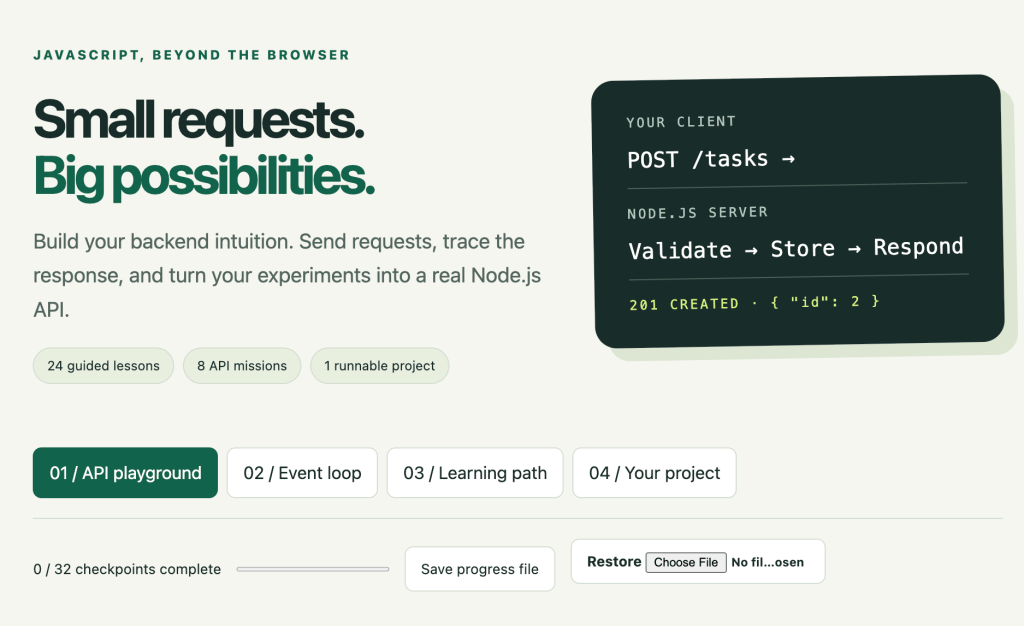
https://discoveryvip.com/node-backend-lab
Learn how backend applications work, understand HTTP requests and responses, build a working JavaScript API, and discover how to turn frontend programming skills into full-stack development.
You know how to build a webpage.
You can create buttons, forms, interactive interfaces, and JavaScript applications that run inside a browser.
But what happens when your application needs to do something beyond the browser?
What if you want to save information, retrieve records, validate user input, manage tasks, or provide data to multiple applications?
That’s where backend development begins.
And if you already know JavaScript, you have an advantage.
You can use the same programming language on both sides of a web application.
With Node.js, JavaScript can run outside the browser, receive HTTP requests, process data, and send responses to clients.
But learning backend development is about more than starting a server.
You need to understand how requests travel through a system, how APIs communicate, why validation matters, how asynchronous operations work, and how to test your code.
In this guide, we’ll explore these concepts step by step.
You’ll learn the reasoning behind backend development, examine practical JavaScript examples, and build a small working REST API using Node.js.
Then I’ll introduce my new Node.js Backend Lab, an interactive learning resource designed to help you experiment with requests, inspect server behavior, understand the event loop, and build a real backend project.
1. What Is Backend Development?
A modern web application usually contains several connected parts.
The frontend is what the user sees and interacts with.
The backend processes requests, applies business rules, and manages access to information.
A database, when one is used, stores information that needs to survive beyond a single running process.
Consider a task management application.
A user opens the website and enters:
“Finish my JavaScript project.”
The frontend displays the form and collects the input.
But what happens next?
The browser might send an HTTP request to a backend server.
The server receives the request, checks whether the submitted data is valid, creates a task record, and sends a response.
The browser then displays the result.
The request-response cycle
USER
  |
  v
BROWSER / FRONTEND
  |
  | POST /tasks
  | {"title":"Finish my JavaScript project"}
  v
NODE.JS BACKEND
  |
  | Validate request
  | Create task
  | Store data
  v
HTTP RESPONSE
  |
  | 201 Created
  | {"id":1,"title":"Finish my JavaScript project"}
  v
BROWSER UPDATES THE INTERFACE
This process is fundamental to backend development.
The frontend asks for something.
The backend decides how to handle the request.
The response tells the frontend what happened.
Why separate frontend and backend responsibilities?
Imagine putting all application logic inside browser JavaScript.
A user could inspect and modify much of that code.
That makes the browser unsuitable for enforcing trusted business rules or protecting server-side secrets.
The backend provides a separate environment where the application can validate operations and enforce authorization.
Important: A backend isn’t automatically secure simply because it runs on a server. You still need proper validation, authentication, authorization, and operational safeguards.
The first skill to develop is understanding which responsibilities belong on each side.
2. What Is Node.js?
Node.js is a JavaScript runtime.
It allows JavaScript programs to run outside a web browser.
In a browser, JavaScript commonly interacts with the Document Object Model (DOM).
For example:
document.querySelector("#message").textContent =
  "Hello from the browser!";
This code requires a browser document.
A normal Node.js script doesn’t have a webpage or a document object.
Instead, Node.js provides APIs for operations such as:
- Working with files and directories
- Running command-line programs
- Creating HTTP servers
- Managing streams
- Handling network connections
- Performing asynchronous operations
- Running automated tests
Your first Node.js program
Create a file named hello.js.
console.log("Hello from Node.js!");Open a terminal in the same directory and run:
node hello.jsYou should see:
Hello from Node.js!This may seem like a small accomplishment, but it represents an important shift.
Your JavaScript program is running as a process on your computer rather than as a script inside a webpage.
A useful mental model
Browser JavaScript focuses on user interfaces and browser capabilities.
Node.js provides a runtime for JavaScript programs that can work with server and operating-system APIs.
The language is shared.
The execution environments are different.
Understanding that distinction will help you make better architectural decisions.
3. Understanding HTTP: How Clients and Servers Communicate
HTTP stands for Hypertext Transfer Protocol.
It defines how clients and servers exchange requests and responses.
Every time a browser retrieves a webpage, calls an API, or submits information to a server, HTTP is commonly involved.
An HTTP request contains several important pieces of information.
The HTTP method
The method describes the kind of operation the client wants to perform.
Common methods include:
| Method | Typical purpose | Example |
|---|---|---|
| GET | Retrieve information | Get all tasks |
| POST | Create a resource | Add a new task |
| PATCH | Partially update a resource | Mark a task complete |
| PUT | Replace a resource representation | Replace task details |
| DELETE | Remove a resource | Delete a task |
These are conventions used in API design, not automatic behaviors enforced by HTTP.
The server decides what each endpoint actually does.
The request path
A path identifies the resource or operation.
For example:
GET /tasksThis might request all tasks.
GET /tasks/5This might request task number five.
PATCH /tasks/5This might update task number five.
Request headers
Headers provide additional information.
For example:
Content-Type: application/jsonThis tells the server that the request body is represented as JSON.
Request body
Some requests include data.
For example:
{
  "title": "Learn Node.js",
  "done": false
}
The server receives this information and decides whether the request can be processed.
Key lesson: Understanding HTTP methods, paths, headers, and bodies makes API development much easier to reason about.
4. HTTP Status Codes: Understanding What Happened
When a server responds to a request, it includes an HTTP status code.
This code communicates the general result of the operation.
Here are several important examples:
| Status | Meaning | Common use |
|---|---|---|
| 200 OK | Request succeeded | Retrieve or update data |
| 201 Created | Resource created | Create a new task |
| 204 No Content | Succeeded without a response body | Delete a resource |
| 400 Bad Request | Invalid request | Malformed JSON or invalid fields |
| 401 Unauthorized | Authentication required or invalid | Missing credentials |
| 403 Forbidden | Access not permitted | User lacks permission |
| 404 Not Found | Resource unavailable | Task ID doesn’t exist |
| 405 Method Not Allowed | Method unsupported for the target resource | POST to a GET-only endpoint |
| 413 Content Too Large | Request content exceeds a limit | Oversized JSON body |
| 500 Internal Server Error | Unexpected server failure | Unhandled application error |
Why status codes matter
Imagine your frontend sends a request to create a task.
If the server responds with 201 Created, the interface can show a success message.
If the server responds with 400 Bad Request, the interface should explain what needs correcting.
If the server responds with 500 Internal Server Error, the interface should handle the failure without pretending the operation succeeded.
This is an important principle:
A good API communicates failure as clearly as success.
Designing useful error responses
Instead of returning only:
{
  "error": "Invalid"
}
Consider:
{
  "error": "VALIDATION_ERROR",
  "message": "Title must contain between 1 and 80 characters."
}
The second response provides information that developers and client applications can act on.
For public APIs, error messages should be helpful without revealing sensitive internal details.
5. Building Your First HTTP Server with Node.js
Let’s create a working HTTP server without installing an external framework.
Node.js includes a built-in HTTP module.
Create a file named server.mjs.
import { createServer } from "node:http";

const server = createServer((req, res) => {
  res.writeHead(200, {
    "Content-Type": "application/json"
  });

  res.end(JSON.stringify({
    message: "Hello from my Node.js API!"
  }));
});

server.listen(3000, "127.0.0.1", () => {
  console.log(
    "Server running at http://127.0.0.1:3000"
  );
});
Run the server:
node server.mjsOpen your browser and visit:
You should see a JSON response containing the message.
Understanding the code
createServer() creates an HTTP server.
The callback runs when the server receives a request.
req represents the incoming request.
res represents the outgoing response.
writeHead() sets the response status and headers.
res.end() completes the response.
listen() starts the server listening for connections.
Why use 127.0.0.1?
The address 127.0.0.1 refers to your local computer.
Binding to this address keeps the example intended for local development rather than listening on every network interface.
This is a useful default for beginner experiments.
A limitation of our first server
Every request currently receives the same response.
Whether the user requests /, /tasks, or /something-else, the result is identical.
To build a useful API, we need routing.
6. Routing: Giving Different URLs Different Behaviors
Routing determines how a server responds to different combinations of HTTP methods and paths.
Consider a task management API.
We might want these endpoints:
GET    /health
GET    /tasks
POST   /tasks
GET    /tasks/:id
PATCH  /tasks/:id
DELETE /tasks/:id
Each route represents a different operation.
A simple routing example
import { createServer } from "node:http";

const server = createServer((req, res) => {
  if (req.method === "GET" && req.url === "/health") {
    res.writeHead(200, {
      "Content-Type": "application/json"
    });

    res.end(JSON.stringify({
      status: "ok"
    }));

    return;
  }

  if (req.method === "GET" && req.url === "/tasks") {
    res.writeHead(200, {
      "Content-Type": "application/json"
    });

    res.end(JSON.stringify({
      tasks: []
    }));

    return;
  }

  res.writeHead(404, {
    "Content-Type": "application/json"
  });

  res.end(JSON.stringify({
    error: "Route not found"
  }));
});

server.listen(3000, "127.0.0.1");
Now the server responds differently depending on the request.
Why routing becomes more complex
As an application grows, you need to handle:
- Dynamic resource IDs
- Query parameters
- Different HTTP methods
- Request body parsing
- Validation
- Error responses
- Authentication and authorization
This is why developers often organize routing logic into separate functions or modules.
The important idea is that every route should have a clearly defined responsibility.
7. JSON: The Language of Modern APIs
JSON stands for JavaScript Object Notation.
It’s a text format commonly used to exchange structured data between applications.
Consider this task:
{
  "id": 1,
  "title": "Build my first API",
  "done": false
}
JSON can represent strings, numbers, booleans, null values, arrays, and nested objects.
Converting JavaScript objects into JSON
Use JSON.stringify().
const task = {
  id: 1,
  title: "Learn backend development",
  done: false
};

const json = JSON.stringify(task);

console.log(json);
Converting JSON text into JavaScript objects
Use JSON.parse().
const json = '{"id":1,"done":false}';

const task = JSON.parse(json);

console.log(task.id);
What happens when JSON is invalid?
Consider:
JSON.parse("{ invalid JSON }");This throws an error.
A backend must handle that possibility.
function parseJson(text) {
  try {
    return {
      ok: true,
      data: JSON.parse(text)
    };
  } catch {
    return {
      ok: false,
      error: "Invalid JSON"
    };
  }
}
This function turns a parsing failure into a result the application can handle deliberately.
Important: Successfully parsing JSON doesn’t mean the data is valid for your application.
That brings us to validation.
8. Validation: Never Assume Incoming Data Is Correct
Suppose your API accepts new tasks.
A valid request might look like this:
{
  "title": "Practice Node.js"
}
But what if the client sends:
{
  "title": ""
}
Or:
{
  "title": 123
}
Or:
{
  "title": "Practice Node.js",
  "admin": true
}
Your application needs to decide which inputs are acceptable.
Building a task validator
function validateTask(input) {
  if (
    input === null ||
    typeof input !== "object" ||
    Array.isArray(input)
  ) {
    return {
      valid: false,
      error: "Expected a JSON object"
    };
  }

  const allowedFields = ["title", "done"];

  const unknownFields = Object.keys(input)
    .filter(key => !allowedFields.includes(key));

  if (unknownFields.length > 0) {
    return {
      valid: false,
      error: "Unknown fields are not allowed"
    };
  }

  if (typeof input.title !== "string") {
    return {
      valid: false,
      error: "Title must be a string"
    };
  }

  const title = input.title.trim();

  if (title.length < 1 || title.length > 80) {
    return {
      valid: false,
      error: "Title must contain 1–80 characters"
    };
  }

  if (
    input.done !== undefined &&
    typeof input.done !== "boolean"
  ) {
    return {
      valid: false,
      error: "Done must be a boolean"
    };
  }

  return {
    valid: true,
    data: {
      title,
      done: input.done ?? false
    }
  };
}
What does this validator protect?
It checks the overall data structure.
It rejects unsupported fields.
It requires a meaningful title.
It limits title length.
It ensures the completion status is a boolean.
It also creates a normalized result.
For example, extra whitespace around a title is removed.
Why validation matters
Without validation, your backend may store inconsistent data.
A task title might unexpectedly be a number.
A completion status might contain the string "yes" instead of a boolean.
Later code may assume the data is valid and behave incorrectly.
Validation establishes the contract between the client and the server.
For real applications, validation is only one part of security; authentication, authorization, and appropriate resource limits remain essential.
9. Build a Complete Task API Using Node.js
Now let’s combine routing, JSON, validation, and HTTP responses into a working example.
We’ll create a small API that supports:
- Checking server health
- Listing tasks
- Creating tasks
- Retrieving individual tasks
- Updating task completion status
- Deleting tasks
The example stores information in memory.
That means tasks disappear when the server restarts.
This is intentional for a beginner project.
It lets us focus on backend concepts before introducing a database.
Complete working example
Create a file named task-api.mjs.
import { createServer } from "node:http";

const tasks = new Map();
let nextId = 1;

function sendJson(res, status, data) {
  res.writeHead(status, {
    "Content-Type": "application/json; charset=utf-8",
    "Cache-Control": "no-store"
  });

  res.end(JSON.stringify(data));
}

async function readJson(req) {
  const chunks = [];
  let size = 0;
  const limit = 10_000;

  for await (const chunk of req) {
    size += chunk.length;

    if (size > limit) {
      const error = new Error("Request body too large");
      error.status = 413;
      throw error;
    }

    chunks.push(chunk);
  }

  try {
    return JSON.parse(
      Buffer.concat(chunks).toString("utf8")
    );
  } catch {
    const error = new Error("Invalid JSON");
    error.status = 400;
    throw error;
  }
}

function validateTitle(value) {
  if (typeof value !== "string") {
    return null;
  }

  const title = value.trim();

  return title.length >= 1 && title.length <= 80
    ? title
    : null;
}

function hasOnlyFields(obj, allowed) {
  return Object.keys(obj).every(
    key => allowed.includes(key)
  );
}

function isObject(value) {
  return value !== null &&
    typeof value === "object" &&
    !Array.isArray(value);
}

const server = createServer(async (req, res) => {
  try {
    const url = new URL(
      req.url,
      "http://localhost"
    );

    const path = url.pathname;
    const method = req.method;

    // GET /health
    if (method === "GET" && path === "/health") {
      return sendJson(res, 200, {
        status: "ok"
      });
    }

    // GET /tasks
    if (method === "GET" && path === "/tasks") {
      return sendJson(res, 200, {
        tasks: [...tasks.values()]
      });
    }

    // POST /tasks
    if (method === "POST" && path === "/tasks") {
      if (
        !req.headers["content-type"]
          ?.toLowerCase()
          .startsWith("application/json")
      ) {
        return sendJson(res, 415, {
          error: "Content-Type must be application/json"
        });
      }

      const input = await readJson(req);

      if (
        !isObject(input) ||
        !hasOnlyFields(input, ["title", "done"]) ||
        (input.done !== undefined &&
          typeof input.done !== "boolean")
      ) {
        return sendJson(res, 400, {
          error: "Invalid task fields"
        });
      }

      const title = validateTitle(input.title);

      if (!title) {
        return sendJson(res, 400, {
          error: "Title must contain 1–80 characters"
        });
      }

      const task = {
        id: nextId++,
        title,
        done: input.done ?? false
      };

      tasks.set(task.id, task);

      return sendJson(res, 201, task);
    }

    // Routes with an ID
    const match = path.match(/^\/tasks\/(\d+)$/);

    if (match) {
      const id = Number(match[1]);
      const task = tasks.get(id);

      if (!task) {
        return sendJson(res, 404, {
          error: "Task not found"
        });
      }

      // GET /tasks/:id
      if (method === "GET") {
        return sendJson(res, 200, task);
      }

      // PATCH /tasks/:id
      if (method === "PATCH") {
        if (
          !req.headers["content-type"]
            ?.toLowerCase()
            .startsWith("application/json")
        ) {
          return sendJson(res, 415, {
            error: "Content-Type must be application/json"
          });
        }

        const input = await readJson(req);

        if (
          !isObject(input) ||
          !hasOnlyFields(input, ["done"]) ||
          typeof input.done !== "boolean"
        ) {
          return sendJson(res, 400, {
            error: "Expected a boolean done field"
          });
        }

        task.done = input.done;

        return sendJson(res, 200, task);
      }

      // DELETE /tasks/:id
      if (method === "DELETE") {
        tasks.delete(id);

        res.writeHead(204);
        return res.end();
      }
    }

    sendJson(res, 404, {
      error: "Route not found"
    });

  } catch (error) {
    sendJson(res, error.status ?? 500, {
      error: error.status
        ? error.message
        : "Internal server error"
    });
  }
});

server.listen(3000, "127.0.0.1", () => {
  console.log(
    "Task API running at http://127.0.0.1:3000"
  );
});
Run your API
Open a terminal in the project directory.
node task-api.mjsYour backend is now listening locally on port 3000.
Test the health endpoint
Visit:
Expected response:
{
  "status": "ok"
}
Create a task
Using a terminal with curl:
curl -X POST http://127.0.0.1:3000/tasks \
  -H "Content-Type: application/json" \
  -d '{"title":"Learn Node.js"}'
Expected response:
{
  "id": 1,
  "title": "Learn Node.js",
  "done": false
}
Retrieve all tasks
curl http://127.0.0.1:3000/tasksMark a task complete
curl -X PATCH http://127.0.0.1:3000/tasks/1 \
  -H "Content-Type: application/json" \
  -d '{"done":true}'
Delete a task
curl -X DELETE http://127.0.0.1:3000/tasks/1Congratulations — you’ve built a small working REST-style API using JavaScript!
What this example does not include
This is a learning project, not a production-ready service.
It doesn’t include a database, authentication, authorization, rate limiting, or HTTPS termination.
The request-size check also provides only basic protection; a public service needs more comprehensive request handling, resource limits, and operational safeguards.
Keep the example local while learning.
10. Understanding Asynchronous JavaScript and the Event Loop
One of the most important Node.js concepts is asynchronous execution.
Node.js commonly handles operations such as file access, network requests, and timers without requiring JavaScript to wait synchronously for every operation to finish.
This allows applications to remain responsive while work is pending.
But asynchronous behavior can initially seem confusing.
Consider this example
console.log("A");

setTimeout(() => {
  console.log("B");
}, 0);

Promise.resolve().then(() => {
  console.log("C");
});

console.log("D");
What order do you expect?
The result is:
A
D
C
B
Why?
First, synchronous JavaScript executes.
That produces A and D.
The promise reaction is then processed as a microtask.
That produces C.
The timer callback runs later.
That produces B.
Does a zero-millisecond timer run immediately?
No.
A timer delay is a threshold, not a guarantee that the callback will execute at that exact moment.
Other work may delay execution.
This is why backend developers need to understand the event loop rather than assuming asynchronous operations always finish in a particular order.
A practical asynchronous example
import { readFile } from "node:fs/promises";

async function loadSettings() {
  try {
    const text = await readFile(
      "./settings.json",
      "utf8"
    );

    const settings = JSON.parse(text);

    console.log(settings);
  } catch (error) {
    console.error(
      "Could not load settings:",
      error.message
    );
  }
}

loadSettings();
The await keyword lets us write asynchronous code in a readable, sequential style.
It doesn’t mean the entire Node.js process stops executing all other work.
Why asynchronous programming matters
Imagine an API that needs to retrieve information from a database.
That operation might take several milliseconds.
A well-designed server can use asynchronous I/O to avoid unnecessarily blocking other requests while waiting.
However, CPU-intensive synchronous JavaScript can still block the event loop.
Important lesson: Asynchronous code improves how applications handle waiting, but it doesn’t automatically make expensive computation faster.
11. Separating Business Logic from HTTP Transport
Our task API currently combines several responsibilities inside one server file.
For a small example, that’s manageable.
For a larger application, it becomes harder to test and maintain.
A useful architecture separates three concerns.
HTTP layer
Responsible for receiving requests and sending responses.
Business logic
Responsible for application rules, such as creating tasks and validating updates.
Data layer
Responsible for storing and retrieving records.
A simple project structure might look like this:
my-api/
├── start.mjs
├── server.mjs
├── tasks.mjs
├── validation.mjs
└── tests/
    └── api.test.mjs
Why separation matters
Suppose you want to change how tasks are stored.
Today, tasks might live in memory.
Tomorrow, they might live in a database.
If your application logic is tightly connected to storage, changing the implementation becomes more difficult.
Separating responsibilities allows you to improve one part of the application without rewriting everything else.
It also makes automated testing easier.
You can test validation rules without starting an HTTP server.
And you can test HTTP behavior without duplicating all your business logic.
12. Testing Your API: Proving That It Works
A server that starts successfully isn’t necessarily a server that behaves correctly.
What happens when a user submits an empty title?
What happens when a task doesn’t exist?
What happens when a request contains malformed JSON?
What happens when the client uses the wrong HTTP method?
These questions should be answered with tests.
Node.js includes a built-in test runner.
A simple test
Create math.test.mjs:
import test from "node:test";
import assert from "node:assert/strict";

function add(a, b) {
  return a + b;
}

test("adds two numbers", () => {
  assert.equal(add(2, 3), 5);
});
Run it:
node --testTesting a real HTTP endpoint
You can also use fetch() to test an API that is already running.
import test from "node:test";
import assert from "node:assert/strict";

test("health endpoint returns OK", async () => {
  const response = await fetch(
    "http://127.0.0.1:3000/health"
  );

  assert.equal(response.status, 200);

  const data = await response.json();

  assert.equal(data.status, "ok");
});
This test requires the server to be running before execution.
A more complete integration test suite would start the server automatically, use an isolated port and data store, and clean up after each test.
Think beyond successful requests
A useful test plan includes both success and failure cases.
| Scenario | Expected result |
|---|---|
| GET /health | 200 |
| POST valid task | 201 |
| POST empty title | 400 |
| POST invalid JSON | 400 |
| POST wrong content type | 415 |
| GET nonexistent task | 404 |
| PATCH valid completion status | 200 |
| DELETE existing task | 204 |
Testing these behaviors helps establish confidence that the API follows its intended contract.
A good backend isn’t just one that works with perfect input. It’s one that behaves predictably when things go wrong.
13. Five Common Backend Mistakes Beginners Should Avoid
Mistake 1: Trusting client input
Never assume incoming JSON contains the correct fields or data types.
Validate inputs before using them.
Mistake 2: Ignoring error responses
An API should communicate failures clearly.
Avoid returning 200 OK for operations that failed.
Mistake 3: Blocking the event loop
Large synchronous operations can delay other requests.
Understand the difference between asynchronous I/O and CPU-intensive work.
Mistake 4: Mixing every responsibility together
As projects grow, separate routing, validation, business rules, and data storage.
This improves readability and testing.
Mistake 5: Treating a local prototype as production-ready
A local API is an excellent learning tool.
But publishing an API introduces additional responsibilities involving security, authentication, persistence, monitoring, and deployment.
Start small and expand deliberately.
14. Introducing Node.js Backend Lab: Learn by Sending Realistic Requests
Now that you’ve explored how backend systems work, it’s time to experiment with these concepts in a guided environment.
I’ve created a new interactive resource called Node.js Backend Lab, available free on DiscoveryVIP.
The lab is designed to make backend behavior visible.
Instead of only reading about HTTP requests, you can construct them, inspect responses, trace server decisions, and practice the logic behind a working task API.
Explore the free guide:
https://discoveryvip.com/node-backend-lab
What’s Inside Node.js Backend Lab?
24 Guided Lessons
The learning path introduces backend concepts one step at a time.
Rather than treating backend development as a collection of commands to memorize, the guide emphasizes understanding what happens inside the system.
8 API Missions
Practice making requests and observing how the backend responds.
The API playground uses the same routing and validation logic as the downloadable Node.js server.
Interactive Request Builder
Choose an HTTP method, enter a path, set a content type, and supply JSON data.
Then submit the request and inspect the result.
The supported task API routes include:
GET    /health
GET    /tasks
POST   /tasks
GET    /tasks/:id
PATCH  /tasks/:id
DELETE /tasks/:id
You can also experiment with:
GET /tasks?done=trueThis filters the task list to completed tasks.
Response Inspector
Examine the server’s response and relevant headers.
Observe how different inputs produce different outcomes.
For example, compare a successful task creation with a request containing an invalid title.
Server Decision Trace
See how the request moves through routing, validation, storage, and response generation.
This helps connect the HTTP result with the internal decisions that produced it.
Event Loop Simulator
Explore asynchronous JavaScript using a conceptual event-loop model.
Experiment with synchronous work and timer thresholds.
Predict the order of operations, then step through the simulated execution timeline.
The model is intentionally simplified; it doesn’t reproduce every Node.js event-loop phase or scheduling mechanism.
Request History
Review recent requests and inspect their results.
This is useful for comparing successful operations with validation errors and other failure cases.
Downloadable Node.js Project
Move beyond the browser simulation with a real, dependency-free Node.js task API.
The downloadable project includes:
- HTTP endpoints
- Request body validation
- A request-size limit
- In-memory task storage
- Automated tests
- Setup instructions
The project separates its responsibilities across files:
start.js starts the process.
server.js handles HTTP communication.
engine.js manages routing, validation, and task operations.
api.test.js verifies actual HTTP behavior.
The downloadable starter requires a supported Node.js release, version 22 or newer.
Important: The browser playground simulates HTTP behavior without sending network requests. The downloadable project runs a real local Node.js server.
15. Six Practical Experiments to Try in Node.js Backend Lab
The best way to learn backend development is to make predictions and test them.
Here are six experiments to try.
Experiment 1: Create Your First Task
Open the API Playground.
Choose:
POST /tasksEnter:
{
  "title": "Build my first backend"
}
Send the request.
Inspect the response.
What to look for: A successful creation response and the new task ID.
What you’ll learn: How POST requests create resources.
Experiment 2: Investigate Validation Errors
Try submitting:
{
  "title": ""
}
Then try:
{
  "title": "Learn Node.js",
  "done": "yes"
}
Compare the responses.
What you’ll learn: Why backend applications validate data types and field requirements.
Experiment 3: Explore HTTP Methods
Create a task.
Retrieve it with GET.
Update it with PATCH.
Delete it with DELETE.
Then attempt to retrieve it again.
What you’ll learn: How API operations change application state.
Experiment 4: Test Filtering
Create several tasks.
Mark some as complete.
Then request:
GET /tasks?done=trueObserve which records are returned.
What you’ll learn: How query parameters can modify the results of a retrieval operation.
Experiment 5: Predict the Event Loop
Open the Event Loop simulator.
Set a timer threshold.
Introduce simulated synchronous work.
Predict which operation will complete first.
Step through the execution timeline.
What you’ll learn: Why asynchronous callbacks don’t necessarily run at the exact moment their timer threshold is reached.
Experiment 6: Run the Real Node.js Project
Download the project starter.
Extract it into a folder.
Open a terminal and run:
npm testThen start the server:
npm startVisit:
Try the example requests from the included README.
What you’ll learn: How the same backend concepts move from a browser simulation into a real running Node.js application.
16. A Practical Capstone: Add a Statistics Endpoint
Once you understand the starter project, try extending it.
The lab suggests adding a new endpoint:
GET /statsThe endpoint should return the total number of tasks and the number completed.
For example:
{
  "total": 5,
  "completed": 3
}
Step 1: Define the expected behavior
The endpoint should count all tasks.
It should also count tasks where done is true.
Step 2: Write a test first
Create several tasks with different completion states.
Request /stats.
Verify that the response contains the expected counts.
Step 3: Implement the logic
A simplified implementation might look like this:
function getTaskStats(tasks) {
  const allTasks = [...tasks.values()];

  return {
    total: allTasks.length,
    completed: allTasks.filter(
      task => task.done
    ).length
  };
}
Step 4: Connect the function to a route
Your routing layer should call the statistics function and return its result as JSON.
Step 5: Test again
Run the complete test suite.
Confirm that the new endpoint works without breaking existing routes.
Step 6: Add another feature
Extend tasks with a priority field:
{
  "title": "Finish backend project",
  "done": false,
  "priority": "high"
}
Allow only:
low
medium
high
Update the validator, tests, and documentation.
This exercise teaches an important development principle:
A new feature isn’t complete when the code runs. It’s complete when the behavior is defined, validated, tested, and documented.
17. A Seven-Day Node.js Backend Learning Plan
Here’s a structured way to build your understanding over one week.
| Day | Learning focus | Practical activity |
|---|---|---|
| 1 | Node.js fundamentals | Run your first JavaScript program outside the browser |
| 2 | HTTP requests and responses | Experiment with methods, paths, and status codes |
| 3 | Routing and JSON | Build endpoints that return structured data |
| 4 | Validation and errors | Test malformed JSON and invalid task fields |
| 5 | Asynchronous JavaScript | Predict and investigate event-loop behavior |
| 6 | Testing and architecture | Run API tests and examine project structure |
| 7 | Capstone project | Add a statistics endpoint and priority validation |
At the end of the week, challenge yourself to answer these questions without looking at your notes:
What happens when a browser sends a POST request?
Why does the backend need to validate input?
What is the difference between a 400 and a 500 response?
Why can asynchronous callbacks execute later than expected?
What is the benefit of separating business logic from HTTP handling?
How would you prove that an API endpoint behaves correctly?
Being able to explain these concepts is more valuable than simply memorizing commands.
18. From Backend Development to Full-Stack JavaScript
Once you understand how to build an API, many new possibilities open up.
You can connect a browser interface to your backend.
You can build applications that manage structured information.
You can create APIs for dashboards, educational tools, productivity systems, and other applications.
You can also explore databases, authentication, deployment, and more advanced server architectures.
Connecting a frontend to your API
Imagine a webpage that retrieves tasks from your local backend.
async function loadTasks() {
  try {
    const response = await fetch(
      "http://127.0.0.1:3000/tasks"
    );

    if (!response.ok) {
      throw new Error(
        `HTTP error: ${response.status}`
      );
    }

    const data = await response.json();

    console.log(data.tasks);

  } catch (error) {
    console.error(
      "Could not load tasks:",
      error.message
    );
  }
}
This is the beginning of full-stack development.
The browser requests data.
Node.js processes the request.
The backend returns JSON.
The frontend uses the response to update the interface.
If the frontend and backend run on different origins, you’ll also need to configure appropriate Cross-Origin Resource Sharing (CORS) behavior.
Where to go next
After completing your first backend project, consider learning:
Databases: Store information persistently.
Authentication: Identify users securely.
Authorization: Control which operations users may perform.
API design: Create consistent and understandable interfaces.
Testing: Verify behavior automatically.
Deployment: Learn how applications run in managed server environments.
Monitoring: Understand how to detect and investigate problems.
Each topic builds on the foundations you’ve already learned.
19. Why Learning Backend Development Through Experimentation Works
Backend development can initially feel abstract.
Unlike frontend programming, where changes often appear immediately on the screen, backend behavior is frequently hidden behind requests, responses, and internal processing.
That’s why interactive experimentation is especially valuable.
When you can construct a request, predict the result, inspect the response, and trace what happened inside the server, the concepts become more concrete.
You stop thinking of an API as a mysterious URL.
You begin to understand it as a system of rules.
You learn to ask better questions.
What input did the server receive?
Which route handled the request?
Was the data valid?
Did the application change its state?
What response was returned?
How can I test that behavior?
This approach reflects the principles behind my Vibe Learning Framework.
The goal is to move beyond passive consumption toward active understanding.
Explore a concept.
Make a prediction.
Test it.
Inspect the evidence.
Explain the result.
Apply what you’ve learned to a new challenge.
That process helps turn isolated programming facts into practical development skills.
Final Thoughts: Your First Backend Is the Beginning of Something Bigger
Every full-stack application begins with a few fundamental ideas.
A client sends a request.
A server receives it.
The application processes the input.
A response communicates the result.
From those simple interactions, developers build complex systems.
But you don’t need to understand every backend technology before getting started.
Begin with one route.
Return some JSON.
Add validation.
Create a resource.
Handle an error.
Write a test.
Then expand your application one feature at a time.
The goal isn’t just to make a server respond. It’s to understand why it responds the way it does.
And once you understand those principles, you’ll have a foundation you can apply to a wide range of JavaScript applications.
Start Learning with Node.js Backend Lab
Node.js Backend Lab — From Requests to Real APIs
Explore 24 guided lessons, eight API missions, an interactive request playground, event-loop simulations, and a downloadable Node.js task API with automated tests.
Open the free learning guide:
https://discoveryvip.com/node-backend-lab
More Free Learning Resources
Node.js Studio:
https://discoveryvip.com/nodejs-studio/
APIs & Data Guide:
https://discoveryvip.com/api-data-guide/
JavaScript Studio:
https://discoveryvip.com/javascript-studio/
DiscoveryVIP:
https://discoveryvip.com/
Vibe Learning:
https://vibelearning.ca/
Written by Laurence Lars Svekis — Web developer, author, Google Developer Expert, and creator of the Vibe Learning and Vibe Teaching frameworks. Laurence has taught more than 3 million students through online courses and educational resources.
Join the Discussion
What’s the most challenging part of learning backend development?
Is it understanding HTTP requests?
Designing APIs?
Handling asynchronous JavaScript?
Validating data?
Or connecting the frontend to the backend?
Share your thoughts and experiences!
#NodeJS #JavaScript #BackendDevelopment #RESTAPI #WebDevelopment #FullStackDevelopment #APIDevelopment #LearnToCode #JavaScriptTutorial #NodeJSTutorial #BackendEngineering #HTTP #JSON #AsyncJavaScript #SoftwareDevelopment #VibeCoding #VibeLearning #LearningByDoing #ProgrammingEducation #DiscoveryVIP #LaurenceSvekis