
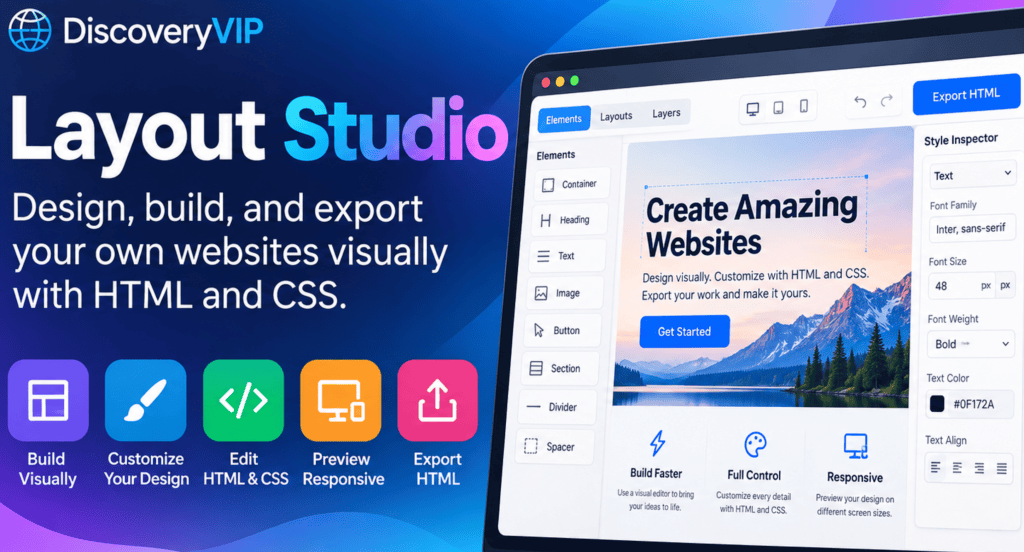
Create professional website layouts, customize every element, and take control of your code with DiscoveryVIP’s Layout Studio.
Have you ever had a great idea for a website but struggled to turn it into a working design? Perhaps you know some HTML and CSS but spend too much time adjusting layouts, experimenting with spacing, or trying to make everything look right.
What if you could design your website visually, see your changes immediately, and still have complete access to the underlying HTML and CSS?
That’s the idea behind
DiscoveryVIP Layout Studio — a visual website-building tool that brings together interactive design, live previews, code editing, and HTML export.
Whether you’re learning web development, experimenting with new layouts, or building your next website, Layout Studio offers a practical way to move from an idea to working web code.
What Is Layout Studio?
Layout Studio is a browser-based website design environment that lets you build and customize web pages using visual controls and editable HTML and CSS.
Instead of switching constantly between a code editor and your browser, you can work with your page’s visual structure and its underlying code in one place.
The tool brings together a live design canvas, layout and element controls, a layer-based editing interface, a style inspector, and HTML and CSS editing. Once you’re satisfied with your design, you can export your HTML.
https://discoveryvip.com/layout-studio
The goal is to make website creation more approachable without taking away the flexibility that makes HTML and CSS so powerful.
Try the web design tool https://discoveryvip.com/layout-studio/
DiscoveryVIP Layout Studio
Build your page visually, customize its design, edit the code, and export your work.Open Layout Studio
1. Build Your Website Visually
One of the biggest challenges when creating a website is understanding how different elements fit together.
A typical web page contains multiple sections, containers, headings, images, buttons, and other components. Their arrangement determines how the page looks and how visitors interact with it.
Layout Studio provides a visual environment for working with this structure.
You can select a container, add elements, and work with the different parts of your page using its Elements, Layouts, and Layers controls.
This makes it easier to experiment with a page’s structure before spending time refining its appearance.
For example, imagine you’re creating a landing page for a new online course. You might begin with a hero section introducing the course, followed by a section explaining what students will learn and a call to action.
Building the structure visually helps you focus on the visitor’s experience rather than getting caught up in CSS details too early.
2. Customize Your Design with the Style Inspector
A good website needs more than a collection of elements. Its typography, spacing, colors, and visual hierarchy should work together to make the content easy to understand.
Layout Studio includes a Style Inspector for working with selected elements.
The live canvas lets you click an element to style it, giving you a more direct connection between the part of the page you’re looking at and the design you’re editing.
https://discoveryvip.com/layout-studio
This is particularly useful when you’re learning CSS because it encourages you to think about how styling decisions affect the finished page.
As you experiment, consider these design principles:
- Visual hierarchy: Make important headings and actions easy to identify.
- Consistent spacing: Give related elements enough room without making the page feel disconnected.
- Readability: Choose text sizes and color combinations that are comfortable to read.
- Responsive design: Consider how the layout should adapt to smaller screens.
The more you experiment with these ideas, the more naturally you’ll begin to recognize what makes a website effective.
3. Edit HTML and CSS Directly
Visual website builders can be convenient, but developers often want access to the actual code.
Layout Studio brings both approaches together.
Its code-editing interface includes HTML and CSS views, allowing you to inspect and modify the code behind your design. You can apply changes and continue working with the visual page.
https://discoveryvip.com/layout-studio
This creates an opportunity to learn how visual design translates into real web development.
For example, when you’re experimenting with a two-column layout, you can explore how CSS Grid or Flexbox can create that structure.
When you’re styling a button, you can investigate how padding, background colors, borders, and hover states affect its appearance.
You aren’t limited to simply seeing the finished result. You can explore the code that makes the result possible.
Why this matters for beginners
Learning HTML and CSS becomes easier when you can connect abstract code to something you can actually see.
Rather than memorizing CSS properties in isolation, you can work with a real page, examine its structure, make changes, and observe the results.
That combination of experimentation and immediate feedback is an effective way to build practical web development skills.
4. Create Your Own HTML
Sometimes you need something more specific than a standard page element.
Layout Studio includes an Insert HTML option for adding your own HTML and CSS to a design.
The tool also includes a safety restriction: scripts and unsafe attributes are removed from inserted HTML.
https://discoveryvip.com/layout-studio
This gives you another way to experiment with custom markup while keeping the focus on page structure and styling.
For example, you could use custom HTML to explore a particular content structure or experiment with semantic HTML elements.
It’s a useful feature for learners who are ready to move beyond predefined components and start creating their own page elements.
5. Preview Your Website on Different Screen Sizes
A website might look excellent on a large desktop monitor but become difficult to use on a phone.
Responsive web design addresses this by adapting layouts to different screen sizes.
Layout Studio includes a live canvas with multiple viewport controls, so you can inspect your page at different display sizes while designing.
https://discoveryvip.com/layout-studio
As you build your website, consider how its layout should change.
A multi-column section may need to become a single column on a narrow screen. Large headings might need smaller font sizes, and navigation elements should remain accessible.
Previewing your design at different widths can help you identify these issues before publishing your website.
6. Experiment Without Losing Your Progress
Web design is an iterative process. You try an idea, evaluate the result, and make improvements.
Sometimes an experiment works. Other times, you want to return to an earlier version.
Layout Studio includes Undo and Redo controls, as well as options to duplicate, move, and delete selected elements. Its interface also indicates that replacing a page can be undone.
https://discoveryvip.com/layout-studio
These controls make experimentation more convenient.
For example, you might duplicate a section to test a different arrangement or move a section higher on the page to see whether it improves the content flow.
Being able to reverse changes makes it easier to explore different designs without committing to every decision.
7. Export Your HTML and Continue Building
One of the most useful parts of creating a website is being able to take your work beyond the design environment.
Layout Studio includes an Export HTML option, allowing you to take your design into the next stage of your web development workflow.
https://discoveryvip.com/layout-studio
You can continue refining your exported website in your preferred code editor, integrate it into a larger project, or prepare it for publishing on your web server.
This is particularly valuable for developers who want to use a visual builder to accelerate their initial design process while retaining control of the finished code.
A Practical Project: Build Your First Landing Page
The best way to explore a new development tool is to create something useful.
Here’s a simple project you can try with Layout Studio.
Your first website design challenge
Create a landing page for a product, online course, portfolio, or personal project.
[ ] Start with a page structure and add a hero section with a clear headline.
[ ] Add a short introduction explaining what your website offers.
[x] Create a section highlighting three features or benefits.
[ ] Add a call-to-action button and customize its appearance.
[ ] Use the style inspector to refine typography, spacing, and colors.
[ ] Preview your page at different screen sizes and make adjustments.
[ ] Explore the HTML and CSS, then export your finished design.
When you’re finished, you’ll have more than a page design. You’ll have experience making decisions about structure, styling, responsive layouts, and code.
Try creating a second version with a different layout or color scheme. Comparing the two versions can help you understand how design decisions influence the overall experience.
Combine Layout Studio with AI and Vibe Coding
Layout Studio can also fit naturally into an AI-assisted development workflow.
With vibe coding, you describe what you want to create, use AI to help generate or improve the code, and then review and refine the result.
Layout Studio provides a visual environment where you can work on the HTML and CSS involved in that process.
For example, suppose you’re designing a portfolio website and want to improve the appearance of its hero section.
You could ask AI to suggest a more effective HTML and CSS structure, review the proposed code, and experiment with the styling in Layout Studio.
Here’s an example prompt you can use:
Example AI prompt Copy
Act as an experienced frontend web developer. Help me create a modern, responsive hero section for a personal portfolio website using HTML and CSS only. Include a clear headline, a short introduction, and a call-to-action button. Use semantic HTML, accessible color contrast, and a mobile-first layout. Explain the important CSS decisions so I can understand and customize the design. Return the HTML and CSS separately.
The important part is to stay involved in the development process.
Review the generated code, understand what it does, test the design at different screen sizes, and make improvements based on what you observe.
AI can help you explore possibilities, but your decisions determine whether the finished website meets your goals.
Learn by Building, Not Just Watching
Layout Studio is also a useful companion to the Vibe Learning approach: explore a topic, practice what you’re learning, evaluate the results, and use feedback to improve.
Instead of watching another tutorial about CSS layouts, try creating one yourself.
Change the structure, experiment with the styles, inspect the code, and ask questions when something doesn’t behave as expected.
Every experiment gives you an opportunity to develop a better understanding of how websites work.
You can also explore the
free interactive learning guides on DiscoveryVIP to continue learning about HTML, CSS, JavaScript, web design, and vibe coding.
Start Building with Layout Studio
You don’t need to have every detail of your website planned before you begin.
Start with a simple structure, experiment with the design, and refine your ideas as you go.
Whether you’re building your first web page, creating a landing page, or exploring a new layout for an existing project, Layout Studio gives you a place to turn ideas into working HTML and CSS.
Ready to create your next website?
Try
DiscoveryVIP Layout Studio and start building your page today.