
Modern web applications need to do more than display information. They need to remember user choices, preserve work, recover from interruptions, and sometimes continue working even when the network disappears.
That is exactly what the Browser Storage & Offline Studio from DiscoveryVIP is designed to help you explore.
Try the Browser Storage & Offline Studio:
https://discoveryvip.com/browser-storage-studio/
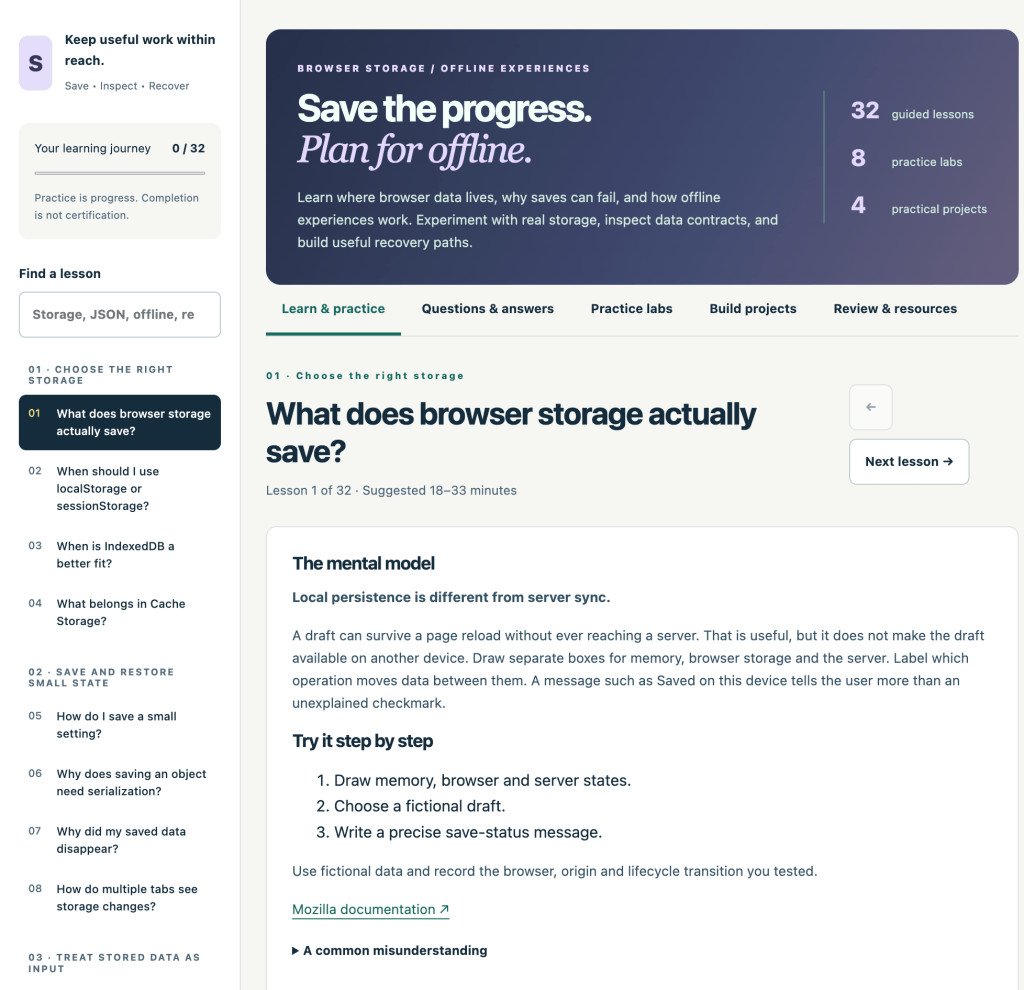
Instead of simply reading about browser storage APIs, this interactive learning environment gives you opportunities to experiment, inspect results, answer questions, complete practical exercises, and build projects.
Why Browser Storage Matters
Imagine building a notes application.
A user writes several notes, closes the browser, and returns tomorrow.
Are the notes still there?
What happens if storage is cleared?
What happens if the data format changes after an application update?
Can the application still open when the user loses their internet connection?
These questions quickly move beyond basic JavaScript. They involve understanding how browsers store information and how developers design applications that can recover gracefully when something goes wrong.
Browser Storage & Offline Studio focuses on these practical problems.
Learn Where Browser Data Actually Lives
The Studio introduces the concepts behind storing information directly within the browser.
Rather than treating storage as a mysterious feature, the lessons encourage you to understand the complete data lifecycle:
Save → Inspect → Recover
You explore where browser data lives, why saved information can disappear, how applications should structure stored data, and what developers need to consider when designing recovery strategies.
The goal isn’t simply to memorize an API.
The goal is to understand what your application is doing with its data.
32 Guided Lessons
Browser Storage & Offline Studio contains 32 guided lessons covering browser storage and offline experiences.
The learning environment encourages you to actively work with each concept instead of simply clicking through pages.
Lessons include scenario questions, practice artifacts, reflection, and opportunities to revisit material later.
Your progress is stored locally in your browser, and you can export your progress so you have a portable record of your work.
Experiment with Real Browser Storage
One of the most useful parts of the Studio is its browser data workbench.
You can experiment with real storage behavior and inspect the results yourself.
This makes concepts such as browser storage, JSON data, persistence, data contracts, migrations, and recovery much easier to understand.
Instead of being told what should happen, you can change an input and observe what actually happens.
That distinction is important when learning web development.
Browsers have storage limits, lifecycle rules, security boundaries, and different behaviors that developers need to understand.
Explore Web Storage and IndexedDB
Two important technologies explored within the learning material are Web Storage and IndexedDB.
Web Storage provides familiar tools such as localStorage, which can be useful for relatively simple pieces of persistent browser data.
IndexedDB provides a more capable browser database for applications that need to manage larger or more structured collections of information.
Learning when and why you might choose different storage approaches is an important part of building modern frontend applications.
Learn to Think About Failure
Saving data is only half of the problem.
Good applications also need to consider what happens when something goes wrong.
Browser Storage & Offline Studio encourages you to think about questions such as:
- What happens when stored data is missing?
- What happens when an application’s data structure changes?
- How should an application migrate older data?
- What happens when storage is unavailable?
- How can users recover important work?
- What should happen when a network request fails?
Thinking about these situations while developing an application can make the final application significantly more resilient.
Understand Offline Web Experiences
The Studio also explores how web applications can provide useful experiences when a network connection is unreliable or unavailable.
This includes learning about service workers and how they can be used as part of an offline strategy.
Importantly, the Studio separates the main learning environment from its offline example.
A dedicated offline-notes example lets you experiment with enabling offline support and understand how the pieces fit together.
This provides a practical bridge between learning the concepts and actually building something.
8 Practice Labs
Reading about browser APIs isn’t enough.
The Studio includes 8 practice labs where you can change inputs, inspect results, and explore browser behavior.
This experimentation helps turn abstract concepts into something observable.
Try something.
Inspect the result.
Change something.
Test again.
Explain what happened.
That process is one of the most effective ways to develop a deeper understanding of browser technology.
Build Four Practical Projects
The Studio also includes 4 practical projects designed to move beyond isolated exercises.
You can start with a scoped offline-notes application and progress toward thinking about more advanced topics such as migrations, queues, synchronization boundaries, and recovery plans.
Projects encourage you to ask an important developer question:
Can I explain why this application works?
Being able to produce working code is useful.
Being able to explain its behavior, limitations, and failure cases is much more valuable.
Questions and Answers When You Get Stuck
The Studio includes 32 common questions with explanations.
You can search by question, application, or symptom when you encounter problems involving topics such as missing data, caching, transactions, storage, or recovery.
The explanations are accompanied by practice guidance and references to Mozilla’s MDN documentation, making the Studio useful both as a structured learning experience and as a reference you can return to later.
Your Learning Record
The Studio also includes tools for tracking your learning.
Completing a lesson requires more than simply pressing a completion button. The learning flow incorporates scenario answers, a practice artifact, and reflection.
You can also return to completed material for recall practice.
This changes the experience from simply consuming information into actively working with it.
Browser Storage Is Not Cloud Storage
One of the most important concepts for developers to understand is that locally stored browser information should not automatically be treated as a cloud backup.
Local browser data can be affected by browser settings, storage policies, clearing site data, application changes, and other lifecycle events.
That is why good application design needs to consider persistence, recovery, synchronization, and the limitations of each storage mechanism.
Understanding those boundaries can prevent a lot of surprises later.
Who Is This Studio For?
Browser Storage & Offline Studio can be useful for:
JavaScript learners who want to move beyond basic variables and DOM manipulation.
Frontend developers who want a stronger understanding of browser persistence.
Web developers building applications that need to remember user state.
Students learning Progressive Web App concepts and service workers.
Developers experimenting with offline-first design.
Vibe coders using AI who want to understand what generated storage and offline code is actually doing.
That final point is especially important.
AI can generate localStorage, IndexedDB, caching, and service-worker code very quickly. But developers still need to understand where information is being stored, when it can disappear, what happens when schemas change, and how users can recover their work.
From “It Works” to “I Understand Why It Works”
It is easy to create a small application that saves something to the browser.
The more interesting challenge is building an application where you understand the complete lifecycle of that information.
Where was it saved?
How long will it remain?
Who can access it?
What happens after an update?
What happens offline?
What happens when something fails?
How does the user recover?
Those questions are what turn a simple browser-storage experiment into real application design.
Browser Storage & Offline Studio gives you a structured environment for exploring them.
Start Learning
Explore the free interactive learning experience:
https://discoveryvip.com/browser-storage-studio
Work through the lessons, experiment with browser storage, complete the labs, build the projects, and test the offline example.
Don’t just save data.
Understand where it goes, why it stays, when it can disappear, and how to recover it.