
Web accessibility is one of those topics that is easy to read about but much harder to truly understand until you start testing websites yourself.
What happens when you try to navigate a page without a mouse? Is the text actually readable against its background? Does an image communicate useful information to someone who cannot see it? Can someone understand what went wrong when a form contains an error?
These are practical questions—and they require practical experience.
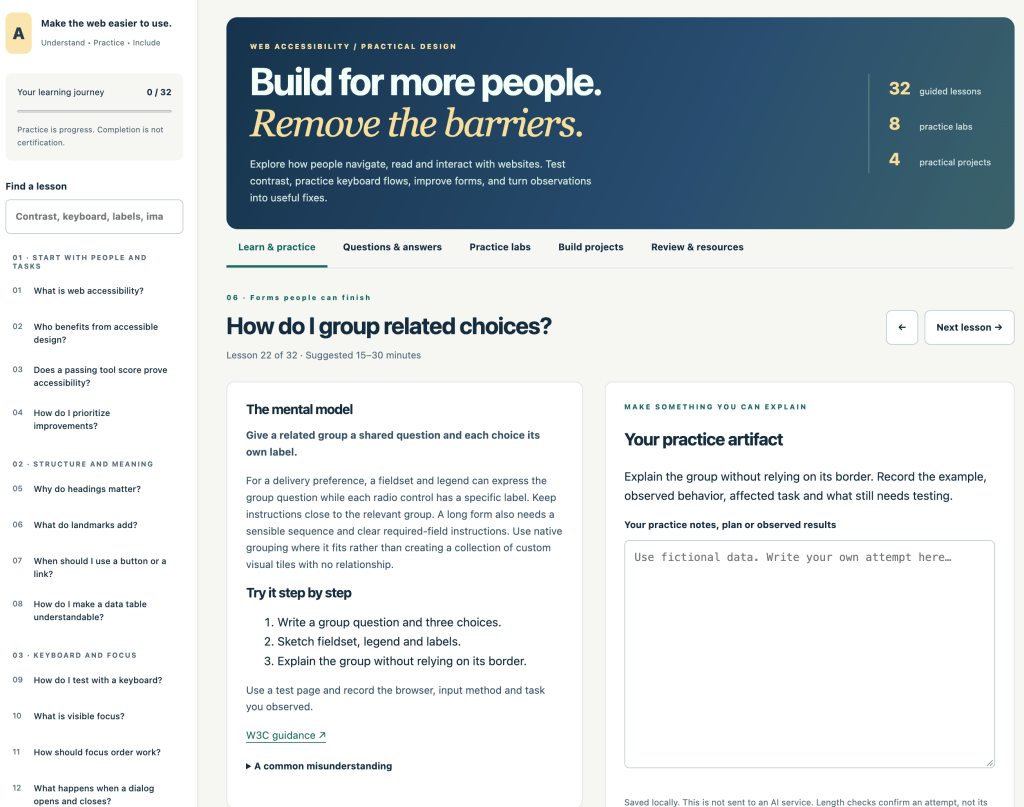
That is why I created the Web Accessibility Studio, a free interactive learning resource on DiscoveryVIP designed to help developers, designers, students, and anyone building for the web develop a more practical understanding of accessibility.
Try the Web Accessibility Studio:
https://discoveryvip.com/web-accessibility-studio/
Accessibility Is About Removing Barriers
Accessibility isn’t simply about satisfying a checklist.
It is about recognizing the barriers that can prevent people from successfully navigating, understanding, and interacting with a website—and learning how to remove those barriers.
The Web Accessibility Studio approaches accessibility from that perspective.
Instead of only presenting definitions and guidelines, the Studio encourages you to:
- observe accessibility problems,
- understand why they matter,
- test possible improvements,
- practice accessible design techniques,
- document what you discover,
- reflect on the results,
- and build something you can explain.
The goal is to move from “I know what accessibility means” to “I know how to look for accessibility problems and improve them.”
32 Guided Accessibility Lessons
The Studio contains 32 guided lessons covering practical areas of web accessibility.
You can work through topics involving things such as keyboard interaction, contrast, images, labels, forms, navigation, and other common accessibility considerations.
The lessons aren’t designed around simply clicking “Next.”
Each lesson encourages you to apply what you are learning.
You answer scenarios, create a practice artifact, record observations, and reflect on what happened.
That creates an important learning loop:
Learn → Practice → Observe → Reflect → Improve
Instead of accessibility becoming another collection of rules to memorize, it becomes something you actively investigate.
Learn to Ask Better Accessibility Questions
One of the most useful skills in accessibility work is knowing what questions to ask.
For example:
Can I complete this task using a keyboard?
Does this text have sufficient contrast?
Does this image need alternative text?
Can users understand what a form field requires?
What happens when the user makes a mistake?
Is the interface communicating information using color alone?
The Studio includes 32 common accessibility questions with explanations, practice guidance, and references to W3C resources.
This makes the Q&A section useful both while learning and later as a quick reference when building websites.
Eight Interactive Practice Labs
Reading about accessibility is useful.
Testing it yourself is better.
The Web Accessibility Studio includes eight practice labs where you can change inputs and inspect the results.
These exercises help turn abstract accessibility ideas into something visible and testable.
The labs use transparent rules, calculations, checklists, and real keyboard interactions so that you can understand what is happening rather than simply receiving a pass/fail message.
That distinction is important.
The goal isn’t to press a button and be told that a website is “accessible.”
The goal is to understand why a particular design decision can create or remove a barrier.
Build Real Accessibility Projects
Learning becomes much more valuable when you apply it to something real.
The Studio includes four practical project briefs that encourage you to take what you’ve learned and conduct a focused accessibility review.
The basic process is straightforward:
Choose a task → Observe barriers → Record evidence → Make an improvement → Test again → Explain what changed
This is much closer to how accessibility work happens in real web development.
You aren’t simply memorizing terminology.
You’re learning how to investigate a user experience.
Practice Keyboard-First Thinking
One of the easiest ways to start seeing a website differently is to put the mouse aside.
Try navigating using the keyboard.
Can you see where the focus is?
Can you reach every interactive element?
Does the order make sense?
Can you activate buttons and controls?
Can you escape components that open?
Exercises like these quickly reveal that accessibility isn’t an invisible technical requirement. It directly affects how someone experiences an interface.
Make Forms Easier to Understand
Forms are another important accessibility area.
A form might look perfectly clear to its designer while creating significant confusion for another user.
Labels, instructions, required fields, validation messages, focus behavior, and error recovery all contribute to whether someone can successfully complete a task.
The Studio encourages you to examine these interactions rather than considering individual HTML elements in isolation.
The real question becomes:
Can the user successfully complete the task?
That is a much more useful way to think about accessibility.
Keep a Learning Record
The Studio also includes a learning record so you can track your progress.
Your practice notes and progress are stored locally in your browser, and you can export your work as a backup.
You can also download materials such as a workbook, Q&A handbook, manual review checklist, example instructions, and a local form-recovery example.
This turns the Studio into more than a one-time tutorial.
It can become a practical accessibility workbook that you return to while improving your web development skills.
Accessibility Is Not a One-Button Audit
An important principle behind the Web Accessibility Studio is that accessibility cannot be reduced to a single automated score.
Automated tools can identify certain problems, but they cannot completely determine whether real people can successfully use a website.
Accessibility requires observation, judgment, manual testing, appropriate assistive technology, and—most importantly—consideration of actual users.
The Studio therefore does not claim to certify websites or provide a complete WCAG conformance evaluation.
Instead, it helps you build the knowledge needed to perform more thoughtful accessibility work.
Useful Accessibility Resources
The Studio also connects learners with established accessibility resources including:
- W3C Web Accessibility Initiative tutorials
- W3C Easy Checks
- WCAG Quick Reference
- ARIA Authoring Practices Guide
This makes it easier to move from an introductory exercise into deeper accessibility research when you encounter a topic you want to explore further.
Better Accessibility Can Make You a Better Web Developer
Learning accessibility can change how you think about web development.
You begin asking better questions.
Not simply:
Does the page look good?
But:
Can people actually use it?
Not simply:
Does the form work?
But:
Can someone understand it, navigate it, recover from mistakes, and complete the task?
Not simply:
Is the interface technically functional?
But:
Who might this design unintentionally exclude?
Those questions lead to better interfaces.
And often, improvements that help people with disabilities also produce clearer, more understandable experiences for everyone.
Start Learning Web Accessibility
If you build websites, teach web development, study frontend development, or simply want to understand how to create more inclusive digital experiences, the Web Accessibility Studio gives you a practical place to begin.
Work through the lessons.
Try the labs.
Use only your keyboard.
Inspect your forms.
Question your design assumptions.
Build the projects.
Record what you discover.
Then take what you’ve learned and apply it to the next website you create.
Explore the free Web Accessibility Studio:
https://discoveryvip.com/web-accessibility-studio/
Build for more people. Remove the barriers.