
AI becomes much more useful when it can do more than answer questions.
What if you could connect AI to Google Sheets, Docs, Gmail, and other Google Workspace tools—and use it as part of an actual automation workflow?
That is what the Apps Script + Gemini Studio on DiscoveryVIP is designed to help you learn.
Explore the Apps Script + Gemini Studio:
https://discoveryvip.com/apps-script-gemini-studio/
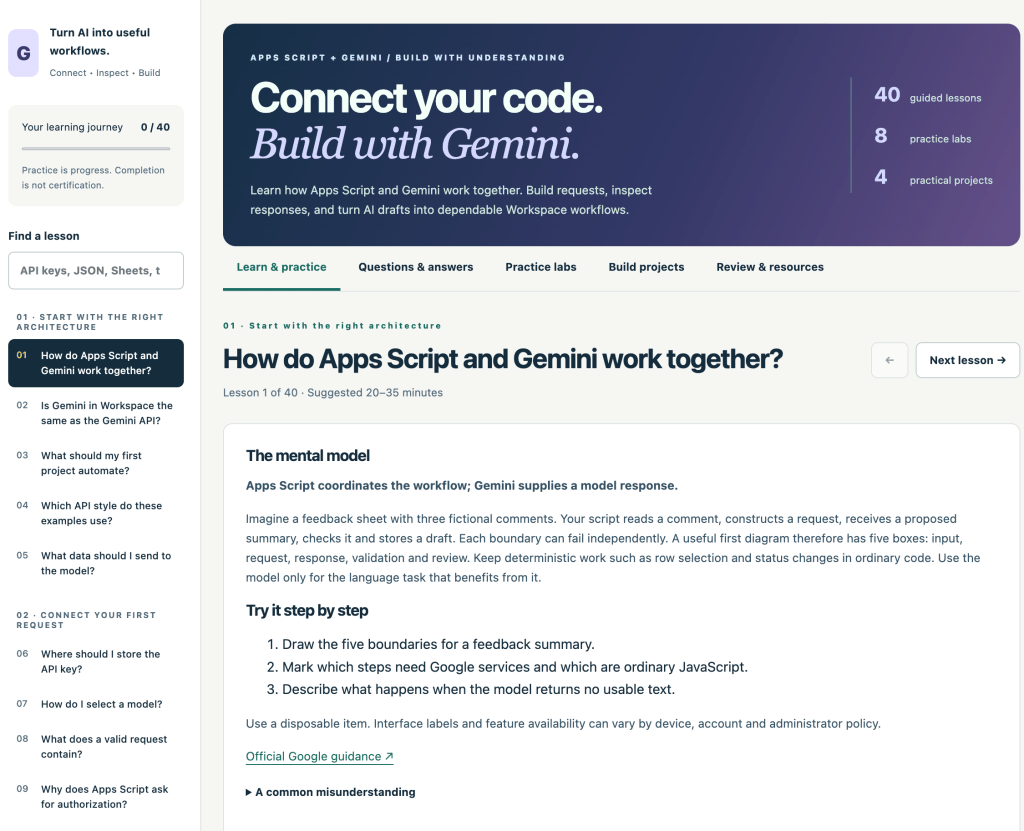
Instead of simply giving you code to copy and paste, this interactive learning guide focuses on helping you understand how Google Apps Script and Gemini work together so you can build, inspect, test, and improve your own AI-powered Workspace solutions.
From AI Prompts to Real Automation
There is an important difference between asking an AI a question and integrating AI into an application.
With Apps Script and Gemini, you can begin connecting AI capabilities with the tools you already use in Google Workspace.
That opens the door to workflows such as:
- Analyzing information stored in Google Sheets
- Generating or transforming content for Google Docs
- Creating AI-assisted responses and drafts
- Processing structured information
- Turning spreadsheet data into useful AI-generated output
- Building repeatable Workspace workflows
- Connecting existing Apps Script projects with Gemini
The challenge is understanding what is happening between your Apps Script code and the AI model.
Apps Script + Gemini Studio was created to make that process easier to learn.
40 Guided Lessons
The Studio includes 40 guided lessons covering the concepts you need to understand when connecting Apps Script with Gemini.
The goal isn’t simply:
Copy this code and run it.
Instead, the learning process encourages you to understand the request, inspect the response, experiment with the result, and create something you can explain.
That distinction becomes increasingly important as developers use AI to generate more of their code.
AI can help you write code quickly.
Understanding the code helps you determine whether that code actually does what you intended.
Learn How Apps Script Talks to Gemini
When you integrate Gemini into Apps Script, several pieces have to work together.
Your script needs to prepare a request, send information to the appropriate API, receive a response, interpret the returned data, handle possible problems, and then do something useful with the result.
The Studio helps break this process into smaller concepts that you can explore individually.
Rather than treating the AI API as a mysterious black box, you can start understanding the mechanics behind the interaction.
That knowledge makes it much easier to troubleshoot and extend your projects later.
40 Common Questions and Answers
Learning API integrations usually creates plenty of questions.
Why didn’t my request work?
Where should an API key be configured?
What does the JSON response contain?
How should errors be handled?
How do triggers interact with an AI workflow?
Apps Script + Gemini Studio includes 40 searchable questions and explanations covering common topics and problems learners are likely to encounter.
The Q&A section also includes practice steps and references to official Google resources.
This makes the Studio useful not only as a course but also as a reference you can return to while building projects.
8 Interactive Practice Labs
Reading about an API is useful.
Experimenting with how one works is better.
The Studio contains eight local practice simulators that let you change inputs and inspect how different parts of an AI automation workflow behave.
Importantly, these labs don’t require you to provide an API key, make a live Gemini request, or connect a Google account.
That provides a safer learning environment where you can concentrate on understanding the mechanics before configuring a real project.
Change something.
Inspect what happens.
Think about why it happened.
Then try something else.
That feedback loop is one of the fastest ways to develop practical technical understanding.
Build Practical Projects
Eventually, learning needs to turn into building.
Apps Script + Gemini Studio includes four practical projects designed to move you from individual concepts toward complete workflows.
Project briefs help you plan what you want to build before moving into your own Apps Script environment.
The objective is not simply to finish a project.
It is to build something that you understand well enough to explain, modify, debug, and improve.
Downloadable Apps Script Starter Code
Once you’re ready to experiment inside your own Google Apps Script project, the Studio provides downloadable starter resources.
These include an Apps Script API wrapper along with examples involving Google Sheets, Google Docs, and AI-assisted replies.
There is also a downloadable setup and testing guide.
Your credentials should be configured inside your own private Apps Script project rather than entered into the local learning simulations.
This creates a useful separation between learning how the workflow works and running real API requests.
Learn by Creating Artifacts
One feature I especially wanted in this learning experience was active participation.
Throughout the lessons, learners can create practice artifacts containing their notes, plans, observations, and results.
You aren’t just clicking “Next” repeatedly.
You are producing evidence of your thinking.
The Studio also provides opportunities to reflect on what happened before marking lessons complete.
This follows an important principle behind the way I approach AI-assisted learning:
Don’t just generate an answer. Build understanding around the answer.
Progress That Stays With You
The Studio tracks your learning progress locally in your browser.
You can work through lessons, complete activities, record reflections, revisit material, and export your progress.
There is also recall practice that lets you return to previously completed material.
This turns the resource into more than a one-time tutorial.
It becomes a learning workspace you can continue using as your Apps Script and Gemini skills develop.
A Different Way to Learn AI Development
Generative AI has made it incredibly easy to generate code.
You can describe an Apps Script project and have AI produce a substantial amount of code within seconds.
But generated code isn’t automatically reliable code.
You still need to understand what information is being sent, what the model returns, how the response is processed, where errors can occur, and how your automation interacts with Google Workspace.
That is why Apps Script + Gemini Studio emphasizes:
Connect → Inspect → Build
Connect the technologies.
Inspect what is happening.
Then build something useful.
What You Can Learn
By working through the Studio, you can develop a stronger understanding of:
- Google Apps Script fundamentals
- Gemini API requests and responses
- JSON request and response structures
- Prompt construction for applications
- AI-assisted Google Sheets workflows
- AI-assisted Google Docs workflows
- Error handling and troubleshooting
- API configuration concepts
- Workspace automation patterns
- Testing AI-generated results
- Designing dependable AI workflows
More importantly, you can begin developing the habit of inspecting and understanding AI-generated solutions rather than automatically accepting them.
Apps Script + Gemini Is a Powerful Combination
Google Apps Script already provides an accessible way to automate Google Workspace.
Gemini adds another layer.
Instead of writing automation that only follows predefined rules, developers can create workflows capable of interpreting, summarizing, classifying, transforming, and generating information.
That creates opportunities for entirely new types of Workspace applications.
A spreadsheet can become an intelligent processing tool.
A document workflow can incorporate AI-assisted analysis.
Routine information can be transformed into useful summaries.
Existing Apps Script automations can gain AI capabilities.
And many of these ideas can be explored without building a traditional server-side application.
Start Learning and Building
If you’ve been curious about combining Google Apps Script, Gemini, AI, and Google Workspace automation, this Studio gives you a structured place to begin.
You don’t need to understand everything before you start.
Work through a lesson.
Try a practice lab.
Inspect a request.
Study a response.
Build a small workflow.
Then improve it.
The goal isn’t to have AI do everything for you.
The goal is to use AI to help you build things you actually understand.
Start exploring Apps Script + Gemini Studio:
https://discoveryvip.com/apps-script-gemini-studio/
40 guided lessons. 40 common questions. 8 practice labs. 4 practical projects.
Learn how Apps Script and Gemini work together—and start turning AI into useful Google Workspace workflows.