
AI can generate code in seconds. But generating code and understanding what you are building are two very different things.
That is the idea behind the Vibe Coding Apps Script Studio, a free interactive learning resource I created to help you learn how to combine AI-assisted coding with Google Apps Script in a more structured, practical way.
Explore the studio:
https://discoveryvip.com/vibe-coding-apps-script-studio
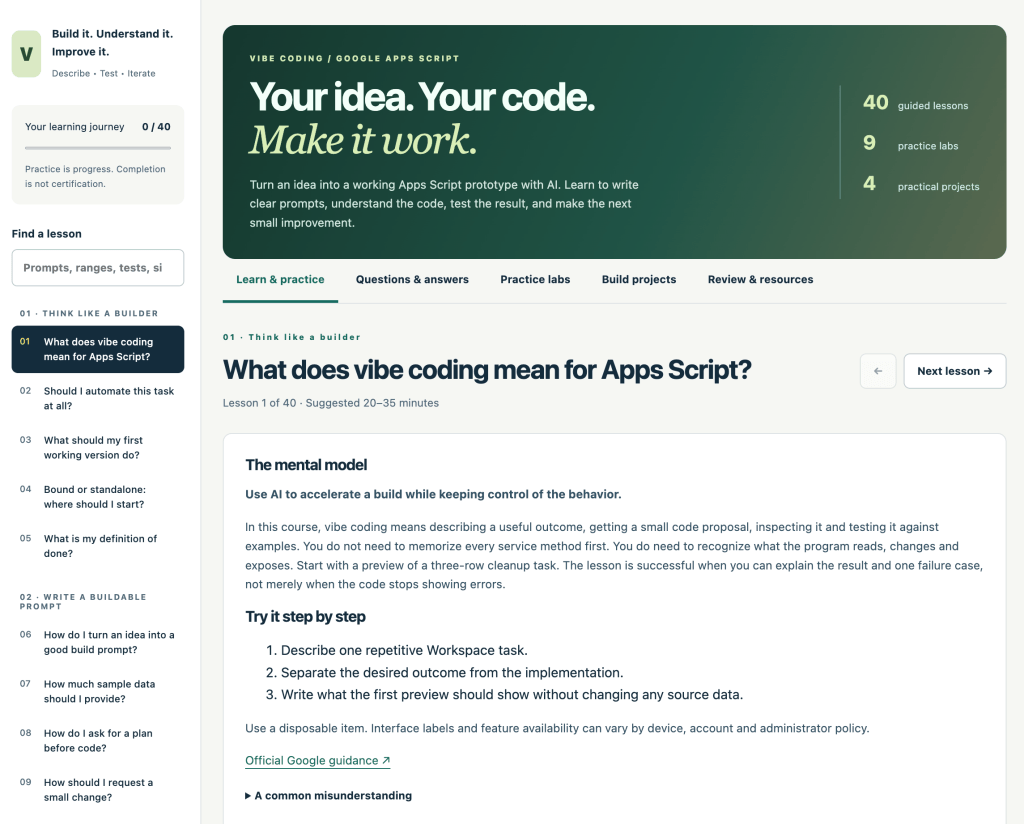
Instead of simply asking AI to generate an entire application and hoping it works, the Studio encourages a much better workflow:
Describe → Build → Test → Understand → Improve
The goal isn’t just to make AI produce code.
The goal is to build something you can explain, test, debug, and improve.
What Is Vibe Coding with Google Apps Script?
Vibe coding changes the way we approach software development.
Rather than starting with every line of code yourself, you begin with the outcome you want.
You describe the application, automation, or feature to an AI coding assistant. The AI helps generate an initial solution, and you work with that solution through a cycle of testing, reviewing, debugging, and improvement.
Google Apps Script is an excellent environment for learning this approach because relatively small amounts of code can create useful applications and automations across Google Workspace.
You can build solutions involving:
- Google Sheets
- Google Docs
- Gmail
- Google Drive
- Google Calendar
- Google Forms
- Custom menus
- Sidebars and dialogs
- Web apps
- Workspace automation
This means you can move quickly from an idea to something you can actually run and test.
A Complete Interactive Learning Studio
The Vibe Coding Apps Script Studio isn’t designed as a page you simply read from top to bottom.
It’s an interactive learning environment built around doing.
The Studio contains 40 guided lessons, 40 common questions and explanations, 9 hands-on practice labs, and 4 practical projects.
You can move between learning, practicing, answering questions, building projects, and reviewing what you’ve learned.
Your progress and practice notes can also be stored locally in your browser, and you can export your progress so you have a record of your learning.
Learn How to Write Better AI Coding Prompts
One of the most important skills in AI-assisted development is learning how to clearly describe what you want.
A vague request such as:
“Make me an Apps Script app.”
doesn’t give an AI coding assistant much useful direction.
A stronger prompt describes the environment, objective, data, expected behavior, constraints, and how the result should be tested.
The Studio helps you practice thinking through these requirements before generating code.
This is important because better specifications generally give you a much better starting point for your application.
You’re not just learning how to prompt AI.
You’re learning how to think about software requirements.
Don’t Just Accept the Generated Code
One of the biggest mistakes you can make when vibe coding is assuming that generated code must be correct.
AI-generated code should be treated as a proposed solution.
You still need to inspect it.
You still need to test it.
You still need to understand what it changes.
And you need to recognize when something isn’t behaving the way you expected.
That process is built directly into the Studio.
The learning activities encourage you to examine code patterns, reason about spreadsheet ranges, preview changes, think through application behavior, and test your assumptions.
Nine Practice Labs
The Studio includes nine local practice labs designed to develop the reasoning skills you need when working with Apps Script and AI-generated code.
These activities include tasks such as writing better development briefs, inspecting code patterns, mapping spreadsheet ranges, previewing data changes, and reasoning through possible outcomes.
The labs deliberately focus on understanding rather than blindly executing code.
They use fictional examples and fixed rules, and pasted code isn’t automatically executed.
That gives you a space to practice the thought process behind development before applying those ideas to your own Apps Script projects.
Build Real Projects
Learning becomes much more useful when you actually build something.
The Studio includes practical projects where you can apply what you’ve learned.
One of the starting projects is a task-audit sidebar for Google Sheets.
From there, you can experiment with ideas around cleanup tools, reporting applications, workflow helpers, and other Workspace solutions.
The objective is not simply:
“I got the code to run.”
A much better milestone is:
“I understand what this application does, why it works, how I tested it, and what I would change next.”
That distinction is at the heart of effective vibe coding.
A Starter Kit You Can Experiment With
The Studio also includes a downloadable starter kit for building a read-only task-audit sidebar in a disposable Google Sheet.
The resources include Apps Script code, the sidebar interface, setup and testing instructions, and reusable prompts for building, reviewing, and repairing applications.
You can use your preferred AI coding assistant to suggest small extensions and then inspect and test each change.
This creates a practical development loop:
Start small → Generate → Inspect → Test → Improve
Instead of asking AI to create a massive application in one attempt, you gradually evolve something that already works.
40 Apps Script Questions Explained
When you’re learning Apps Script, questions appear constantly.
Why isn’t my range correct?
Why didn’t an event trigger?
Why isn’t my sidebar communicating with the server?
What permissions does the application require?
How should I deploy this?
The Studio includes 40 common questions with explanations, practice steps, and links to official Google documentation.
This gives you another way to explore Apps Script beyond following lessons in sequence.
If you encounter a problem, you can search the Q&A section by question, application, or symptom and explore the reasoning behind the answer.
Learning Through Reflection
Another important part of the Studio is reflection.
After completing an activity, you’re encouraged to explain what happened and what you learned.
This might seem like a small step, but it makes a major difference.
If you can explain:
- what the code does,
- what inputs it expects,
- what output it produces,
- what permissions it requires,
- what could go wrong,
- and how you tested it,
then you’re moving beyond copying code.
You’re developing actual understanding.
Vibe Coding Is an Iterative Process
The most productive AI coding workflow isn’t:
Prompt → Copy → Done
It’s closer to:
Idea → Describe → Generate → Inspect → Test → Debug → Improve → Explain → Repeat
Each iteration should make the application slightly better while also improving your understanding of it.
That’s why the Studio focuses heavily on making small, testable improvements rather than generating huge applications all at once.
You Don’t Need to Be an Apps Script Expert
The Studio is designed to help learners build their understanding while they build applications.
You don’t need to memorize the entire Apps Script API before you start.
Instead, you can begin with an idea, learn the concepts required to implement it, use AI to help generate solutions, and investigate the code as you go.
This creates a different learning experience.
Instead of spending weeks studying concepts before building anything, you’re learning those concepts in the context of something you actually want to create.
Build Something You Can Explain
AI is making it easier than ever to produce code.
That makes understanding the code even more important.
The developers who get the most value from AI won’t necessarily be the people who can generate the most code.
They’ll be the people who can clearly describe problems, evaluate proposed solutions, test results, identify problems, and continuously improve what they’ve built.
That’s what the Vibe Coding Apps Script Studio is designed to help you practice.
If you want to explore AI-assisted development while learning Google Apps Script through practical exercises and projects, start here:
Vibe Coding Apps Script Studio
https://discoveryvip.com/vibe-coding-apps-script-studio
Start with an idea.
Describe it clearly.
Build something small.
Test it.
Understand it.
Then make it better.