
Discover five essential JavaScript concepts, practice with real code examples, and explore a free 15-mission coding adventure that turns learning into a game.
What if learning JavaScript felt less like studying a textbook and more like solving a series of puzzles?
Imagine starting with a simple problem.
You write a few lines of code.
You test your solution.
It works.
You move on to something slightly more challenging.
Before long, you’ve written functions, worked with variables, made decisions using conditions, and started thinking like a programmer.
This is one of the most effective ways to develop programming skills: small, achievable challenges that gradually build your confidence and understanding.
You don’t need to begin with a complicated application.
You don’t need to memorize hundreds of JavaScript methods.
And you certainly don’t need to understand an entire framework before writing your first useful program.
You need a starting point, a problem to solve, and opportunities to practice.
In this edition, we’ll explore five foundational JavaScript concepts using simple examples you can try immediately.
Then I’ll introduce JavaScript Quest: Pip & the Lighthouse, a new free interactive coding game I’ve created on DiscoveryVIP to make practicing JavaScript more engaging.
Let’s start with the code.
1. Variables: Teaching JavaScript to Remember Information
Every application needs to work with information.
A game might track points, energy, player names, or completed challenges.
A shopping application might track product prices and quantities.
A business application might track orders and customer information.
In JavaScript, variables allow us to store values and use them later.
Consider this example:
const playerName = "Pip";
let energy = 5;

console.log(playerName);
console.log(energy);
Here, playerName contains a string, while energy contains a number.
We use const when we don’t intend to reassign a variable.
We use let when its value may change.
For example:
let energy = 5;

energy = energy + 3;

console.log(energy); // 8
We started with five energy points and added three.
JavaScript calculated the result and stored the new value.
A useful shortcut
JavaScript also provides an addition assignment operator.
let energy = 5;

energy += 3;

console.log(energy); // 8
Both approaches produce the same result.
Try it yourself: Create a variable called score, give it a starting value of 10, and increase it by 25.
Then decrease it by 5.
What is the final score?
Key takeaway: Variables give programs a way to remember information and update it as things change.
2. Functions: Turn Instructions Into Reusable Solutions
Imagine you need to calculate the energy gained by a player several times.
You could repeat the calculation throughout your program.
But what happens when the rules change?
You’d have to update every calculation.
Functions solve this problem by letting you create reusable blocks of logic.
function addEnergy(current, bonus) {
  return current + bonus;
}

console.log(addEnergy(5, 3));  // 8
console.log(addEnergy(10, 5)); // 15
console.log(addEnergy(2, 8));  // 10
Let’s break this down.
function tells JavaScript we’re defining a function.
addEnergy is the function’s name.
current and bonus are parameters that receive input values.
return sends the calculated result back to the code that called the function.
Why return matters
A common beginner mistake is confusing console.log() with return.
Consider this:
function doubleNumber(number) {
  console.log(number * 2);
}
This function displays the result, but it doesn’t return that result.
If we write:
const result = doubleNumber(5);The function prints 10, but result contains undefined.
Now compare:
function doubleNumber(number) {
  return number * 2;
}

const result = doubleNumber(5);

console.log(result); // 10
This version returns a value that other parts of the application can use.
Try it yourself: Write a function called calculatePoints() that accepts the number of completed missions and returns the total points when each mission is worth 100.
For example:
calculatePoints(3); // 300Key takeaway: Functions help organize code into smaller, reusable solutions. Returning values makes those solutions more flexible.
3. Conditions: Help Your Code Make Decisions
Programs need to make decisions.
Should a button be enabled?
Has the user entered valid information?
Does a player have enough energy to continue?
Should an application display a success message?
JavaScript uses conditional statements to answer these questions.
const energy = 7;

if (energy >= 5) {
  console.log("You can continue!");
} else {
  console.log("Not enough energy.");
}
The condition energy >= 5 checks whether energy is greater than or equal to five.
If the condition is true, the first block executes.
Otherwise, the else block executes.
Combine conditions
JavaScript also lets us combine multiple requirements.
const energy = 7;
const hasKey = true;

if (energy >= 5 && hasKey) {
  console.log("The lighthouse door opens!");
} else {
  console.log("You need more energy or a key.");
}
The && operator means AND.
Both conditions must be true.
Other useful operators include:
===— strict equality!==— strict inequality>— greater than<— less than>=— greater than or equal to||— logical OR
A beginner mistake worth avoiding
Compare these expressions:
5 == "5"  // true
5 === "5" // false
The loose equality operator == can convert values between types before comparing them.
Strict equality === compares without that type conversion.
In most everyday JavaScript code, strict equality is a clearer default.
Try it yourself: Write a function called canEnter() that accepts an energy value and a Boolean indicating whether the player has a key.
Return true only when the player has at least five energy points and possesses the key.
Key takeaway: Conditional logic allows your applications to respond differently depending on their inputs and current state.
4. Arrays: Work With Collections of Information
As applications grow, you’ll often need to work with multiple values.
Imagine a player collecting items during an adventure.
Instead of creating a separate variable for each item, you can use an array.
const inventory = [
  "Map",
  "Lantern",
  "Key"
];

console.log(inventory[0]); // Map
console.log(inventory[2]); // Key
Arrays store ordered collections of values.
JavaScript array indexes begin at zero.
That means the first element is at index 0.
Add an item
inventory.push("Compass");Now the inventory contains four items.
Check whether an item exists
const hasKey = inventory.includes("Key");

console.log(hasKey); // true
The includes() method checks whether the array contains a particular value.
Process every item
inventory.forEach(item => {
  console.log("Collected:", item);
});
This loops through the array and performs an operation for each item.
Transform an array
const scores = [10, 20, 30];

const doubled = scores.map(score => score * 2);

console.log(doubled); // [20, 40, 60]
The map() method creates a new array by transforming each element.
Try it yourself: Create an array containing five mission scores.
Use reduce() to calculate the total.
const scores = [100, 100, 50, 100, 75];

const total = scores.reduce(
  (sum, score) => sum + score,
  0
);

console.log(total); // 425
Key takeaway: Arrays allow you to organize collections of data and process them efficiently using built-in JavaScript methods.
5. Objects: Give Your Data Meaning and Structure
Arrays are useful for collections.
But what if you want to represent something with multiple related properties?
For example, a player might have a name, energy level, score, and inventory.
An object is a natural way to organize this information.
const player = {
  name: "Pip",
  energy: 10,
  score: 0,
  inventory: ["Map", "Lantern"]
};
You can access properties using dot notation.
console.log(player.name);   // Pip
console.log(player.energy); // 10
You can also update properties.
player.score += 100;
player.energy -= 2;

console.log(player.score);  // 100
console.log(player.energy); // 8
Notice that we can change the properties of an object declared with const.
That’s because const prevents reassignment of the variable itself; it doesn’t automatically make the object immutable.
Combine objects with functions
function completeMission(player) {
  return {
    ...player,
    score: player.score + 100
  };
}

const updatedPlayer = completeMission(player);

console.log(updatedPlayer.score);
The spread operator ...player copies the object’s top-level properties into a new object.
We then replace the score property with an updated value.
This approach avoids changing the original player’s score directly.
Keep in mind that the spread operator creates a shallow copy, so nested arrays and objects remain shared unless you copy those separately.
Try it yourself: Add a level property to the player object.
Write a function that increases the level by one and returns an updated player object.
Key takeaway: Objects let you represent real-world entities and organize related information in a way that’s easier to understand and maintain.
Why Learning Through Small Challenges Works
Let’s connect everything we’ve covered.
You now have examples of five important JavaScript concepts:
- Variables store information.
- Functions organize reusable instructions.
- Conditions make decisions.
- Arrays manage collections.
- Objects structure related data.
These concepts might seem simple individually.
But combine them and you have the foundations of a real application.
A game uses variables to track progress.
Functions calculate outcomes.
Conditions determine what happens next.
Arrays manage collections.
Objects represent players, missions, and other game elements.
And here’s something important:
The same programming concepts apply to business applications, websites, dashboards, automation tools, and countless other projects.
Learning these fundamentals isn’t just about becoming better at a particular coding exercise.
It’s about developing problem-solving skills you can reuse.
The small-victory approach
Rather than trying to learn everything at once, follow this process:
Understand → Experiment → Test → Improve → Repeat
Start with a problem you can understand.
Write a solution.
Test it with different inputs.
Investigate anything unexpected.
Then move on to a slightly more challenging problem.
This approach makes progress visible and gives you opportunities to develop confidence through experience.
It’s also the philosophy behind my newest JavaScript learning game.
Introducing JavaScript Quest: Pip & the Lighthouse
A Little Code. A Big Adventure.
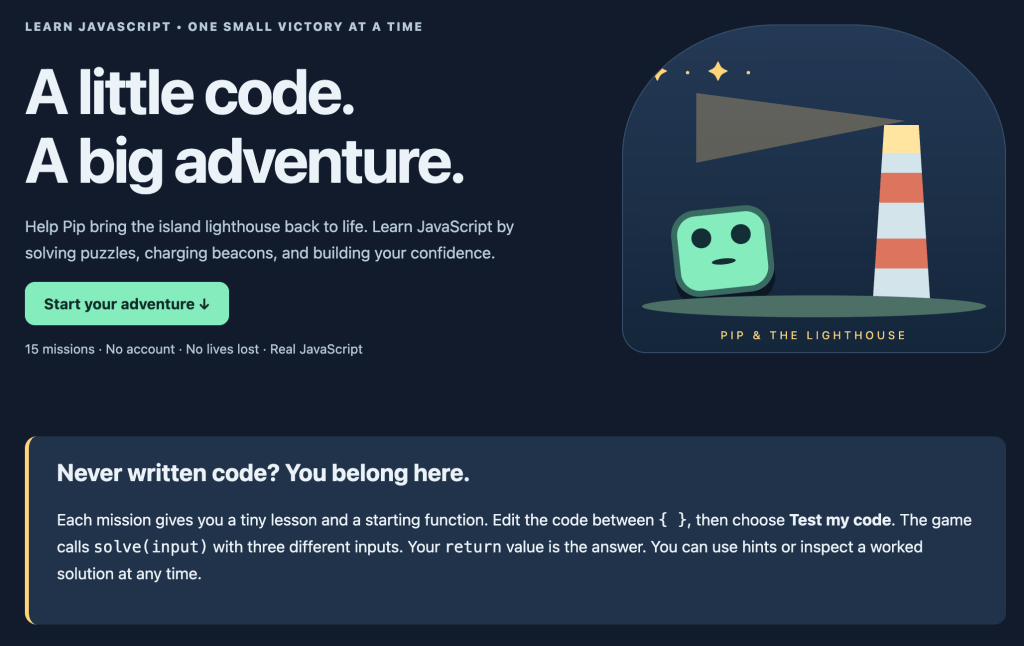
I’ve created a new free interactive JavaScript game on DiscoveryVIP designed to help beginners learn programming through short, achievable coding challenges.
JavaScript Quest: Pip & the Lighthouse takes you on a small island adventure.
Your mission?
Help Pip restore the island lighthouse by solving JavaScript puzzles and lighting beacons along the way.
Instead of simply reading about JavaScript, you’ll write actual code to solve problems and advance through the adventure.
<text color=”secondary” size=”sm”>Explore the game:</text>
https://discoveryvip.com/javascript-quest
How JavaScript Quest Works
The game includes 15 coding missions that gradually introduce important JavaScript concepts.
Each mission provides a small lesson, a problem to solve, and a starting function.
Your task is to edit the code and return the correct result.
For example, a mission might ask you to complete a function like this:
function solve(input) {
  return input * 2;
}
This is an illustrative example of the kind of function-based challenge you’ll encounter.
The game tests your solve(input) function using three different inputs.
It checks the values your code returns rather than requiring you to write the solution in one particular way.
That means you can experiment with different approaches.
What makes the game useful?
15 progressive missions
Start with manageable problems and gradually build your understanding of JavaScript.
Real JavaScript code
You’re not simply choosing answers from a multiple-choice quiz. You’re writing and testing JavaScript functions.
Immediate feedback
Run your solution to see whether it passes the mission’s checks.
Hints and worked solutions
If you’re stuck, you can request a hint or inspect a solution to help understand the concept.
No lives lost
Making mistakes doesn’t end your adventure. You can retry challenges without penalties.
Progress tracking
Complete missions, earn XP, and light beacons as you advance across the island.
No account required
You can begin learning directly in your browser without creating an account.
Save your work
The game stores drafts, completed missions, and notes in your browser, and provides options to save progress and download your code.
Downloadable handbook
You can also download an adventure handbook to support your learning.
Who Is JavaScript Quest For?
I designed this experience to be approachable for people who are just beginning their JavaScript journey.
It’s particularly useful for:
- Complete beginners who have never written JavaScript.
- Students looking for a more engaging introduction to coding.
- Educators searching for practical programming activities.
- Self-directed learners who enjoy puzzle-based challenges.
- Developers who want a quick refresher on fundamental concepts.
You don’t need to install a development environment to get started.
You can open the game in your browser and begin your first mission.
A Challenge for Readers
Here’s my challenge to you:
Can you complete all 15 missions and bring the lighthouse back to life?
Don’t rush through the challenges.
Take time to understand why each solution works.
Try changing your code to see what happens.
Use hints when you need them, but make sure you understand the result before moving on.
And once you complete a mission, ask yourself:
Could I solve the same problem in a different way?
That question can lead to some of the most valuable learning experiences.
Start JavaScript Quest — Free Interactive Coding Adventure:
https://discoveryvip.com/javascript-quest
Final Thoughts: Every Developer Starts Somewhere
After teaching over 3 million students, one of the most important lessons I’ve learned is that successful programming education isn’t about overwhelming learners with information.
It’s about creating opportunities to understand concepts, apply them, and experience progress.
Every experienced developer once struggled with variables, functions, loops, or conditional statements.
Those early challenges are part of learning.
What matters is continuing to experiment and build your understanding.
JavaScript Quest is one more way I’m working to make programming education accessible, practical, and enjoyable.
Whether you’re writing your first JavaScript function or helping someone else learn, I hope you’ll give the adventure a try.
Because sometimes a small coding victory is exactly what you need to keep going.
Let’s Discuss!
Do you think learning programming through games and interactive challenges is more effective than traditional tutorials?
What helped you most when you first started learning JavaScript?
Was it reading documentation, watching videos, building projects, or solving coding puzzles?
I’d love to hear your experiences in the comments.
And if you try JavaScript Quest, share how many missions you complete!
About the Author
Laurence Lars Svekis is a web developer, bestselling author, Google Developer Expert for Google Workspace, and online educator who has taught over 3 million students.
He creates practical programming courses, interactive learning tools, and educational resources through DiscoveryVIP, helping developers learn by building and experimenting.
Explore JavaScript Quest:
https://discoveryvip.com/javascript-quest
Discover more free coding tools and guides:
https://discoveryvip.com/tools.php
https://discoveryvip.com/guides.php
Subscribe to JavaScript Code Examples & Learning:
https://www.linkedin.com/newsletters/javascript-code-examples-learn-7025674646964371456
#JavaScript #LearnJavaScript #JavaScriptForBeginners #LearnToCode #CodingGames #JavaScriptQuest #Programming #WebDevelopment #CodingChallenges #GameBasedLearning #InteractiveLearning #JavaScriptDeveloper #ProgrammingEducation #CodingForBeginners #DeveloperTools #FreeLearning #DiscoveryVIP #LaurenceSvekis