AI is changing the way we build software.
You no longer need to begin every project with an empty editor and write every line of code yourself. AI can help generate code, explain unfamiliar concepts, debug problems, explore ideas, and turn a description into a working prototype surprisingly quickly.
But there is an important difference between asking AI to generate code and actually knowing how to build software with AI.
That difference is what Vibe Coding is about.
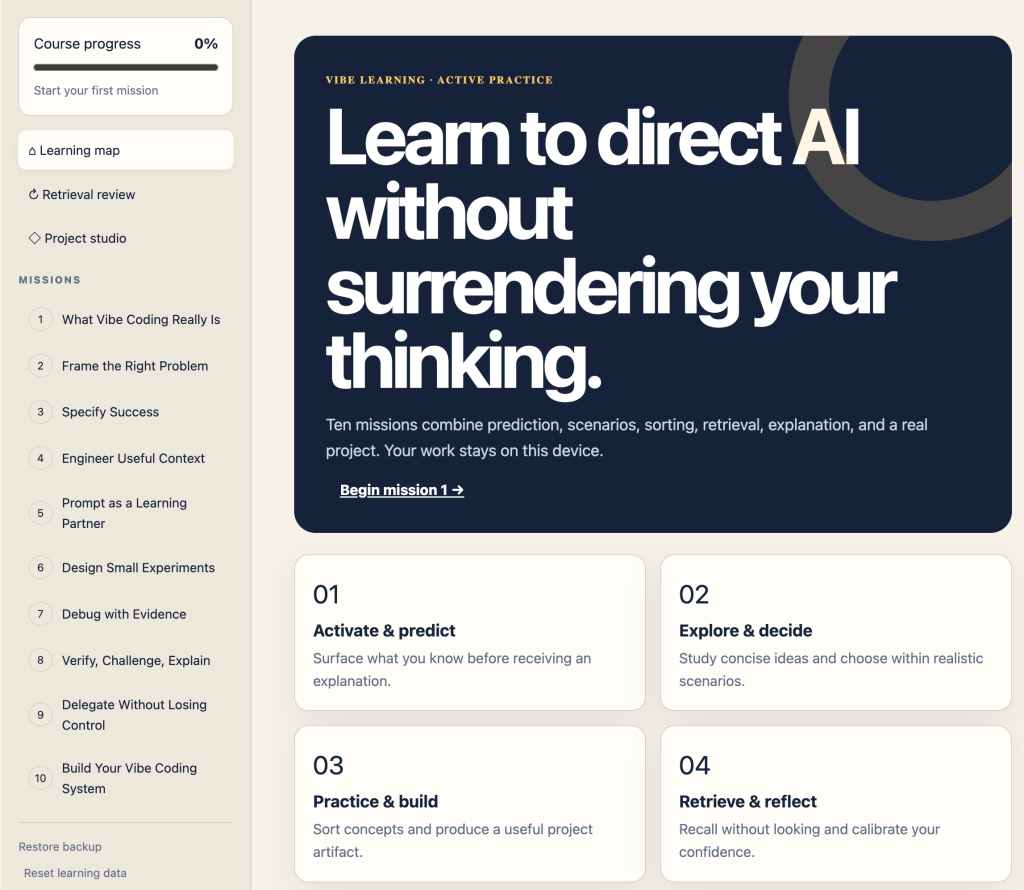
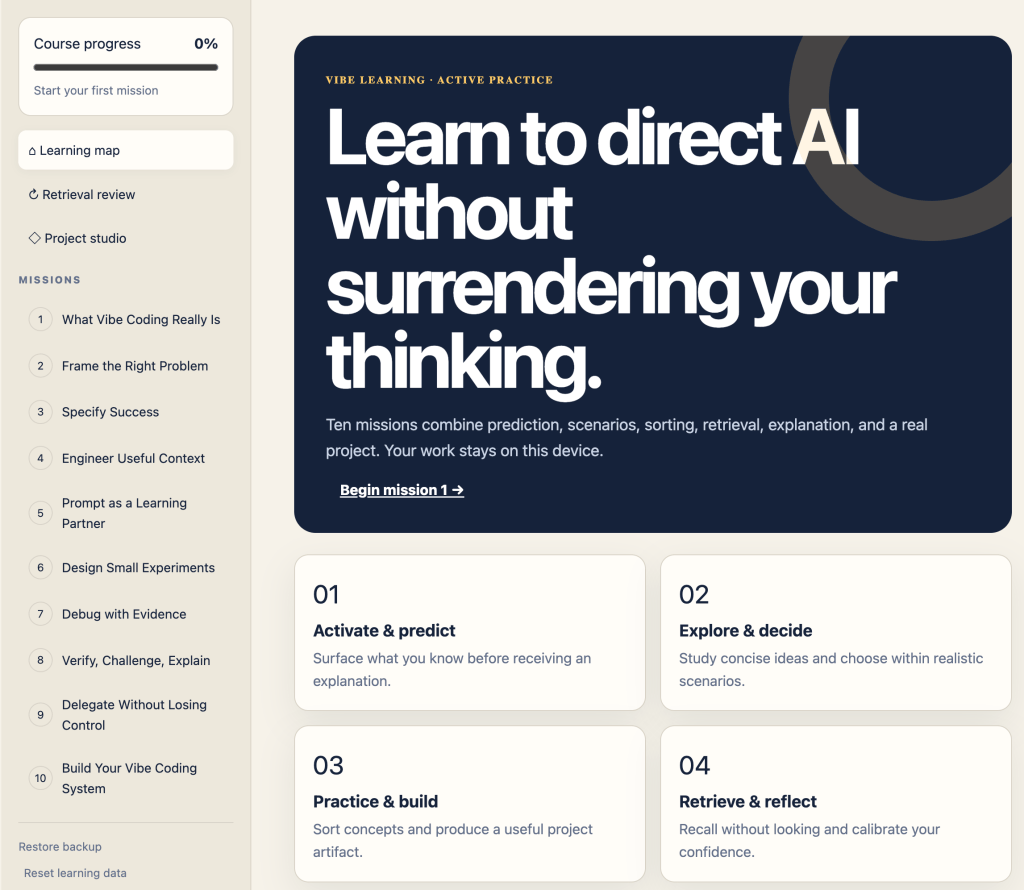
I created the Vibe Coding V1 Learning Lab as an interactive learning experience designed to help you develop the skills needed to work effectively with AI while building real projects.
Try the Vibe Coding V1 Learning Lab
Visit:
https://discoveryvip.com/vibe-coding-v1
Instead of simply reading another tutorial about AI coding, the Learning Lab gives you activities, missions, projects, reviews, and progress tracking so that you can practice the process yourself.
What Is Vibe Coding?
Vibe coding is a different approach to software development.
Instead of thinking only in terms of individual lines of code, you begin with intent.
What are you trying to create?
What should the application do?
What should the user experience be?
What constraints need to be respected?
You communicate that intent to an AI coding assistant, evaluate what it produces, test the result, identify problems, refine your instructions, and repeat.
A typical workflow becomes:
Idea → Prompt → Generate → Test → Evaluate → Refine → Build
The AI can accelerate the implementation, but the developer still provides the direction.
That means good vibe coding isn’t about blindly accepting generated code.
It requires you to learn how to describe problems clearly, break larger ideas into manageable tasks, recognize when an AI-generated solution isn’t doing what you intended, test your assumptions, and progressively improve both your prompts and your application.
Those are the skills the Vibe Coding Learning Lab is designed to develop.
Learning Through Missions
The Learning Lab is organized around missions rather than a traditional wall of lessons.
The goal is to make learning active.
Instead of reading several pages and hoping you remember them later, you work through activities that require you to think about what you’re building and make decisions.
Each mission contributes to your overall course progress, giving you a visible path through the material.
This creates a simple learning loop:
Learn something → Apply it → Check your understanding → Use it again
The more often you retrieve and apply an idea, the more useful that knowledge becomes when you’re working on your own projects.
Your Learning Map
The Learning Map gives you a central place to navigate the experience and see where you are in the course.
Rather than treating learning as a collection of disconnected tutorials, the map encourages you to think of your skills as something you’re progressively building.
You can see your course progress and continue through the missions at your own pace.
There is no need to rush.
The objective isn’t simply to reach 100%.
The objective is to become better at turning ideas into working software.
Retrieval Review
One of the features I’m particularly excited about is Retrieval Review.
It’s easy to read an explanation and think:
“That makes sense.”
But recognizing information isn’t the same as being able to recall and use it later.
Retrieval practice asks you to actively bring ideas back from memory.
That small difference matters.
Instead of repeatedly rereading the same information, the Learning Lab encourages you to recall concepts and apply them again.
This is part of the broader Vibe Learning approach I’ve been developing: use AI to accelerate learning, but keep the learner actively thinking.
AI shouldn’t replace the learning process.
It should help create a better one.
Build in the Project Studio
Eventually, concepts need to become projects.
That’s where the Project Studio comes in.
The studio helps move you from guided learning toward actually creating something.
This is an important transition.
Following an example is useful, but starting with your own idea forces you to make decisions:
What am I building?
What features matter?
How should I describe the application to AI?
Should I ask for the entire application at once or break it into smaller components?
How will I know whether the generated solution actually works?
What should I change next?
These are exactly the kinds of questions you’ll encounter when vibe coding outside a tutorial.
Prompting Is Only Part of the Skill
There’s a tendency to reduce AI development to “prompt engineering.”
Prompting matters, but it is only one part of the process.
A great prompt won’t help much if you can’t evaluate the result.
Effective vibe coding combines several skills:
Clear intent — Know what you’re trying to accomplish.
Decomposition — Break complicated ideas into smaller problems.
Context — Give AI the information it needs to understand your project.
Generation — Use AI to create possible implementations.
Evaluation — Determine whether the generated solution actually meets your requirements.
Testing — Try the application instead of assuming the code works.
Debugging — Investigate problems and use AI as a partner in finding solutions.
Iteration — Improve the project through repeated cycles.
That final skill may be the most important.
Your first prompt doesn’t need to produce the perfect application.
It needs to produce something useful enough to evaluate.
Then you improve it.
Track Your Progress
The Learning Lab includes progress tracking, points, and learning streaks.
These aren’t intended to turn learning into a race.
They’re there to provide feedback.
You can see that you’ve completed another mission, continued your learning streak, or moved further through the course.
Small indicators of progress can make a large learning project feel much more manageable.
Instead of thinking:
“I need to learn AI development.”
You can focus on:
“I’m going to complete the next mission.”
That’s a much easier action to take.
Your Progress Stays With You
The Learning Lab is designed as a browser-based experience and includes options for maintaining and backing up your learning progress.
You’ll find a Backup option as well as the ability to restore learning data.
That means the experience isn’t just a collection of static web pages.
It’s designed to behave more like a personal learning environment.
Who Is This For?
The Vibe Coding Learning Lab can be useful whether you’re an experienced developer or you’re still learning how software development works.
If you’re new to coding, it can help you understand the process behind building applications instead of simply copying AI-generated code.
If you’re already a developer, it can help you rethink how AI fits into your existing development workflow.
And if you’ve experimented with AI coding but often find yourself endlessly prompting, fixing unexpected results, or starting over, the structured workflow can help you become much more deliberate about the process.
Don’t Just Generate Code. Learn to Direct the Process.
AI makes it possible to create software faster than ever.
But speed alone isn’t the goal.
The real opportunity is learning how to combine human judgment, creativity, technical understanding, experimentation, and AI assistance into a repeatable workflow.
That’s what I want the Vibe Coding Learning Lab to help you practice.
Start with the first mission.
Experiment.
Make mistakes.
Refine your prompts.
Test what AI gives you.
Build something.
Then build something better.
Start Learning Vibe Coding
The Vibe Coding V1 Learning Lab is available now:
https://discoveryvip.com/vibe-coding-v1
Open the Learning Lab, start your first mission, and begin exploring a more interactive way to learn how to build software with AI.
Learn the concepts. Practice the process. Build real things.