
Introducing JavaScript Mastery Lab: 50 Interactive Lessons That Turn JavaScript Knowledge Into Practical Coding Skills
What if the fastest way to improve your JavaScript skills wasn’t watching another tutorial, but writing code, making mistakes, and discovering how things actually work?
We’ve all been there.
You watch a JavaScript tutorial. The instructor explains variables, functions, arrays, and loops. Everything makes sense. You follow along, and the code works perfectly.
Then you open a blank editor and try to build something yourself.
Suddenly, you’re not sure where to begin.
This is one of the biggest challenges in learning programming: understanding code when someone explains it is not the same as being able to write it independently.
That’s why I created the JavaScript Mastery Lab, a free, interactive learning environment designed to help you move from passive learning to practical JavaScript problem-solving.
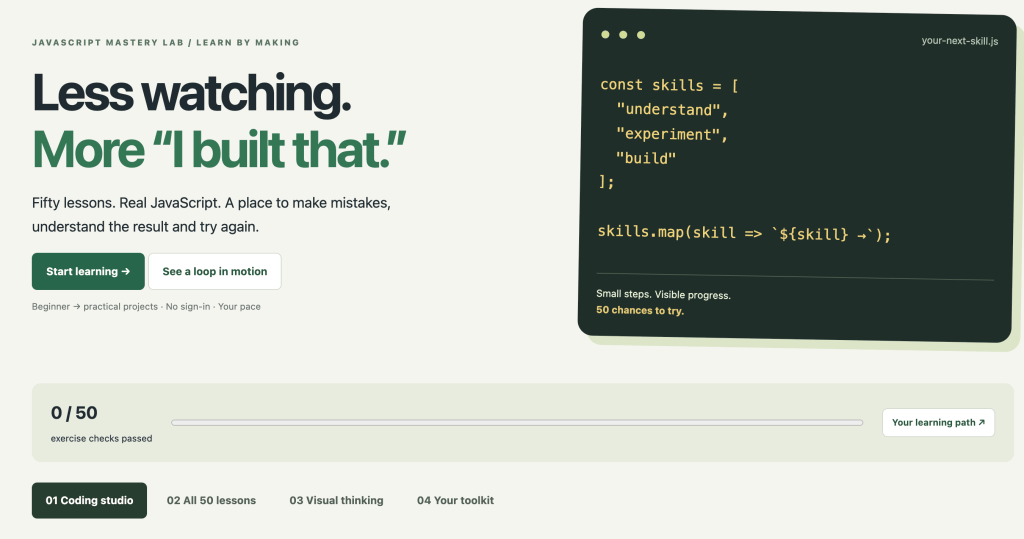
🔗 Explore JavaScript Mastery Lab:
https://discoveryvip.com/javascript-mastery-lab/#studio
With 50 interactive lessons, an integrated coding studio, automated exercise checks, visual demonstrations, and progress tracking, the lab provides a structured path to developing JavaScript skills.
But this article isn’t just about a new learning tool.
I also want to share several practical techniques you can use immediately to become a better JavaScript developer.
1. Why Learning JavaScript Requires More Than Watching Videos
JavaScript is one of the most useful programming languages you can learn.
It powers interactive websites, web applications, browser features, server-side applications, and countless automation workflows.
Yet many aspiring developers get stuck in what is commonly called tutorial hell.
They consume lesson after lesson without becoming confident enough to build independently.
The problem isn’t necessarily a lack of knowledge.
It’s a lack of deliberate practice.
Consider these three learning experiences:
Experience A: Watching
You watch someone explain how Array.map() works.
Experience B: Following
You copy their code and get the same output.
Experience C: Solving
You’re given an array of prices and asked to calculate discounted prices. You must decide which JavaScript methods to use and write the solution yourself.
The third experience requires you to retrieve knowledge, make decisions, test assumptions, and correct mistakes.
That’s where practical programming skills develop.
A better approach: Learn → Try → Test → Reflect
Rather than spending all your time studying examples, alternate between short explanations and meaningful challenges.
Try this simple process:
- Learn: Understand one JavaScript concept.
- Predict: Decide what a piece of code should produce.
- Practice: Write your own solution.
- Test: Check the result using different inputs.
- Reflect: Explain why your solution works.
- Extend: Modify the challenge to test your understanding.
This approach is also consistent with the Vibe Learning framework I’ve developed for structured, AI-supported learning.
The objective is not simply to finish a lesson.
It’s to become capable of using the knowledge.
2. Introducing JavaScript Mastery Lab
The JavaScript Mastery Lab brings structured practice directly into your browser.
Instead of jumping between tutorials, coding websites, and reference materials, you can learn and experiment in one environment.
What’s included?
50 interactive JavaScript lessons
The learning path contains 10 chapters with five lessons each, taking you from foundational concepts toward more practical programming challenges.
An integrated JavaScript coding studio
Write real JavaScript directly in your browser and run your solutions against exercise test cases.
Hints and example solutions
When you get stuck, request a hint or reveal a solution to understand a possible approach.
Automated exercise checks
Run tests to see whether your code produces the expected results for the provided examples.
Experiment with custom inputs
Go beyond the standard test cases and see how your code behaves with different values.
Visual learning tools
Watch a loop execute step by step and observe how variables change during each iteration.
Progress tracking and notes
Save your drafts, record explanations, track completed exercise checks, and export your learning progress.
Downloadable JavaScript files
Keep your code and continue experimenting outside the lab.
There’s no account required, and you can work through the lessons at your own pace.
🔗 Start practicing:
https://discoveryvip.com/javascript-mastery-lab/#studio
3. Practical JavaScript Lesson: Learn to Think in Functions
One of the most valuable skills a JavaScript developer can develop is breaking problems into small, reusable functions.
Let’s work through an example.
The challenge
You have a list of product prices and want to calculate the total after applying a discount.
Start with this data:
const prices = [25, 40, 15, 60];
const discount = 0.10;
How would you solve this?
Before looking at the code, consider the steps:
- Calculate the total price.
- Determine the discount amount.
- Subtract the discount.
- Return the final value.
Here’s one possible solution:
function calculateTotal(prices, discount) {
  const subtotal = prices.reduce(
    (total, price) => total + price,
    0
  );

  return subtotal * (1 - discount);
}

console.log(
  calculateTotal([25, 40, 15, 60], 0.10)
);

// Output: 126
What did we learn?
The reduce() method combines the array values into one result.
The callback receives the accumulated total and the current price.
The initial value of 0 ensures the calculation starts at zero and works even when the array is empty.
The expression:
subtotal * (1 - discount)applies the discount to the total.
This is useful, but the real learning begins when you experiment.
Your challenge
Modify the function so it can:
- Handle an empty array.
- Reject invalid discount values.
- Round the result to two decimal places.
- Calculate the total including a sales tax.
- Return an object containing the subtotal, discount amount, tax, and final total.
Now you’ve transformed one simple example into several practical programming exercises.
The key lesson: Don’t stop when your code works once. Explore why it works and when it might fail.
4. One of the Most Important JavaScript Skills: Understanding Arrays
Arrays appear everywhere in JavaScript applications.
You use them to manage products, users, search results, API responses, tasks, and collections of data.
Three particularly useful methods are map(), filter(), and reduce().
map(): Transform data
Use map() when you want to create a new array by transforming each element.
const numbers = [1, 2, 3, 4];

const doubled = numbers.map(
  number => number * 2
);

console.log(doubled);

// [2, 4, 6, 8]
filter(): Select matching values
Use filter() when you want to keep only elements that satisfy a condition.
const scores = [45, 82, 91, 63, 77];

const passing = scores.filter(
  score => score >= 70
);

console.log(passing);

// [82, 91, 77]
reduce(): Combine values
Use reduce() when you want to accumulate an array into a single result.
const sales = [100, 250, 175];

const total = sales.reduce(
  (sum, amount) => sum + amount,
  0
);

console.log(total);

// 525
Practice challenge: Combine all three
Imagine you’re working with an online store.
const products = [
  { name: "Keyboard", price: 45 },
  { name: "Mouse", price: 25 },
  { name: "Monitor", price: 180 },
  { name: "Webcam", price: 65 }
];
Can you write JavaScript that:
- Filters products costing more than $40?
- Extracts only their names?
- Calculates their combined price?
Try solving the problem before looking up the answer.
This type of exercise helps develop the problem-solving skills required for real-world applications.
5. Stop Guessing: Learn to Test Your JavaScript
One habit that separates increasingly capable developers from beginners is the willingness to test assumptions.
Consider this function:
function divide(a, b) {
  return a / b;
}
It looks straightforward.
But what happens when you test these inputs?
divide(10, 2);
divide(10, 0);
divide(-10, 2);
divide(0, 5);
What happens if someone passes a string instead of a number?
Testing helps reveal unexpected behavior and clarify what your function should support.
A practical testing strategy
Whenever you write a function, consider at least four categories:
1. Normal inputs
Values you expect users to provide.
2. Boundary inputs
Values at the limits of expected behavior, such as zero or an empty array.
3. Invalid inputs
Values that should be rejected or handled safely.
4. Unexpected combinations
Inputs that might reveal overlooked assumptions.
The JavaScript Mastery Lab includes automated exercise checks and lets you experiment with custom JSON inputs.
It’s important to understand that passing the provided checks doesn’t prove your function is correct for every possible input.
That’s why creating your own tests is so valuable.
🔗 https://discoveryvip.com/javascript-mastery-lab/#studio
6. Visualize Your Code: Understand What Happens Inside a Loop
Many JavaScript beginners can write a for loop but struggle to understand how the variables change as the code executes.
Consider:
let total = 0;

for (let i = 1; i <= 5; i++) {
  total += i;
}

console.log(total);
The output is 15.
But understanding the result requires following the execution.
| Iteration | i | Total |
|---|---|---|
| Start | — | 0 |
| 1 | 1 | 1 |
| 2 | 2 | 3 |
| 3 | 3 | 6 |
| 4 | 4 | 10 |
| 5 | 5 | 15 |
Each iteration updates the accumulated total.
This is a simple example of understanding program state.
Why this matters
When you understand how values change during execution, you become better at:
- Finding logical errors.
- Understanding nested loops.
- Working with arrays.
- Recognizing off-by-one errors.
- Predicting program output.
The JavaScript Mastery Lab includes a step-by-step loop visualizer that lets you observe this process interactively.
Try different values, especially boundary cases such as zero, one, and five.
Instead of memorizing loop syntax, focus on understanding execution.
7. How to Use AI Without Becoming Dependent on It
AI coding assistants have changed how developers learn and write software.
You can describe a problem and receive a working JavaScript solution in seconds.
But there’s an important distinction:
Generating code is not the same as understanding code.
If AI solves every challenge before you’ve attempted it, you may finish exercises without developing the skills needed to solve new problems.
I recommend using AI as a learning partner rather than an automatic answer generator.
Try this AI-assisted learning prompt
I’m learning JavaScript and want to improve my problem-solving skills.
Give me one practical JavaScript challenge involving arrays and functions.
Don’t provide the solution immediately.
Ask me to explain my approach before writing code.
After I submit my solution, review it for correctness, edge cases, and readability.
Give me hints before revealing a complete solution.
Finally, suggest a slightly more difficult variation of the same problem.
This creates a guided learning experience rather than a shortcut.
Combine AI with JavaScript Mastery Lab
Here’s a workflow I recommend:
- Select a lesson in JavaScript Mastery Lab.
- Read the challenge and inspect its test cases.
- Attempt the solution independently.
- Run the exercise checks.
- If you’re stuck, request a hint or ask AI to explain the underlying concept.
- Improve your solution and test it again.
- Explain what you learned in your own words.
The objective is to use AI to strengthen your thinking, not replace it.
This is a central principle of my Vibe Learning approach.
Learn more about Vibe Learning:
8. A Seven-Day JavaScript Practice Challenge
Want to make meaningful progress without spending hours watching tutorials?
Try this seven-day practice routine.
| Day | Focus | Practical challenge |
|---|---|---|
| 1 | Variables and values | Calculate totals and percentages |
| 2 | Conditions | Build a simple grading function |
| 3 | Loops | Calculate sums and find patterns |
| 4 | Arrays | Filter and transform product data |
| 5 | Functions | Create reusable utility functions |
| 6 | Objects | Organize and process structured data |
| 7 | Review | Combine concepts into a small project |
Spend approximately 20–30 minutes per session, adjusting the pace to your needs.
For each challenge, try to produce three things:
Working code: A solution that produces the expected result.
An explanation: A short description of how the solution works.
An improvement: One meaningful modification or additional test.
At the end of seven days, review the problems you can now solve independently.
That’s a more useful measure of progress than simply counting tutorials watched.
9. Five Habits That Will Make You a Better JavaScript Developer
After years of developing software and creating programming courses, I’ve found that effective learning depends heavily on how you practice.
Here are five habits worth developing.
Habit 1: Predict before executing
Read the code and decide what it will output.
Then run it and compare your prediction with the actual result.
Habit 2: Change one thing at a time
Modify one variable, condition, or expression.
Observe the effect before making another change.
This makes debugging and experimentation much easier.
Habit 3: Explain your solutions
If you can explain what every important line does and why it’s needed, you’re developing deeper understanding.
Habit 4: Practice unfamiliar problems
Don’t repeatedly solve only the exercises you’ve already mastered.
Introduce new challenges that require you to combine concepts.
Habit 5: Build something useful
Turn small exercises into practical tools.
A price calculator can become a shopping-cart utility.
An array-filtering exercise can become a search feature.
A function that formats text can become part of a data-cleaning workflow.
Small exercises become valuable when you learn to connect them to real problems.
10. From JavaScript Exercises to Real Projects
The JavaScript Mastery Lab focuses on core JavaScript language skills and data logic.
Its exercise runner is intentionally limited. It doesn’t provide direct DOM access, network requests, or module imports, so full browser applications should be built in a separate project environment.
Once you’re comfortable solving exercises, take the next step.
Build a small browser application that uses what you’ve learned.
Here are three project ideas:
Project 1: Interactive Task Manager
Practice arrays, objects, functions, and event handling while creating a simple task list.
Project 2: Product Search and Filter
Use array methods to search and filter a collection of products based on user input.
Project 3: Quiz Application
Combine functions, conditions, arrays, and scoring logic into an interactive quiz.
You don’t need to build something complicated.
A small application that you understand completely can teach you more than a larger project assembled without understanding its components.
11. Your JavaScript Learning Environment Is Ready
The goal of JavaScript Mastery Lab is simple:
Make learning JavaScript more active, practical, and rewarding.
You don’t need to install software, create an account, or configure a development environment to begin practicing.
Open the lab, choose a lesson, and start coding.
Your drafts, notes, and exercise progress can be saved in your browser, and you can export a backup to keep your work.
Explore the free resources
JavaScript Mastery Lab — 50 Interactive Lessons
https://discoveryvip.com/javascript-mastery-lab/#studio
Complete JavaScript Mastery Lab and Downloadable Handbook
https://discoveryvip.com/javascript-mastery-lab
More JavaScript Guides and Developer Resources
https://discoveryvip.com/guides.php
Vibe Learning — Structured Learning With AI
Final Thoughts: The Best Way to Learn JavaScript Is to Use It
Programming is a skill developed through practice, experimentation, and problem-solving.
Tutorials can introduce concepts.
Documentation can clarify syntax.
AI can provide guidance and feedback.
But ultimately, you need opportunities to apply what you’re learning.
That’s the experience I wanted to create with JavaScript Mastery Lab.
Fifty interactive lessons. A practical coding environment. Immediate exercise feedback. The freedom to experiment, make mistakes, and improve.
Whether you’re learning JavaScript for the first time, refreshing your knowledge, or developing stronger problem-solving skills, I encourage you to give it a try.
Your next step: Open the lab, complete one challenge, and then modify your solution to handle a case you haven’t tested before.
That’s how you start moving from knowing JavaScript to being able to use it.
Join the conversation
I’d love to hear your thoughts:
What’s the hardest part of learning JavaScript?
Is it understanding the concepts, remembering syntax, debugging, or figuring out how to build something independently?
And do you learn more effectively by watching tutorials, building projects, or solving interactive challenges?
Share your experiences in the comments. Your answers might help other developers find a better way to learn.
Start building your JavaScript skills today:
https://discoveryvip.com/javascript-mastery-lab/#studio
About the Author
Laurence Lars Svekis is a web developer, online educator, bestselling author, and Google Developer Expert with more than 20 years of experience in web development and technology education. His educational resources have reached over one million students worldwide. He develops practical coding tools, educational frameworks, and AI-supported learning resources through DiscoveryVIP and Vibe Learning.
#JavaScript #LearnJavaScript #WebDevelopment #Coding #Programming #JavaScriptDeveloper #LearnToCode #CodingEducation #FrontendDevelopment #DeveloperTools #VibeLearning #AILearning #OnlineLearning #SoftwareDevelopment #DiscoveryVIP