
Vibe Learning AI Studio: Stop Asking AI for Answers and Start Using It to Learn
AI has made it incredibly easy to get an answer.
Ask a question.
Get an explanation.
Ask for an example.
Ask for a summary.
Ask AI to simplify it.
And within seconds, you have more information than you probably need.
But there is a problem.
Getting an answer is not the same as learning.
You can read a perfect explanation and forget it tomorrow.
You can follow AI-generated code without understanding why it works.
You can ask AI to solve a problem and walk away without developing the ability to solve the next one.
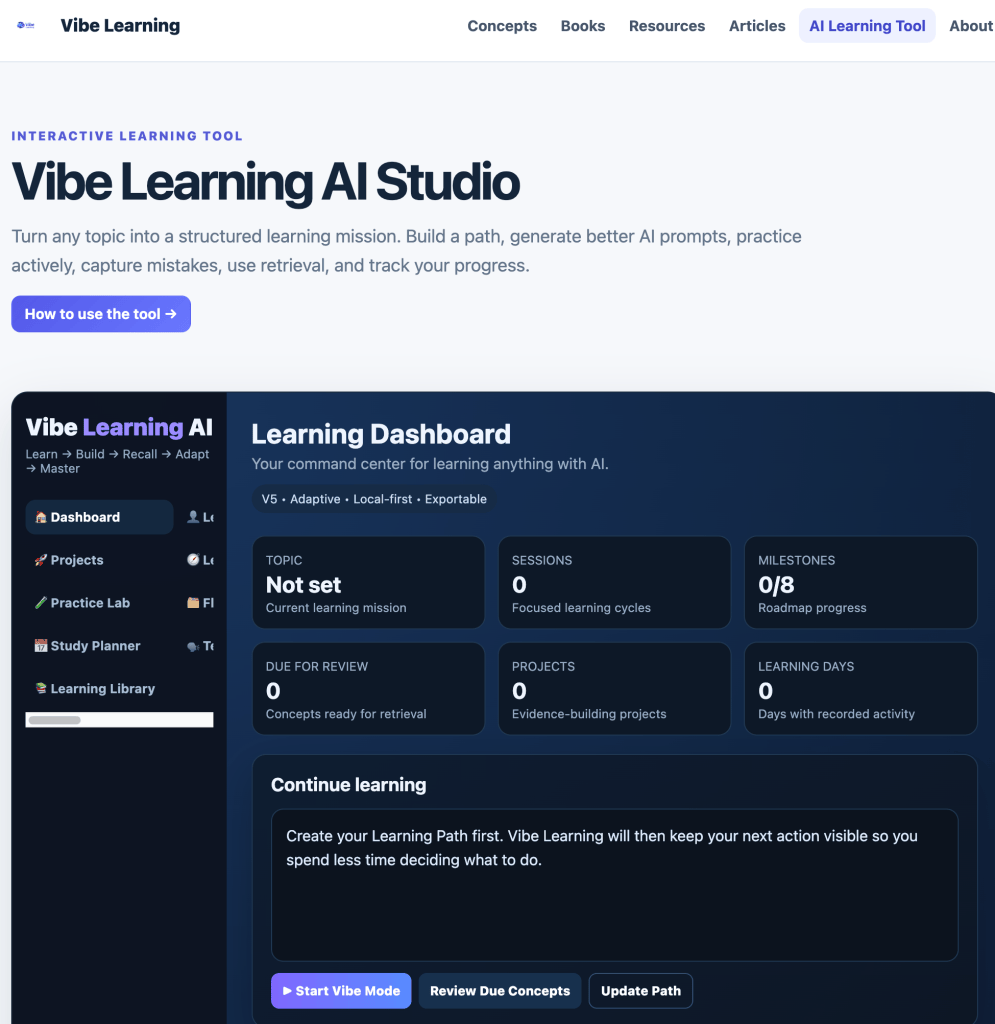
This is one of the reasons I created the Vibe Learning AI Studio.
👉 https://vibelearning.ca/learn.php
The idea is simple:
Don’t just use AI to get answers. Use AI to create better learning experiences.
The Problem with “Teach Me This”
Imagine you want to learn JavaScript.
You open an AI chatbot and type:
“Teach me JavaScript.”
AI might produce a perfectly reasonable lesson.
Variables.
Functions.
Arrays.
Objects.
Loops.
DOM manipulation.
Maybe some exercises.
But there is something missing.
The AI doesn’t automatically know:
- what you already understand
- what you only think you understand
- what you have forgotten
- which concepts are blocking your progress
- whether you can apply what you learned
- whether you can explain it without help
- what you should review tomorrow
- what you should learn next
Most importantly, simply reading AI-generated information keeps the learner relatively passive.
Vibe Learning approaches the problem differently.
Instead of asking:
“What information should AI give me?”
we ask:
“What should the learner do next?”
That small change creates a very different learning experience.
The Vibe Learning Loop
At the center of the Studio is a learning loop:
Orient → Understand → Predict → Apply → Feedback → Recall → Connect → Transfer
Each stage has a purpose.
Orient
Understand where you are going.
What are you trying to learn?
Why does it matter?
What prerequisite knowledge do you need?
What would success actually look like?
Understand
Build a useful mental model.
AI can explain concepts, provide analogies, compare ideas and generate examples.
But explanation is only the beginning.
Predict
Before AI reveals what happens, make a prediction.
Commit to an answer.
Explain your reasoning.
Prediction exposes your current mental model.
Apply
Do something with the knowledge.
Solve a problem.
Write some code.
Analyze an example.
Make a decision.
Build something.
Feedback
Now let AI examine the attempt.
Instead of simply asking for the correct answer, ask:
Where did my reasoning begin to break down?
That produces much more useful feedback.
Recall
Close the explanation.
Can you reconstruct the idea without looking?
Retrieval is where we begin discovering what actually stayed with us.
Connect
How does this concept relate to something you already understand?
What is similar?
What is different?
Where does it fit into the larger system?
Transfer
Finally, change the situation.
Can you use the same idea with different data, different constraints or an unfamiliar problem?
That is much stronger evidence of learning.
What the Vibe Learning AI Studio Does
I built the Studio as a collection of learning tools around this process.
It isn’t designed to replace ChatGPT, Gemini or another AI assistant.
It helps you use those systems more deliberately.
1. Learning Path
Start by defining what you want to learn.
More importantly, define what you eventually want to be able to do.
The Studio helps turn a broad topic into a more manageable learning path.
Instead of:
Learn JavaScript
you might move toward:
Understand JavaScript fundamentals well enough to build an interactive browser application without following a tutorial.
That is a much more useful learning target.
2. AI Prompt Coach
The quality of an AI learning session depends heavily on the instructions we give the AI.
The Studio helps create prompts designed around learning rather than answer generation.
For example, instead of:
Explain JavaScript arrays.
you can create an interaction where AI:
- checks what you already know,
- asks you to predict,
- gives a small example,
- asks you to modify it,
- evaluates your reasoning,
- creates a transfer challenge.
The AI becomes more like a coach.
3. Vibe Mode
This is one of the ideas I find most interesting.
Learning involves a surprising amount of decision-making.
What should I study?
Should I review?
Should I practice?
Should I continue?
Am I ready for a project?
Should I revisit something?
That creates friction.
Vibe Mode is designed to reduce the “What should I do next?” problem.
Your learning goal, progress, concept evidence, review needs, mistakes and projects can help determine the most useful next learning activity.
The learner still controls the process.
The system simply helps identify the next useful move.
4. Focus Sessions
Learning does not always require hours.
You can create a useful learning cycle in 20–30 minutes.
A simple session might look like this:
3 minutes — Recall
Write what you remember from the previous session without looking.
6 minutes — Learn
Work on one concept or gap.
10 minutes — Apply
Solve, build, analyze or create something.
4 minutes — Feedback
Examine the attempt and correct weak reasoning.
2 minutes — Next step
Record what changed and decide what should happen next.
The objective isn’t:
“I studied for 25 minutes.”
It is:
“What evidence of learning did I produce in those 25 minutes?”
5. Concept Mastery Map
Traditional progress indicators can be misleading.
Watching 80% of a course doesn’t mean you understand 80% of the material.
Neither does reading 80% of a book.
The Studio lets you think about mastery at the concept level.
A concept can progress through evidence such as:
Exposed → Recognize → Explain → Apply → Transfer → Teach
Suppose you are learning JavaScript arrays.
You might recognize an array when you see one.
That is useful.
But can you explain when an array is appropriate?
Can you create one without an example?
Can you manipulate its values?
Can you use arrays in a new project?
Can you explain them to someone else?
Those are different levels of evidence.
6. Smart Review Queue
Learning doesn’t end when something makes sense.
The next challenge is remembering it.
The Studio includes a review workflow that encourages retrieval before reteaching.
Instead of immediately showing the information again, review can begin with:
Explain this concept from memory.
Then:
How is it different from this related concept?
Then:
Apply it.
Then:
Use it in a different situation.
Your performance can determine when the concept should appear again.
Weak recall?
Review sooner.
Strong independent recall?
Increase the interval.
The goal isn’t constant review.
It’s useful review at the right time.
7. Teach It Back
One of my favorite ways to test understanding is incredibly simple:
Teach it.
Explain the concept as if someone else were learning it for the first time.
Then let AI inspect your explanation.
Ask it to find:
- missing assumptions
- unclear transitions
- misconceptions
- terminology you may be using without understanding
- examples that don’t quite support your explanation
Then explain it again.
The important part is that you produce the explanation first.
AI critiques it.
AI doesn’t replace it.
8. Mistake Journal
Mistakes contain information.
But only if we examine them.
The Studio encourages learners to capture mistakes and ask:
What did I expect?
What actually happened?
Why was my reasoning wrong?
What rule would prevent this mistake next time?
Over time, patterns begin appearing.
Maybe the problem isn’t ten separate mistakes.
Maybe they all come from one weak prerequisite.
That is valuable information.
9. Evidence Projects
Eventually, learning should become something you can use.
That is why the Studio includes projects.
But I like to think of them as evidence projects.
The question isn’t simply:
“What can I build?”
It is:
“What could I build that would prove I understand this?”
A small project might demonstrate one or two concepts.
A stretch project combines several.
A capstone requires integration, decisions and transfer.
AI can help define:
- requirements
- constraints
- milestones
- test cases
- review criteria
- transfer challenges
without necessarily building the finished solution for you.
10. A Toolkit of Learning Prompts
The Studio also contains specialized prompt strategies for different learning situations.
For example:
First Principles
Break an idea down into its fundamental assumptions.
80/20 Map
Identify the small number of concepts that unlock much of the topic.
Prerequisite Check
Discover what you need to understand before moving forward.
Socratic Coach
Have AI guide you primarily through questions.
Prediction Mode
Commit to what you think will happen before seeing the answer.
Example Ladder
Move from simple examples toward increasingly difficult ones.
Interleaved Practice
Mix related concepts so you must decide which method applies.
Retrieval Sprint
Test what you can reconstruct without looking.
Misconception Hunt
Search specifically for weaknesses in your mental model.
Transfer Test
Apply knowledge in an unfamiliar situation.
Project Builder
Turn knowledge into something practical.
Teach Me to Teach
Develop an explanation strong enough to teach someone else.
The important point is that different learning problems require different interactions with AI.
Try This with Something You Want to Learn
Pick a topic.
Anything.
JavaScript.
Photography.
Excel.
Marketing.
History.
Public speaking.
Physics.
Google Apps Script.
Start with a goal.
Then ask yourself:
What do I want to be able to do with this knowledge?
Open the Vibe Learning AI Studio:
👉 https://vibelearning.ca/learn.php
Build a learning path.
Run a focused session.
Make predictions.
Practice.
Record mistakes.
Track important concepts.
Retrieve them later.
Teach them back.
And eventually build something that proves you can use what you learned.
AI Can Give You Answers. Build Your Ability.
AI is changing access to knowledge.
We can ask questions that once required hours of research and receive useful explanations in seconds.
That’s extraordinary.
But I think the bigger opportunity is not simply making information faster.
It’s creating better learning loops.
AI can question us.
Challenge us.
Generate practice.
Adapt difficulty.
Provide feedback.
Create new examples.
Expose misconceptions.
Help us connect ideas.
And challenge us to transfer what we’ve learned.
But the learner still needs to think.
The learner still needs to attempt.
The learner still needs to retrieve.
The learner still needs to create.
And the learner still needs to make decisions.
That is what I’m trying to explore with Vibe Learning.
Use AI to strengthen thinking — not replace it.
Try the Vibe Learning AI Studio:
👉 https://vibelearning.ca/learn.php
I’d love to know what you try learning with it and what you’d like to see added next.
#VibeLearning #ArtificialIntelligence #AI #Education #Learning #EdTech #GenerativeAI #AILearning #LifelongLearning #FutureOfEducation