
Building a website is only part of the job.
You can create a great-looking layout, write clean code, add forms, navigation, interactive features, and responsive styling—but there is still one important question:
Does it actually work?
That is the idea behind my Website Testing Guide & Launch Lab, a free interactive learning resource on DiscoveryVIP.
Website Testing Guide & Launch Lab:
https://discoveryvip.com/website-testing-guide/
The resource is designed to help developers, students, website owners, and anyone building with AI develop a repeatable process for testing a website before launch.
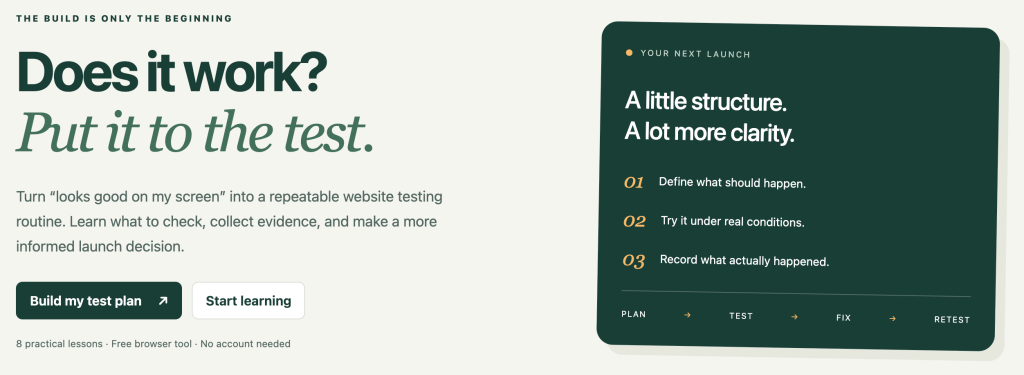
Instead of relying on “it works on my computer,” you learn how to define what should happen, test it under realistic conditions, record what happened, fix problems, and test again.
The Website Testing Workflow
The guide centers around a simple cycle:
PLAN → TEST → FIX → RETEST
It sounds straightforward, but this small change in thinking can dramatically improve how you build websites.
When developing a website, it is easy to spend most of your time thinking about what you want to create.
Testing requires you to change perspectives.
Instead of asking:
“Did I build the feature?”
Start asking:
“Can a visitor actually use the feature successfully?”
That difference is important.
A button existing on the page doesn’t mean it works correctly. A form displaying correctly doesn’t mean submissions work. A navigation menu working on desktop doesn’t mean it works on a phone.
Testing turns assumptions into evidence.
Eight Practical Website Testing Lessons
The guide contains eight practical lessons designed to introduce website testing as a skill you can immediately apply to your own projects.
Rather than treating testing as a theoretical subject, the goal is to learn something and then try it.
Open a lesson.
Learn the concept.
Apply it to your website.
Check your understanding.
Then improve what you built.
This makes testing part of development rather than something you remember to do five minutes before publishing a website.
Introducing the Launch Lab
One of the most useful parts of the resource is the interactive Launch Lab.
The Launch Lab helps you build a testing plan specifically for your website.
You can enter information about your project, including your website address, the most important task visitors should be able to complete, and the environment or release you are testing.
You can then include checks for features such as:
- Forms and submissions
- Search and filtering
- Accounts and access
- Saved work and downloads
The tool generates repeatable checks with testing steps and expected results.
You can also create your own custom checks.
This means you aren’t simply looking around your website hoping to notice something wrong.
You have a plan.
Expected Results Matter
One of the most useful habits in website testing is defining the expected result before performing the test.
Suppose you are testing a contact form.
Instead of writing:
Test the contact form
you might define a test such as:
Action: Complete all required fields and submit the form.
Expected result: The form submits successfully, the visitor receives confirmation, and the submitted information reaches its intended destination.
Now you have something measurable.
The same idea can be applied throughout a website.
What should happen when someone clicks the navigation?
What happens when a required field is empty?
What happens on a small screen?
What happens when someone searches for something that doesn’t exist?
What happens after a download button is clicked?
Good testing starts by clearly defining what should happen.
Test Under Real Conditions
A website can work perfectly in the environment where you created it and still have problems elsewhere.
That is why testing should reflect how real visitors will interact with your site.
Try different screen sizes.
Test important workflows.
Check navigation.
Submit forms.
Try incorrect or incomplete inputs.
Follow links.
Test the important actions you expect visitors to perform.
You aren’t trying to prove that your website works.
You are trying to discover where it doesn’t.
Finding a problem during testing is a success because you found it before your visitors did.
Keep Evidence of Your Testing
The Launch Lab also encourages you to record your results.
This creates a history of what you tested and the environment in which you tested it.
The workspace saves information in your browser, and you can export a backup to preserve or move your testing information.
You can also download a report of your recorded checks.
This is especially useful as projects become larger.
After making changes, you can return to important user journeys and test them again.
Why Retesting Is Important
Fixing one problem can sometimes create another.
You might change JavaScript to fix a form and accidentally affect another feature.
You might adjust CSS for mobile devices and unexpectedly change the desktop layout.
You might change navigation and leave an older link pointing to the wrong location.
That is why the workflow doesn’t end with FIX.
It ends with:
RETEST
Testing should be a cycle.
Plan → Test → Fix → Retest
Then repeat when the website changes.
Website Testing Is Especially Important in the Age of AI
AI has made it much faster to create websites.
You can describe a feature and generate HTML, CSS, JavaScript, PHP, Apps Script, or other code within seconds.
That speed is incredibly useful.
But faster code generation doesn’t remove the need for testing.
In many ways, it makes testing even more important.
When AI generates code, you should still understand what the feature is supposed to accomplish and verify that the result behaves correctly.
A useful AI-assisted development workflow is:
Describe → Generate → Review → Test → Improve → Retest
AI can help create the solution.
Human judgment is still needed to decide whether that solution actually solves the problem.
Testing Is Part of Vibe Coding
This is also an important skill for anyone practicing vibe coding.
Vibe coding should not mean:
Prompt → Generate → Publish
A stronger workflow is:
Idea → Prompt → Generate → Review → Test → Refine → Retest → Launch
Testing gives you the feedback required to write better follow-up prompts.
Instead of telling AI:
“The website doesn’t work.”
you can provide useful context:
“The form submits correctly on desktop, but on a mobile-sized viewport the submit button extends beyond the form container. Review the responsive CSS and correct the layout without changing the desktop design.”
Testing creates better information.
Better information creates better prompts.
Better prompts usually produce better results.
A Green Checklist Isn’t the Finish Line
Passing your planned tests gives you useful evidence about what you checked.
It doesn’t prove that a website has no problems.
The Launch Lab is a manual testing workspace. It does not automatically scan your website or independently verify your results.
It also isn’t a replacement for specialized security testing or formal accessibility evaluation.
Instead, it helps you develop something every web developer needs:
a repeatable testing habit.
Try the Free Website Testing Guide
If you are building a website, learning web development, experimenting with AI-generated code, or preparing a project for launch, try the Website Testing Guide & Launch Lab.
Use it with a real project.
Create a testing plan.
Run the checks.
Record what happens.
Fix something.
Then test it again.
The goal isn’t simply to build websites faster.
The goal is to build websites that actually work.
Start the Website Testing Guide & Launch Lab:
https://discoveryvip.com/website-testing-guide/
Explore more free developer guides:
https://discoveryvip.com/guides.php
DiscoveryVIP
Learn by building. Improve by testing.