
🚀 Are You Really Getting the Most Out of Google Workspace? 💻📧📊
Most people use Gmail, Google Drive, Docs, Sheets, and Calendar every day.
But here’s the question…
Are you using these tools together to make your work easier, or are you spending more time searching, organizing, and switching between apps than actually getting things done?
💡 The real power of Google Workspace isn’t just knowing how to use each app.
It’s knowing how to connect them into a smarter, more productive workflow!
That’s why I’ve created the FREE Google Workspace Learning Studio — an interactive learning resource featuring 50 lessons across 10 topics and six learning spaces.
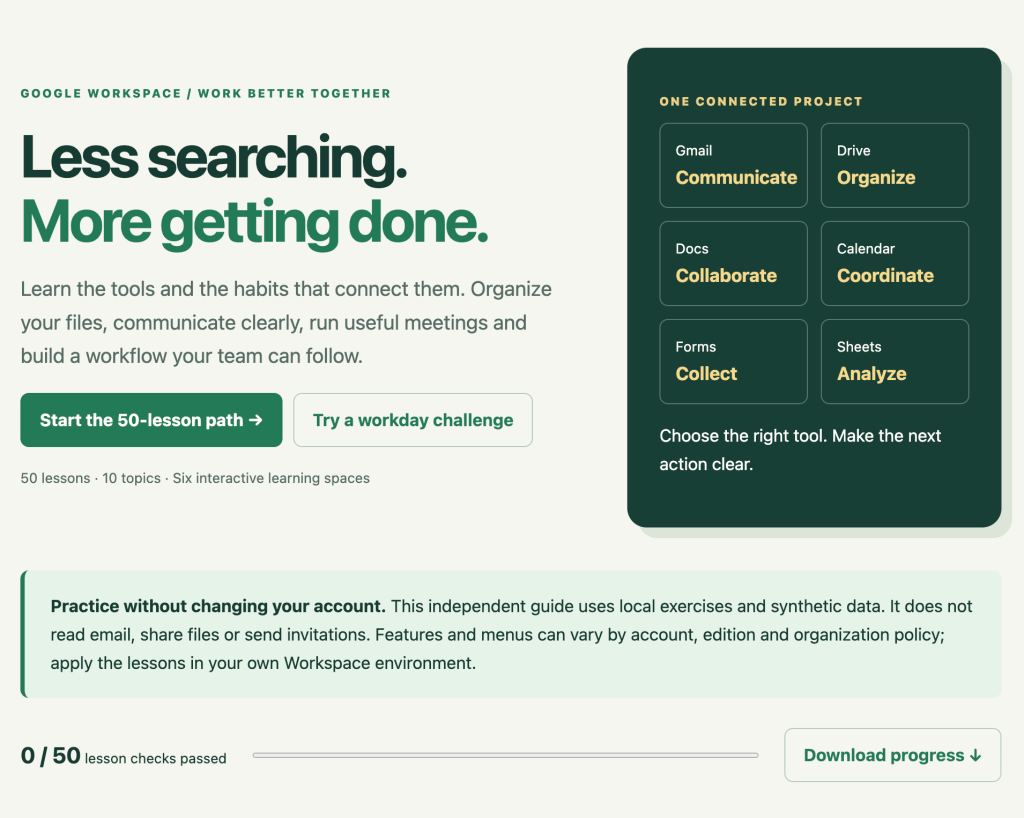
🎓 Explore the free learning studio:
https://discoveryvip.com/google-workspace-studio/#learn
🔥 Here’s what you can learn and practice:
✅ Gmail — Communicate Smarter
Discover techniques for finding important messages, building effective searches, and organizing communication.
✅ Google Drive — Organize & Share Confidently
Learn how to organize files, choose appropriate sharing permissions, and collaborate without creating unnecessary access risks.
✅ Google Docs — Collaborate Effectively
Explore better ways to create, review, and collaborate on shared documents.
✅ Google Calendar — Plan Better Meetings
Learn how to prepare useful agendas, define meeting outcomes, and make better use of everyone’s time.
✅ Google Forms — Collect Information
Understand how to gather structured information that can support decisions and workflows.
✅ Google Sheets — Turn Data Into Insights
Explore how collected information can become useful reports, calculations, and analysis.
✅ Connected Workflows — Make Everything Work Together
Practice organizing tasks across Workspace applications so projects move forward with less confusion.
🧠 Here’s a practical productivity tip you can use today!
Need to find emails from a particular sender that contain attachments?
Try this Gmail search:
from:example@company.com has:attachment
Instead of scrolling through hundreds of messages, you can narrow your search immediately.
Now imagine combining better Gmail searches with organized Drive folders, shared documents, clear meeting agendas, and structured project tracking.
Small improvements across multiple tools can create a much better workday.
🎯 What makes this learning resource different?
🔹 50 structured lessons across 10 topics
🔹 10 real-world workday decision challenges
🔹 Interactive Google Drive sharing coach
🔹 Gmail search query builder
🔹 Meeting agenda planner
🔹 Workflow sequencing exercises
🔹 Downloadable 50-lesson handbook
🔹 Progress tracking and practical learning activities
You can practice using sample data without connecting your Google account. The learning exercises guide you through decisions and workflows rather than changing your actual files or sending messages.
💡 My philosophy is simple:
Don’t just learn where to click.
Understand why you’re doing something, practice making better decisions, and build workflows that solve real problems.
That’s the thinking behind my Vibe Learning approach — making learning more interactive, practical, and focused on real-world application.
Whether you’re a student, educator, entrepreneur, office professional, team leader, or developer, these are skills you can put to work immediately.
🌐 Start learning Google Workspace for FREE:
https://discoveryvip.com/google-workspace-studio/#learn
Created by Laurence Lars Svekis — Google Developer Expert for Google Workspace, developer, and educator to over 3 million students.
💬 Let’s discuss!
What’s your biggest Google Workspace productivity challenge?
📧 Managing Gmail and finding information
📁 Organizing Google Drive and sharing files
📅 Managing meetings and schedules
📊 Working with Google Sheets and data
⚙️ Connecting tools into efficient workflows
👇 Share your answer in the comments!
♻️ Repost to help someone discover a free resource that could make their workday easier!
#GoogleWorkspace #GoogleSheets #Gmail #GoogleDrive #GoogleDocs #GoogleCalendar #GoogleForms #Productivity #WorkflowAutomation #DigitalSkills #GoogleDeveloperExpert #FreeLearning #OnlineLearning #VibeLearning #LearnByDoing #Collaboration #BusinessProductivity #WorkSmarter #TechEducation #DigitalTransformation #DiscoveryVIP