
From static web pages to interactive applications — learn DOM manipulation, asynchronous JavaScript, and data transformations with practical examples and three new interactive coding labs.
Have you ever written JavaScript that worked perfectly in a tutorial but struggled to apply the same concepts when building a real application?
You’re not alone.
Learning JavaScript syntax is relatively straightforward. You learn variables, functions, loops, arrays, and objects. You follow examples, complete exercises, and gradually become more comfortable with the language.
But something changes when you begin building real applications.
Suddenly, you need to respond to user interactions, retrieve information asynchronously, update page content, and transform data into something useful.
And these tasks don’t happen independently.
They work together.
That’s why I’ve been focusing on creating more practical, interactive JavaScript learning experiences at DiscoveryVIP.
In this edition, we’ll explore three essential skills that connect basic JavaScript knowledge to real-world application development.
You’ll learn how to:
- Make web pages interactive with the DOM and events.
- Understand asynchronous JavaScript and manage operations that finish at different times.
- Transform arrays and objects into useful application data.
We’ll walk through real examples, common mistakes, and practical challenges.
At the end, I’ll introduce three new interactive JavaScript labs I’ve created to help you practice these skills.
Let’s get started.
1. DOM Manipulation: Make Your JavaScript Actually Do Something
JavaScript becomes especially powerful when it can interact with a web page.
The Document Object Model, or DOM, provides a programming interface that lets JavaScript access and modify HTML elements.
You can use the DOM to:
- Respond to button clicks.
- Validate forms.
- Update content dynamically.
- Create interactive menus.
- Display information without reloading the page.
- Build search interfaces and interactive dashboards.
Example: Build a simple interactive counter
Let’s start with a basic HTML interface.
<div>
  <h2>Interactive Counter</h2>
  <p>Current count: <span id="count">0</span></p>
  <button id="increase">Increase</button>
  <button id="reset">Reset</button>
</div>
Now add JavaScript.
let count = 0;

const countDisplay =
  document.querySelector("#count");

const increaseButton =
  document.querySelector("#increase");

const resetButton =
  document.querySelector("#reset");

function updateDisplay() {
  countDisplay.textContent = count;
}

increaseButton.addEventListener("click", () => {
  count++;
  updateDisplay();
});

resetButton.addEventListener("click", () => {
  count = 0;
  updateDisplay();
});
This small example demonstrates several important concepts.
Selecting elements: querySelector() finds elements in the document.
Listening for events: addEventListener() allows your application to respond when something happens.
Managing state: The count variable represents the current application state.
Updating the interface: textContent changes what the user sees.
The important lesson: Separate state from presentation
Notice that the code doesn’t directly update the displayed number in every event handler.
Instead, we created a reusable function:
function updateDisplay() {
  countDisplay.textContent = count;
}
This separation becomes increasingly valuable as applications grow.
Imagine adding a decrease button, a maximum count, or a warning message when the counter reaches a particular value.
Rather than duplicating display logic everywhere, you can keep the interface synchronized through a single function.
A common DOM mistake
Consider this code:
button.addEventListener("click", showMessage());It looks reasonable, but there’s a problem.
The parentheses execute showMessage() immediately, and its return value is passed to addEventListener().
Instead, pass the function itself.
button.addEventListener("click", showMessage);Or use an arrow function:
button.addEventListener("click", () => {
  showMessage();
});
Your challenge
Extend the counter application so that:
- Users can increase and decrease the value.
- The counter cannot go below zero.
- The number changes appearance when it reaches 10.
- The reset button restores the original state.
Key takeaway: DOM development is about managing the relationship between user actions, application state, and what appears on the screen.
Once you understand that relationship, building interactive interfaces becomes much easier.
2. Asynchronous JavaScript: Understand What Happens While Your Code Waits
One of the biggest challenges in JavaScript is understanding why code doesn’t always execute in the order you expect.
Consider this example.
console.log("A");

setTimeout(() => {
  console.log("B");
}, 0);

Promise.resolve().then(() => {
  console.log("C");
});

console.log("D");
Before reading further, try predicting the output.
Will it be A, B, C, D?
Not quite.
The actual output is:
A
D
C
B
Why does this happen?
JavaScript uses an event loop to coordinate synchronous execution and asynchronous callbacks.
Here’s the simplified sequence:
Step 1: Synchronous code executes first.
A appears immediately.
Step 2: The timer callback is scheduled for later execution.
A zero-millisecond timeout doesn’t mean the callback runs immediately.
Step 3: The Promise reaction is queued as a microtask.
Step 4: The remaining synchronous code executes.
D appears.
Step 5: Once the current synchronous work finishes, the queued Promise reaction runs.
C appears.
Step 6: The timer callback can then execute.
B appears.
This simplified ordering applies to this browser example. Different runtimes and scheduling circumstances can affect more complex scenarios.
Why developers need to understand this
Asynchronous JavaScript is essential when working with:
- API requests
- Database operations
- File processing
- Timers
- User interactions
- Background operations
- Multiple independent tasks
Without understanding asynchronous behavior, developers often encounter bugs involving missing data, unexpected execution order, and interfaces displaying outdated results.
Example: Fetch data from an API
async function getUsers() {
  try {
    const response = await fetch(
      "https://jsonplaceholder.typicode.com/users"
    );

    if (!response.ok) {
      throw new Error("Failed to fetch users");
    }

    const users = await response.json();

    console.log(users);

    return users;

  } catch (error) {
    console.error("Error:", error.message);
    return [];
  }
}

getUsers();
The async keyword declares an asynchronous function.
The await keyword allows the function to wait for a Promise to settle without blocking the entire JavaScript runtime.
The try/catch block handles rejected Promises and other errors thrown within the block.
Another important concept: Concurrent operations
Imagine retrieving three independent datasets.
You could write:
const users = await getUsers();
const products = await getProducts();
const orders = await getOrders();
Each operation starts after the previous one finishes.
But what if none depends on the others?
You could instead write:
const [users, products, orders] =
  await Promise.all([
    getUsers(),
    getProducts(),
    getOrders()
  ]);
This starts the operations without waiting for each one to finish before beginning the next.
For independent operations, this can improve overall performance.
Remember that Promise.all() rejects if any input Promise rejects. Whether that is desirable depends on your application.
Your challenge
Create three Promise-based functions that complete after different delays.
Run them sequentially, then concurrently.
Use:
console.time("operations");

// Run your operations here.

console.timeEnd("operations");
Compare the results.
Key takeaway: Understanding asynchronous JavaScript is about knowing when operations run, how they interact, and what happens when they succeed or fail.
3. Arrays and Objects: Turn Raw Data Into Useful Information
Modern applications constantly work with data.
Whether you’re building a shopping cart, processing an API response, creating a dashboard, or generating reports, you need to transform information into useful results.
JavaScript provides powerful built-in methods for this.
Let’s explore a practical example.
Example: Analyze sales data
Imagine you receive the following information.
const sales = [
  { product: "Laptop", amount: 1200, region: "East" },
  { product: "Mouse", amount: 45, region: "West" },
  { product: "Monitor", amount: 350, region: "East" },
  { product: "Keyboard", amount: 90, region: "West" },
  { product: "Tablet", amount: 650, region: "East" }
];
You want to calculate the total sales for the East region.
You could write a traditional loop.
But JavaScript’s array methods provide a more expressive solution.
const eastTotal = sales
  .filter(sale => sale.region === "East")
  .reduce((total, sale) => {
    return total + sale.amount;
  }, 0);

console.log(eastTotal);
Output:
2200Let’s break it down.
Step 1: Filter the data
const eastSales = sales.filter(
  sale => sale.region === "East"
);
filter() returns a new array containing only matching items.
Step 2: Calculate the total
const total = eastSales.reduce(
  (sum, sale) => sum + sale.amount,
  0
);
reduce() combines values into a single result.
Step 3: Transform the data
Suppose you only want the product names.
const productNames = sales.map(
  sale => sale.product
);
map() transforms each element and returns a new array.
These methods can be combined to create powerful data-processing pipelines.
A hidden problem: Accidentally changing the original data
Consider this example.
const numbers = [30, 10, 20];

const sorted = numbers.sort(
  (a, b) => a - b
);

console.log(sorted);
console.log(numbers);
Both arrays now appear sorted.
Why?
Because sort() modifies the original array.
This can introduce unexpected behavior if other parts of your application depend on the original ordering.
One solution is to create a copy first.
const sorted = [...numbers].sort(
  (a, b) => a - b
);
Or use the newer non-mutating method where supported.
const sorted = numbers.toSorted(
  (a, b) => a - b
);
Understanding when methods modify existing data is an important part of writing reliable JavaScript.
Your challenge
Using the sales dataset:
- Find all sales above $100.
- Calculate the total sales across all regions.
- Group sales by region.
- Sort products by amount, highest first.
- Ensure the original dataset remains unchanged.
Key takeaway: Strong JavaScript developers don’t just manipulate data. They understand how each transformation affects the data and how to avoid unintended changes.
Putting It All Together: Build a Real Interactive Application
Now let’s connect the three skills.
Imagine you’re building a simple product dashboard.
Your application needs to:
1. Retrieve information
Use asynchronous JavaScript to load product data from an API.
2. Process information
Use array methods to filter products, calculate totals, and organize results.
3. Display information
Use DOM manipulation to show the results on the page.
4. Respond to users
Add buttons and search fields that let users interact with the data.
5. Handle unexpected situations
Show helpful messages when data is missing, an API request fails, or the user enters invalid information.
This is how JavaScript concepts become real applications.
The DOM, asynchronous programming, and data transformations aren’t isolated subjects.
They’re interconnected skills that developers use together every day.
And the best way to become comfortable with them is to practice.
Introducing Three New Interactive JavaScript Labs
To help developers strengthen these essential skills, I’ve added three new hands-on learning experiences to DiscoveryVIP.
Each lab is designed around practical coding challenges, interactive experiments, and understanding why JavaScript behaves the way it does.
These aren’t just collections of code examples.
They’re opportunities to write code, observe results, investigate problems, and improve your understanding through practice.
1. JavaScript DOM & Events Lab — Make Your Pages Interactive
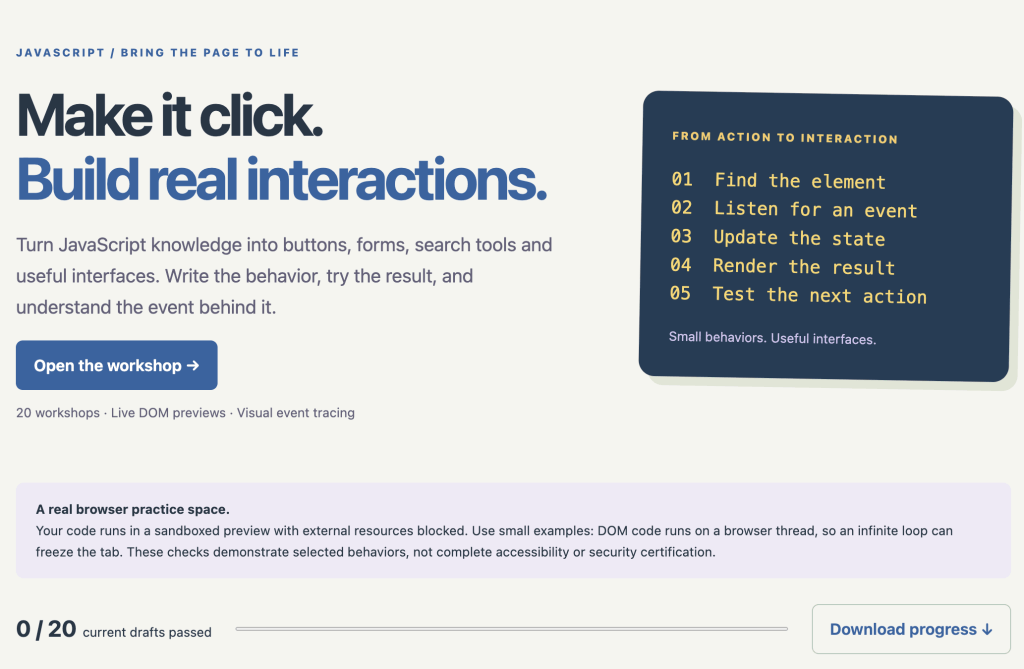
From static HTML to real user interactions.
The JavaScript DOM & Events Lab focuses on the relationship between JavaScript and the browser interface.
It includes:
- 20 interactive workshops.
- Live DOM previews for testing your code.
- Visual event tracing to understand event propagation.
- Exercises involving forms, buttons, and event delegation.
- Automated behavior checks.
- Downloadable working pages and a learning handbook.
One particularly useful feature is the event explorer, which demonstrates how events travel through nested elements during capture, target, and bubbling phases.
You can see the effects of event listeners rather than simply reading about them.
Best for: Developers who want to build interactive websites and become more confident with browser-based JavaScript.
Explore the JavaScript DOM & Events Lab:
https://discoveryvip.com/javascript-dom-lab/#studio
2. JavaScript Async Lab — Stop Guessing How Async Code Works
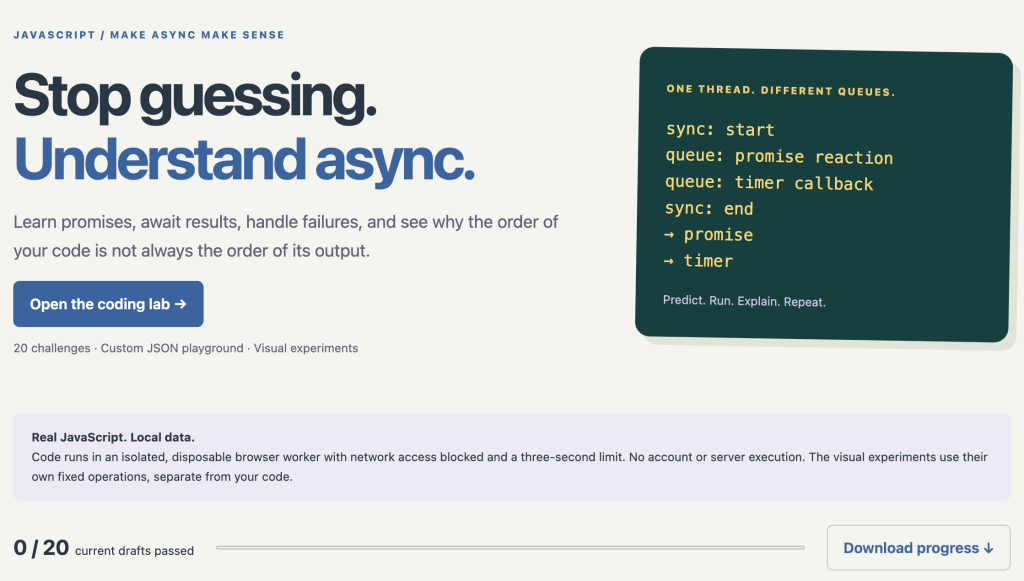
Understand Promises, async/await, and JavaScript execution order.
Asynchronous JavaScript can feel confusing until you start experimenting with it.
The JavaScript Async Lab helps you visualize execution behavior and practice common asynchronous patterns.
It includes:
- 20 coding challenges.
- A custom JSON playground.
- Visual experiments exploring asynchronous behavior.
- A request timeline for comparing sequential and concurrent operations.
- An execution-order detective activity.
- Practice with Promise handling, errors, and retries.
- Downloadable code, reports, and a lesson handbook.
The order detective is especially useful.
You predict the output of JavaScript snippets, test your understanding, and investigate why operations execute in a particular order.
Best for: Developers working with APIs, Promises, asynchronous functions, and applications that manage multiple operations.
Explore the JavaScript Async Lab:
https://discoveryvip.com/javascript-async-lab/#studio
3. JavaScript Array & Object Lab — Master Data Transformations
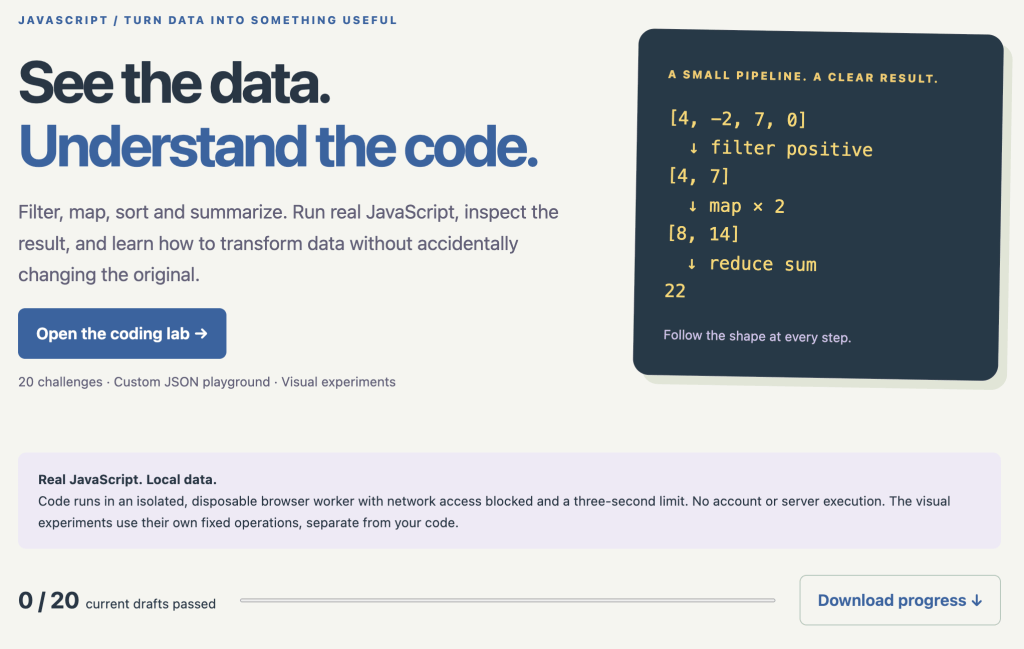
Learn to filter, map, sort, summarize, and work confidently with JavaScript data.
Arrays and objects are fundamental to almost every JavaScript application.
This lab focuses on turning raw information into useful results while avoiding common mistakes.
It includes:
- 20 practical coding challenges.
- A custom JSON playground.
- Interactive data pipeline experiments.
- Exercises with
map(),filter(),reduce(), and sorting. - A copy detective for exploring object references and mutation.
- Automated checks using multiple datasets.
- Downloadable code, reports, and a lesson handbook.
The pipeline explorer makes it easier to understand how data changes as it passes through different operations.
The copy detective demonstrates a particularly important concept: why changing a copied object can sometimes affect the original.
Best for: Developers working with API responses, dashboards, application state, reporting tools, and structured data.
Explore the JavaScript Array & Object Lab:
A Practical Learning Challenge: Seven Days to Better JavaScript
Want to put these ideas into practice?
Here’s a simple seven-day learning challenge.
Day 1 — DOM Fundamentals
Create a page with buttons that update content dynamically.
Day 2 — Events and Forms
Build a form that validates input and displays helpful feedback.
Day 3 — Async Fundamentals
Write asynchronous functions and experiment with execution order.
Day 4 — Working with APIs
Retrieve data and handle loading, success, and error states.
Day 5 — Array Transformations
Use filter(), map(), and reduce() to analyze a dataset.
Day 6 — Objects and State
Explore object copying, mutation, and safe data transformations.
Day 7 — Combine Everything
Build a small interactive dashboard that retrieves, transforms, and displays data.
You don’t need to build something complicated.
A simple working application that you understand is more valuable than a large project assembled from code you can’t explain.
Final Thoughts: Learn by Doing, Not Just Watching
After more than two decades creating development courses and teaching over 3 million students, one principle continues to shape how I approach education:
Understanding grows when you actively apply what you’re learning.
Reading explanations is valuable.
Watching demonstrations can help.
But writing code, making mistakes, investigating unexpected results, and solving problems yourself are what turn knowledge into practical skills.
That’s the purpose behind these new JavaScript labs.
I want developers to have accessible learning environments where they can experiment, test ideas, and build confidence.
Whether you’re just starting with JavaScript or looking to strengthen your existing skills, I encourage you to pick one topic and practice it today.
You might be surprised how much you learn from a small experiment.
Let’s Discuss
Which JavaScript topic do you find the most challenging?
- DOM manipulation and events
- Promises and asynchronous JavaScript
- Arrays, objects, and data transformations
And what JavaScript concept would you like to see explored in a future interactive lab?
Share your thoughts in the comments.
Your suggestions help shape the next learning resources I create.
About the Author
Laurence Lars Svekis is a web developer, bestselling author, Google Developer Expert for Google Workspace, and online educator who has taught over 3 million students.
He creates practical programming courses, interactive learning tools, and educational resources through DiscoveryVIP, with a focus on helping developers learn by building.
Explore more free JavaScript tools and learning resources:
https://discoveryvip.com/tools.php
https://discoveryvip.com/guides.php
Subscribe to JavaScript Code Examples & Learning on LinkedIn:
https://www.linkedin.com/newsletters/javascript-code-examples-learn-7025674646964371456
#JavaScript #LearnJavaScript #JavaScriptDeveloper #DOMManipulation #AsyncJavaScript #JavaScriptArrays #WebDevelopment #Programming #LearnToCode #CodingChallenges #FrontendDevelopment #SoftwareDevelopment #DeveloperTools #HandsOnLearning #DiscoveryVIP