
There’s a big difference between understanding JavaScript while watching someone else code and being able to sit down and actually write, debug, and explain JavaScript yourself.
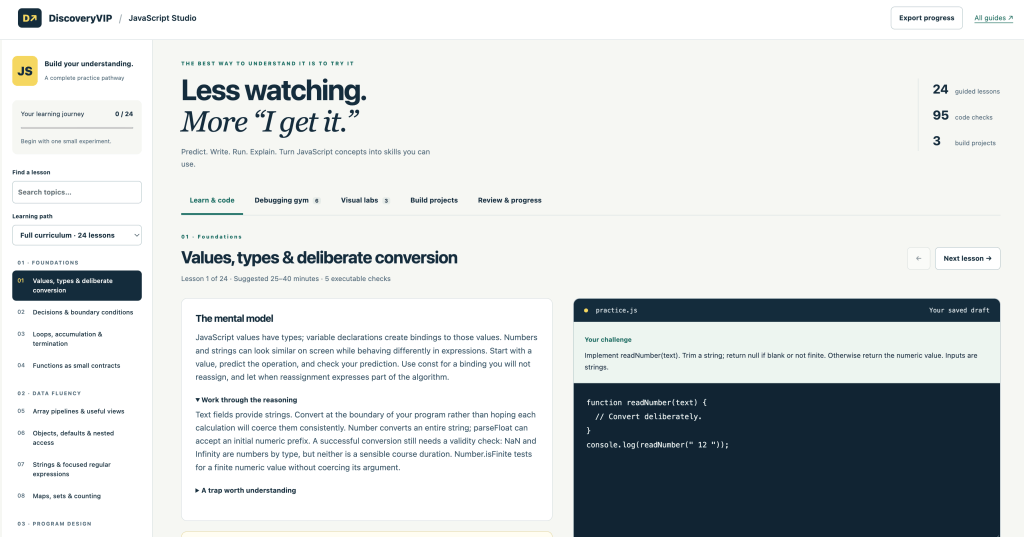
That gap is exactly what I wanted to address with my new JavaScript Studio on DiscoveryVIP.
Try JavaScript Studio:
https://discoveryvip.com/javascript-studio/
JavaScript Studio is a free, interactive learning environment built around a simple idea:
The best way to understand JavaScript is to try it.
Instead of moving through long explanations and passively consuming tutorials, you work directly with JavaScript.
You predict what will happen. You write code. You run it. You inspect the result. You debug problems. And, importantly, you explain what you learned.
24 Guided JavaScript Lessons
The Studio currently includes 24 guided lessons, 95 code checks, 6 debugging challenges, 3 visual labs, and 3 build projects.
The goal isn’t simply to get through 24 lessons.
It’s to build the ability to think with JavaScript.
Each lesson gives you opportunities to experiment with code directly in the browser. There’s an integrated JavaScript editor, console output, automated checks, hints, explanations, and downloadable JavaScript files.
The learning cycle is intentionally active:
Predict → Write → Run → Explain
That small change in how you learn can make a huge difference.
Learn Debugging by Actually Debugging
One of my favorite parts of JavaScript Studio is the Debugging Gym.
You’re given deliberately broken functions and challenged to repair them.
Instead of immediately looking for an answer, you’re encouraged to:
Predict the failure → Read the evidence → Make a small change → Run the checks again
This is much closer to what programming actually feels like.
Professional developers don’t spend their days writing perfect code from scratch. They read existing code, interpret errors, test assumptions, make changes, and verify that those changes actually solved the problem.
Debugging isn’t something you learn after JavaScript.
It’s part of learning JavaScript.
Make Invisible JavaScript Visible
Some JavaScript concepts become much easier when you can actually see what is happening.
That’s why JavaScript Studio includes visual labs.
You can explore concepts such as the call stack, microtask queue, task queue, array transformations, state, rendering, and browser interactions through interactive demonstrations.
Instead of memorizing terminology, you can connect code to observable behavior.
Change an input.
Advance a step.
Watch what happens.
Then ask yourself: Why did JavaScript do that?
That’s where understanding starts becoming transferable knowledge.
Build Something
Eventually, individual exercises aren’t enough.
You need to combine concepts.
JavaScript Studio therefore moves from isolated exercises into build projects, where you can download a working starter, extend it, test it, and make it your own.
This is an important transition.
Learning syntax is useful.
Using several concepts together to solve a problem is where programming starts becoming a skill.
Learning Doesn’t End When You Finish a Lesson
Another feature I wanted to include was recall and review.
Completed lessons can enter a local review queue so you can revisit concepts later and try to remember them before revealing the explanation. The Studio schedules simple follow-up reviews based on your recall rating, with progress stored locally in your browser.
This changes the question from:
“Did I finish the lesson?”
to:
“Can I still explain and use this without looking at the answer?”
That’s a much better measure of learning.
Your Progress Stays With You
Your work and learning progress are saved locally in your browser, and JavaScript Studio also provides options to export progress, import progress, and download a learning workbook.
You can work through the Studio at your own pace and return when you’re ready for another experiment.
Less Watching. More “I Get It.”
AI has made generating JavaScript easier than ever.
But that makes understanding code more valuable, not less.
If AI generates a function for you, can you explain it?
Can you recognize when something looks wrong?
Can you modify it?
Can you debug it?
Can you test whether it actually does what you intended?
JavaScript Studio is designed around building those abilities.
Don’t just read about JavaScript.
Predict it. Write it. Run it. Break it. Fix it. Explain it. Build with it.
That’s how JavaScript starts becoming something you can actually use.
Try JavaScript Studio
JavaScript Studio — Learn, Code & Build
https://discoveryvip.com/javascript-studio
It’s free to use directly in your browser.
Start with one small experiment and see where it takes you.
#JavaScript #WebDevelopment #LearnToCode #Programming #Coding #JavaScriptDeveloper #WebDeveloper #CodingEducation #DeveloperTools #VibeLearning