
Learning Google Apps Script becomes much easier when you can actually experiment with code, see what happens, fix mistakes, and build something useful.
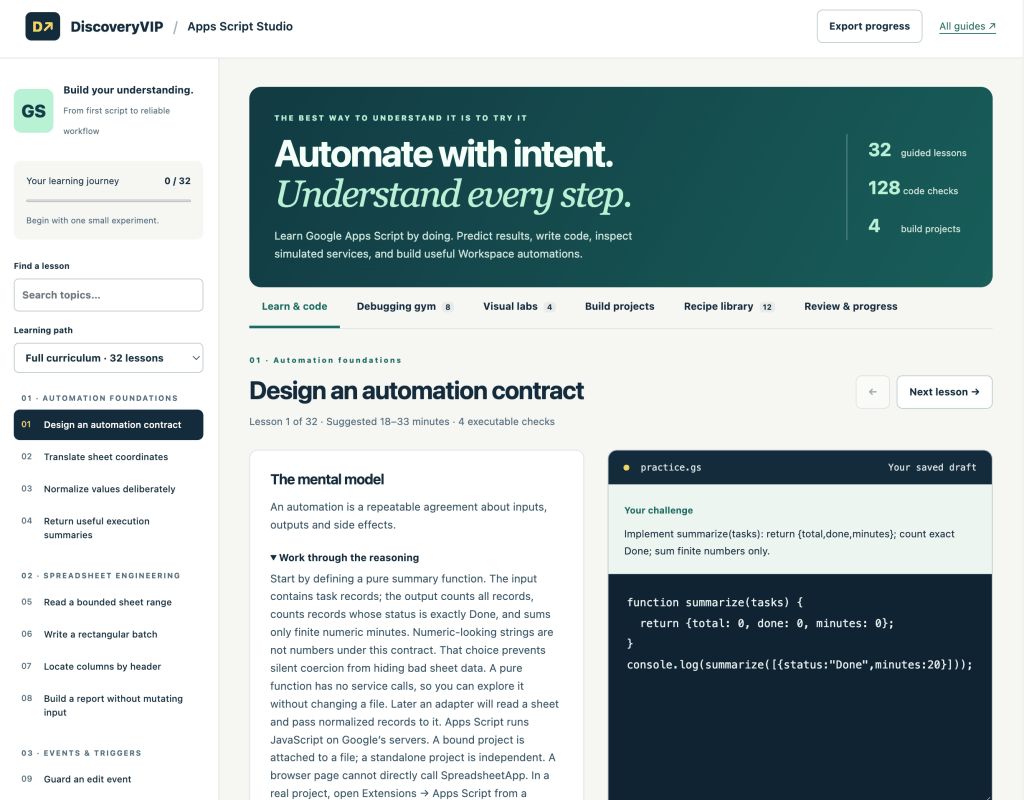
That is the idea behind Apps Script Studio, a new interactive learning tool I created for DiscoveryVIP.
Try Apps Script Studio:
https://discoveryvip.com/apps-script-studio/
Instead of simply reading about Apps Script or copying code from tutorials, Apps Script Studio gives you a structured environment where you can learn, code, debug, experiment, and build.
What Is Apps Script Studio?
Apps Script Studio is an interactive learning environment designed to help you understand Google Apps Script through hands-on practice.
The Studio currently includes:
- 32 guided lessons
- 128 code checks
- 8 debugging exercises
- 4 visual labs
- 12 practical recipes
- 4 build projects
- Progress tracking and recall practice
The goal isn’t simply to give you code that works.
The goal is to help you understand why it works.
Learn Apps Script by Writing Code
One of the most important parts of Apps Script Studio is the built-in practice environment.
You can work through a challenge, edit the starter code, run it, inspect the output, and run checks against your solution.
When something doesn’t work, that becomes part of the learning process.
Instead of treating an error as failure, the Studio encourages you to ask:
What happened? Why did it happen? What should I change?
That approach is much closer to how developers actually learn and work.
A Safe Place to Experiment
The Studio uses an educational simulation rather than connecting directly to your Google account.
That means you can explore selected Apps Script concepts without worrying about accidentally changing a spreadsheet or sending an email.
The simulator can demonstrate selected operations involving concepts such as Spreadsheet ranges, script properties, locks, URL fetch fixtures, Gmail draft records, logging, and console output.
It is intentionally not a replacement for Google’s real Apps Script environment. Instead, it provides a place to understand concepts before moving your code into a real Google project.
Practice Debugging
Writing code is only one part of programming.
Finding out why code doesn’t work is just as important.
Apps Script Studio includes a dedicated Debugging Gym where you are given deliberately broken functions.
Your job is to:
- Predict what might be wrong.
- Inspect the code.
- Make a small change.
- Run the checks.
- Use the results as evidence.
- Continue until you understand the cause.
This helps develop one of the most valuable programming skills: systematic debugging.
Rather than randomly changing code until something works, you learn to investigate the problem.
Explore Apps Script Visually
Some programming concepts make much more sense when you can see them.
Apps Script Studio includes interactive visual labs for exploring important automation concepts.
For example, the Sheet & Range Lab demonstrates how spreadsheet ranges become two-dimensional JavaScript arrays.
You can edit cells, select ranges, inspect their values, and experiment with replacement data.
Other labs help illustrate trigger contexts, batch processing strategies, and personalized draft generation.
These experiments help connect abstract programming concepts with the Workspace automation tasks where you would actually use them.
Understand Performance
A common Apps Script mistake is making too many individual service calls.
The Studio includes experiments that help illustrate the difference between repeatedly crossing a service boundary and processing information in batches.
This introduces an important Apps Script development principle:
Read data in groups, process it efficiently, and write results back in groups whenever practical.
Understanding patterns like this early can make it much easier to build larger and more reliable automations later.
Learn How Triggers Work
Triggers are one of the features that make Apps Script so useful.
They allow scripts to respond to events such as spreadsheet edits or scheduled actions.
But triggers can also be confusing when you first encounter them.
Apps Script Studio provides an interactive Trigger Inspector that helps illustrate how the execution context changes depending on what caused a script to run.
This creates a bridge between simply knowing that triggers exist and understanding how to design code around them.
Move From Exercises to Useful Projects
Individual exercises are useful, but eventually you need to combine those skills.
Apps Script Studio includes build projects designed to move you from isolated concepts toward working applications.
You can download starter projects, extend them, test your changes, and continue development inside a real Google Apps Script project.
This transition is important.
The Studio is where you can experiment and understand.
Google Apps Script is where you can apply that understanding to real Google Workspace automation.
Use the Recipe Library
Sometimes you don’t need another complete lesson.
You just need to remember a useful pattern.
The Studio includes a searchable recipe library containing focused Apps Script examples covering areas such as Sheets, triggers, Gmail, and configuration.
These recipes are intended to be starting points rather than complete production applications.
Read the notes, understand the pattern, adapt it, and then test it in your own project.
Learning Doesn’t Stop When the Code Works
One feature I particularly wanted to include was reflection and recall.
It is easy to follow a tutorial and think:
“I understand this.”
Then two days later, without the tutorial, you can’t remember how to begin.
Apps Script Studio tracks completed lessons locally and provides recall practice so you can revisit concepts.
Completing a lesson involves more than simply viewing the answer. Learners work through code checks, questions, and reflection.
That makes the focus understanding rather than completion.
A Better Way to Learn in the Age of AI
AI can now generate Apps Script code extremely quickly.
That is useful—but generated code doesn’t eliminate the need to understand what the code is doing.
In many ways, understanding becomes even more important.
You need to be able to inspect AI-generated code, identify assumptions, test behavior, recognize errors, and decide whether the solution actually matches what you intended to build.
Apps Script Studio is designed around that mindset.
Use AI to help you explore and create, but stay involved in the process.
Predict. Build. Run. Inspect. Debug. Explain. Improve.
That is how generated code becomes understood code.
From JavaScript to Google Workspace Automation
Apps Script is especially powerful because it combines JavaScript with Google Workspace.
Once you understand the fundamentals, you can use Apps Script to create automations and applications around services such as Google Sheets, Gmail, Docs, Drive, Calendar, Forms, and other Workspace tools.
You can build solutions that remove repetitive work, connect information, generate documents, process spreadsheet data, respond to events, and create custom workflows.
For learners who need stronger JavaScript foundations first, DiscoveryVIP also provides JavaScript Studio, allowing you to build those core programming skills before moving deeper into Apps Script.
Start With One Small Automation
You don’t need to master the entire Apps Script platform before building something useful.
Start small.
Automate one repetitive action.
Experiment with one spreadsheet range.
Understand one trigger.
Debug one broken function.
Build one small workflow.
Then improve it.
That progression is exactly what Apps Script Studio is designed to support.
Start Learning Apps Script
If you want to learn Google Apps Script through hands-on experimentation rather than simply reading tutorials, try the new Apps Script Studio.
Apps Script Studio:
https://discoveryvip.com/apps-script-studio/
Work through the lessons, experiment with the labs, break some code, debug it, explore the recipes, and then take what you have learned into your own Google Workspace projects.
The best way to understand automation is to build it.