
AI is becoming remarkably good at producing answers.
But getting an answer from AI is not the same thing as getting a useful, accurate, or trustworthy result.
That distinction is becoming increasingly important.
As AI becomes part of development, research, writing, automation, learning, and everyday work, one of the most valuable skills isn’t simply knowing how to use an AI tool.
It’s knowing how to work with AI intentionally.
Welcome to the first edition of AI in Practice: Prompts, Tools & Development.
In this newsletter, I’ll explore practical ways to use AI, including prompting, AI tools, web development, vibe coding, automation, AI-assisted workflows, experimentation, and the technologies shaping what comes next.
But I want to begin with the foundation:
Better AI results start with better human thinking.
Prompting Is More Than Asking a Question
A basic prompt might look like this:
Create a website for my business.
AI can certainly generate something from that instruction.
The problem is that you’ve left almost every important decision to the model.
What kind of business?
Who is the audience?
What should visitors do?
What pages are required?
What technology should be used?
What constraints exist?
What does success look like?
Without this information, AI has to fill in the gaps.
Instead, think of a prompt as a specification for a task.
A stronger prompt communicates:
Goal → Context → Requirements → Constraints → Output → Verification
For example, instead of simply asking AI to create a website, define the goal, audience, required sections, technology, accessibility requirements, responsive behavior, output format, and how the result should be tested.
Now you’re not simply requesting code.
You’re defining a problem.
That difference becomes even more important as developers move toward AI-assisted and agentic workflows.
A Simple Prompting Framework
Before sending an important prompt, ask yourself six questions:
- What am I trying to accomplish?
- What context does the AI need?
- What requirements must the result satisfy?
- What should the AI avoid or not change?
- What should the output look like?
- How will I verify that the result works?
The sixth question is frequently overlooked.
AI output should not automatically become the final result.
Prompt → Generate → Inspect → Test → Refine
That loop is far more useful than repeatedly asking AI to “make it better.”
The Developer’s Role Is Changing
For web developers, AI can already help generate HTML, CSS and JavaScript; explain unfamiliar code; debug errors; refactor applications; create documentation; work with APIs; generate tests; brainstorm interfaces; and automate repetitive development tasks.
But this doesn’t eliminate the need for developers.
It changes where developers provide value.
Increasingly, the important skills are understanding the problem, providing useful context, breaking large problems into smaller tasks, recognizing incorrect output, testing generated code, making architectural decisions, and knowing when not to trust an AI-generated answer.
AI can produce code quickly.
The developer still needs to determine whether that code should exist in the first place — and whether it actually works.
Tool Spotlight: AI Learning Studio
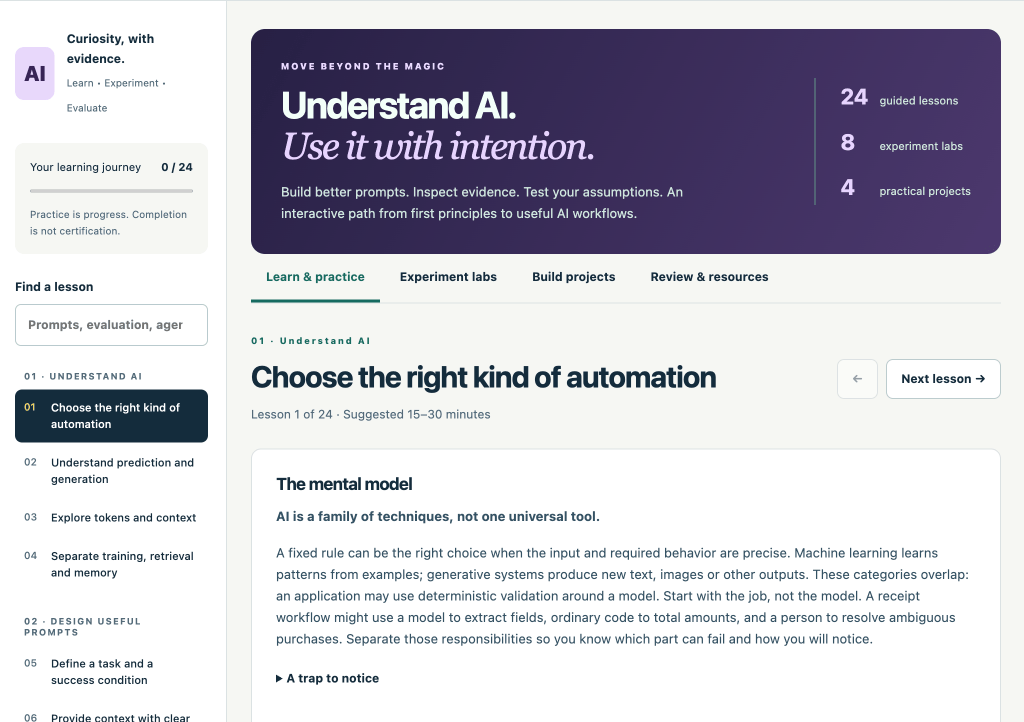
I recently created a free interactive resource on DiscoveryVIP specifically for developing these skills:
AI Learning Studio
https://discoveryvip.com/ai-learning-studio
The Studio is designed around a simple idea:
Understand AI. Use it with intention.
Instead of treating AI like magic, the Studio encourages you to experiment, inspect evidence, test assumptions, and create things you can explain.
It currently includes:
24 guided lessons
8 experiment labs
4 practical projects
The lessons explore prompting, evaluation, AI concepts, workflows, agents, and other practical areas of AI literacy.
The experiment labs provide a place to change inputs and inspect results.
The projects push you further by asking you to turn ideas into testable work and document the decisions behind them.
Importantly, the teaching tools themselves are transparent and browser-based. They don’t make live AI model calls or require API keys. Your practice work is saved locally in your browser.
Try the AI Learning Studio:
https://discoveryvip.com/ai-learning-studio
Try This AI Experiment
Here’s something you can do with your favorite AI assistant.
Take a prompt you use regularly.
Run it once exactly as you normally would.
Then rewrite it using:
Goal + Context + Requirements + Constraints + Output + Verification
Run the new version.
Don’t just ask:
Which answer looks better?
Ask:
Which result better satisfies my actual requirements — and what evidence supports that conclusion?
That small change in thinking is important.
You’re moving from prompting AI to evaluating an AI workflow.
Where AI in Practice Goes Next
Future editions of this newsletter will explore practical prompting techniques, new AI tools, AI for JavaScript and web development, vibe coding, AI agents, context engineering, automation, AI-assisted learning, model capabilities, evaluating AI output, and developments that could shape the future of software development.
I’ll also share tools, experiments, prompts, and projects you can try yourself.
There is going to be a lot of noise around AI.
My goal with AI in Practice is to concentrate on something more useful:
What can we actually do with this technology, how can we use it better, and how do we know when it works?
That’s where things get interesting.
— Laurence Svekis
Developer · Author · Educator · Google Developer Expert
#ArtificialIntelligence #AI #GenerativeAI #PromptEngineering #WebDevelopment #JavaScript #VibeCoding #AIDevelopment #AITools #Developers #Programming #Automation #FutureOfAI